Solved UniqueIndex

ZEEq

Member
Local time
Tomorrow, 01:05
Joined
Sep 26, 2022
Messages
93
hello Everyone!
My question is regarding unique index in table i have a studentFeeInvoiceT table with fields
FeeInvoiceID
StudentClassID
FeeSettingID
InvoiceDueDate
is it possible to create a unique index based on these 4 columns ?
i tried calculated field for invoiceduedate month but i think you can't make unique index on calculated fields what other ways can i achieve this
Regards
 
Unique Index on StudentClassID + FeeSettingID is enough.

meaning each student and (the fee) is unique.

to make InvoiceDueDate automatically filled, you can also use a Form and an Event on the form that assign the value for it.
this way (making invoiceDueDate as a Date type) you can create index to it.
 
Unique Index on StudentClassID + FeeSettingID is enough.

meaning each student and (the fee) is unique.
yes @arnelgp unique row and also student cannot be charged twice in a month
 
charged twice in a month
what do you mean? fees are collectable bi-monthly?
like i said, use a Form for your data entry and add Validation to check how many fees already in the table (not more than 2 in a month).
 
i use append query to insert fees to invoice table just want to make it tight so that any student cannot be charged twice in a single month we collect fees every month i tried it with a function and datamacro but i am not sure that i am writing function correctly
 
here is a demo of a Form.
open forn StudentFeeInvoiceF and enter a student and a fee.
again, enter same student and same fee.
 

Attachments

thank you so much @arnelgp for this much appreciated i did some thing similar please have a look at my function and tell me if i was doing right
Code:
Function checkDuplicateInvoiceFee() As Boolean

    On Error GoTo ErrorHandler

    Dim InvoiceFeeID As Long
    InvoiceFeeID = [InvoiceFeeID]
    Dim StudentClassID As Long
    StudentClassID = [StudentClassID]
    Dim StudentID As Long
    StudentID = [StudentID]
    Dim StudentFeeSettingID As Long
    StudentFeeSettingID = [StudentFeeSettingID]
    Dim InvoiceDueDate As Date
    InvoiceDueDate = [InvoiceDueDate]
          
    Dim DupCount As Long
    
    DupCount = DCount("*", "StudentFeeInvoiceJT", "StudentClassID=" & StudentClassID & _
              " AND StudentID=" & StudentID & _
              " AND StudentFeeSettingID=" & StudentFeeSettingID & _
              " AND Month([InvoiceDueDate])=" & month(InvoiceDueDate) & _
              " AND Year([InvoiceDueDate])=" & Year(InvoiceDueDate) & _
              " AND FeeInvoiceID <> " & InvoiceFeeID)

    If DupCount > 0 Then
        checkDuplicateInvoiceFee = True
    Else
        checkDuplicateInvoiceFee = False
    End If

ExitHandler:
    On Error Resume Next
    Exit Function

ErrorHandler:
            MsgBox "The following error has occurred" & vbCrLf & vbCrLf & _
                "Error Number: " & Err.Number & vbCrLf & _
                "Error Source: checkDuplicateInvoiceFee()" & vbCrLf & _
                "Error Description: " & Err.Description & _
                Switch(Erl = 0, "", Erl <> 0, vbCrLf & "Line No: " & Erl) _
                , vbOKOnly + vbCritical, "Inform Administrator!"
            
            Resume ExitHandler
  
End Function
 
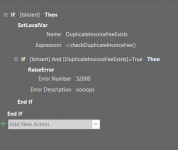
and then i used aobe code in datamacro before change event but its not working :(
 

Attachments

  • Screenshot 2023-03-17 111248.png
    Screenshot 2023-03-17 111248.png
    13.2 KB · Views: 160
you put your function in a Module (not in the form).
then modify it to this:
Code:
Function checkDuplicateInvoiceFee( _
            ByVal StudentClassID As Long, _
            ByVal StudentID As Long, _
            ByVal StudentFeeSettingID As Long, _
            ByVal InvoiceDueDate As Date) As Boolean

    On Error GoTo ErrorHandler
          
    Dim DupCount As Long
    
    DupCount = DCount("*", "StudentFeeInvoiceJT", "StudentClassID=" & StudentClassID & _
              " AND StudentID=" & StudentID & _
              " AND StudentFeeSettingID=" & StudentFeeSettingID & _
              " AND Month([InvoiceDueDate])=" & Month(InvoiceDueDate) & _
              " AND Year([InvoiceDueDate])=" & Year(InvoiceDueDate))

    checkDuplicateInvoiceFee = (DupCount <> 0)

ExitHandler:
    On Error Resume Next
    Exit Function

ErrorHandler:
            MsgBox "The following error has occurred" & vbCrLf & vbCrLf & _
                "Error Number: " & Err.Number & vbCrLf & _
                "Error Source: checkDuplicateInvoiceFee()" & vbCrLf & _
                "Error Description: " & Err.Description & _
                Switch(Erl = 0, "", Erl <> 0, vbCrLf & "Line No: " & Erl) _
                , vbOKOnly + vbCritical, "Inform Administrator!"
            
            Resume ExitHandler
 
End Function

now your macro change to this:

MACRO.png
 
worked perfectly thank you so much @arnelgp just one question how to trigger this function if someone try to update the record or change the record ?
 
the same thing, use the Change Event Macro of the table but don't test if you are in New Record [IsInsert].
 
Annotation:
If you agree for yourself that InvoiceDueDate is used with always the first of the month, you can set a unique index over then three fields (StudentClassID + FeeSettingID + InvoiceDueDate) and save yourself a lot of checking.
 

Users who are viewing this thread

Back
Top Bottom