
You are using an out of date browser. It may not display this or other websites correctly.
You should upgrade or use an alternative browser.
You should upgrade or use an alternative browser.
want to come to an online user group meeting?
- Thread starter strive4peace
- Start date


strive4peace
AWF VIP
- Local time
- Today, 06:31
- Joined
- Apr 3, 2020
- Messages
- 1,063
Presentation about Drawing in Access ... maybe you haven't really used these capabilities?
On Thursday (or maybe early Friday), @GPGeorge George Hepworth's group had a meeting about the drawing features for Access reports ... maybe you haven't really used these capabilities like you could? There's a lot you can do! And data can drive it.
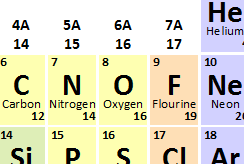
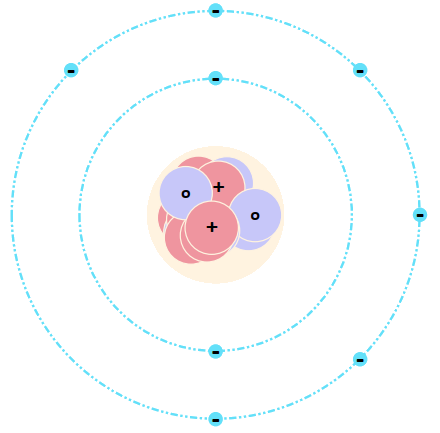
The sample data is basic chemistry -- the elements that compose all matter. It doesn't matter what the data is -- Access is great at managing any kind of information!
Access draws
The download and more information is here:
Near the top is Downloads and Documents where you can get the ACCDB database and see examples of things Access drew.
Below that is a whole lot of information ... my rewritten and simplified explanation* of syntax for drawing methods such as Line, Circle, and Print. It might seem like you can't do much with just a few methods --- oh but you can!
* please, if you notice where something is said wrong or should be clarified, let me know.
There is information for other drawing methods such as points (PSet), and using TextWidth and TextHeight so you can calculate, for instance, where the middle of text will be so you can position CurrentX and CurrentY to its beginning location before Print.
There is also information for several properties you can read and write when drawing, useful functions, order of events, about syntax used, units of measure, and more.
Someone mentioned mapping -- Colin @isladogs would have some ideas about that ...
Here is the video from the presentation recording
AP: Drawing Shapes in an Access Report - Elements and Atoms
Please comments and share your ideas. ... and more, @jdraw (thanks for being there)
On Thursday (or maybe early Friday), @GPGeorge George Hepworth's group had a meeting about the drawing features for Access reports ... maybe you haven't really used these capabilities like you could? There's a lot you can do! And data can drive it.
The sample data is basic chemistry -- the elements that compose all matter. It doesn't matter what the data is -- Access is great at managing any kind of information!
Access draws
- The Periodic Table of the Elements (standard data set or a specialized one) -- Line, Print
- Atoms with a set number of protons and neutrons in the nucleaus and electrons orbiting around -- Circle, Print
- several reports showing examples of various uses for the LINE and CIRCLE methods (filter Navigation Pane for Line or Circle -- more objects in the download than at the time of this presentation) and the effects of various property settings like FillStyle, DrawStyle, and DrawWidth.
The download and more information is here:
Report Draw Reference and VBA Syntax
http://msaccessgurus.com/VBA/ReportDraw_Reference.htmNear the top is Downloads and Documents where you can get the ACCDB database and see examples of things Access drew.
Below that is a whole lot of information ... my rewritten and simplified explanation* of syntax for drawing methods such as Line, Circle, and Print. It might seem like you can't do much with just a few methods --- oh but you can!
* please, if you notice where something is said wrong or should be clarified, let me know.
There is information for other drawing methods such as points (PSet), and using TextWidth and TextHeight so you can calculate, for instance, where the middle of text will be so you can position CurrentX and CurrentY to its beginning location before Print.
There is also information for several properties you can read and write when drawing, useful functions, order of events, about syntax used, units of measure, and more.
Someone mentioned mapping -- Colin @isladogs would have some ideas about that ...
Here is the video from the presentation recording
AP: Drawing Shapes in an Access Report - Elements and Atoms
Please comments and share your ideas. ... and more, @jdraw (thanks for being there)
Last edited:
strive4peace
AWF VIP
- Local time
- Today, 06:31
- Joined
- Apr 3, 2020
- Messages
- 1,063
Word Automation Deep Dive
Word Automation from Access VBA Deep Dive
Here is the video from the presentation. Thanks to those of you who were there live
Just as the title suggests, this is a deep dive into automating Word from Access. Understand key concepts in Word such as Application, Document, Range, Bookmark, Selection, Table, Cell, Style, Paragraph, Character, Templates, Building Blocks, ... and see what Access can make Word do! ... some things you might not even know about yet about Word. Lots of VBA and handouts (links in video description) you can use to pattern after when you write programs.
Word Automation from Access VBA Deep Dive
Here is the video from the presentation. Thanks to those of you who were there live
Just as the title suggests, this is a deep dive into automating Word from Access. Understand key concepts in Word such as Application, Document, Range, Bookmark, Selection, Table, Cell, Style, Paragraph, Character, Templates, Building Blocks, ... and see what Access can make Word do! ... some things you might not even know about yet about Word. Lots of VBA and handouts (links in video description) you can use to pattern after when you write programs.
Last edited:
strive4peace
AWF VIP
- Local time
- Today, 06:31
- Joined
- Apr 3, 2020
- Messages
- 1,063
Word Document Properties and Fields
Not a presentation, but I just posted an interesting video on YouTube about using document properties in Word to substitute data in documents that you might like if you do a lot with Word:
Word Document Properties and Fields (14:06)
Not a presentation, but I just posted an interesting video on YouTube about using document properties in Word to substitute data in documents that you might like if you do a lot with Word:
Word Document Properties and Fields (14:06)
strive4peace
AWF VIP
- Local time
- Today, 06:31
- Joined
- Apr 3, 2020
- Messages
- 1,063
32 to 64 bit conversion
here's Peter Cole @petertheme presentation on 32 to 64 bit conversion for Access Europe
here's Peter Cole @petertheme presentation on 32 to 64 bit conversion for Access Europe
strive4peace
AWF VIP
- Local time
- Today, 06:31
- Joined
- Apr 3, 2020
- Messages
- 1,063
the next online user group meeting is tomorrow, Wednesday 7 Sept at 18:00 (6PM) UK time
Optimising Queries and the JET ShowPlan by Colin Riddington (@isladogs)
 accessusergroups.org
It looks like it will be very interesting!
Optimising Queries and the JET ShowPlan by Colin Riddington (@isladogs)
Meetings Archive - Access User Groups
accessusergroups.org
It looks like it will be very interesting!
strive4peace
AWF VIP
- Local time
- Today, 06:31
- Joined
- Apr 3, 2020
- Messages
- 1,063

isladogs
Access MVP / VIP
- Local time
- Today, 12:31
- Joined
- Jan 14, 2017
- Messages
- 19,550
Crystal / Pat
Thanks to both of you for the positive feedback on this session
Responding to the 2 points raised by Pat:
1. HAVING vs WHERE - Yes I agree with the comments. I believe this was discussed in some detail at around 11:33 & again at 51:44
2. INDEXING - whilst indexing is generally important, you are correct that it is possible to end up with 'duplicate indexes' on the same field. However I believe that is only the case where the index properties have different values - Primary (Yes/No), Unique (Yes/No), Ignore Nulls (Yes/No).
If you manually set the index properties to be the same as Access believes should the case, then Access does not create another index.
Thanks to both of you for the positive feedback on this session
Responding to the 2 points raised by Pat:
1. HAVING vs WHERE - Yes I agree with the comments. I believe this was discussed in some detail at around 11:33 & again at 51:44
2. INDEXING - whilst indexing is generally important, you are correct that it is possible to end up with 'duplicate indexes' on the same field. However I believe that is only the case where the index properties have different values - Primary (Yes/No), Unique (Yes/No), Ignore Nulls (Yes/No).
If you manually set the index properties to be the same as Access believes should the case, then Access does not create another index.
strive4peace
AWF VIP
- Local time
- Today, 06:31
- Joined
- Apr 3, 2020
- Messages
- 1,063
for those of you starving for an online user group meeting to attend for Access ... Mike Wolfe (nolongerset.com aka @NoLongerSet ) posts an article each week about Access that includes online user group meetings that are coming up, as well as what's come to his attention for the past week that folks have posted about Access or VBA.
Here's the current link:
https://nolongerset.com/week-in-review-2022-10-22/
I try to keep this thread especially updated with links to meetings presented by those who post on AWF that sound interesting ... and most of us love anything Access!!
Please comments and share your ideas
kind regards,
crystal
Here's the current link:
https://nolongerset.com/week-in-review-2022-10-22/
I try to keep this thread especially updated with links to meetings presented by those who post on AWF that sound interesting ... and most of us love anything Access!!
Please comments and share your ideas
kind regards,
crystal
Last edited:
isladogs
Access MVP / VIP
- Local time
- Today, 12:31
- Joined
- Jan 14, 2017
- Messages
- 19,550
There wasn't an Access Europe meeting last week - perhaps you meant Access Lunchtime?Updating it a few days before the meeting and including the meeting link would be very helpful although you shouldn't be responsible for doing this, the meeting organizers should
As the organiser of Access Europe, I always send out reminders & connection info about a week before each meeting which are held on the first Wednesday of each month at 18:00 UK time (currently UTC)
The next meeting is on Wed 2 Nov - see info here: Access User Group – Europe | Page 3 | Access World Forums (access-programmers.co.uk) and here: Access Europe – George Hepworth (Power Apps for Access Developers) – Europe – AccessUserGroups.org
isladogs
Access MVP / VIP
- Local time
- Today, 12:31
- Joined
- Jan 14, 2017
- Messages
- 19,550
Hmm....fairly close to EuropeThanks Colin. It was actually the west coast group that meets Friday evenings.

strive4peace
AWF VIP
- Local time
- Today, 06:31
- Joined
- Apr 3, 2020
- Messages
- 1,063
This week, UK is on standard time and America is still on daylight-savings time (we don't switch till next weekend) ... so
for Colin's meeting Wednesday TODAY! if you're used to going and think it is the same time ... the time is 1 hour later in America. George is presenting
https://accessusergroups.org/europe/event/access-europe-2022-11-02/
EDIT: meeting over now -- will post a link to the video once it is available.
for George's meeting Thursday, the time is 1 hour earlier in London -- this time only, instead of 2:30 am, it is just 1:30 am (Friday morning, lol). It is 6:30 pm Pacific time
https://accessusergroups.org/pacific/event/257-2022-11-03/
@isladogs @GPGeorge
for Colin's meeting Wednesday TODAY! if you're used to going and think it is the same time ... the time is 1 hour later in America. George is presenting
https://accessusergroups.org/europe/event/access-europe-2022-11-02/
EDIT: meeting over now -- will post a link to the video once it is available.
for George's meeting Thursday, the time is 1 hour earlier in London -- this time only, instead of 2:30 am, it is just 1:30 am (Friday morning, lol). It is 6:30 pm Pacific time
https://accessusergroups.org/pacific/event/257-2022-11-03/
@isladogs @GPGeorge
Last edited:
strive4peace
AWF VIP
- Local time
- Today, 06:31
- Joined
- Apr 3, 2020
- Messages
- 1,063
recently ... this may be of interest to many of you:
Using SQL Server with Access, by Maria Barnes (1:02:31) read video description for links
Using SQL Server with Access, by Maria Barnes (1:02:31) read video description for links
strive4peace
AWF VIP
- Local time
- Today, 06:31
- Joined
- Apr 3, 2020
- Messages
- 1,063
There a new Microsoft MVP for Access, yay! Juanjo Luna was born in Spain, and is living in Austria. MVP profile
Juanjo leads a Spanish online Access user group
Grupo Virtual Access España!
https://accessusergroups.org/espana/
YouTube video playlist for Access España
https://www.youtube.com/playlist?list=PLwIULo1M2EWusQy_C7mDIQcLWe0BFRAT3
Juanjo leads a Spanish online Access user group
Grupo Virtual Access España!
https://accessusergroups.org/espana/
YouTube video playlist for Access España
https://www.youtube.com/playlist?list=PLwIULo1M2EWusQy_C7mDIQcLWe0BFRAT3
strive4peace
AWF VIP
- Local time
- Today, 06:31
- Joined
- Apr 3, 2020
- Messages
- 1,063
strive4peace
AWF VIP
- Local time
- Today, 06:31
- Joined
- Apr 3, 2020
- Messages
- 1,063
This Wednesday, Colin Riddington @isladogs presents Annotating Google Maps in Access for Access Europe.
Join meeting:
https://accessusergroups.org/europe/event/access-europe-2022-12-07/
Join meeting:
https://accessusergroups.org/europe/event/access-europe-2022-12-07/
strive4peace
AWF VIP
- Local time
- Today, 06:31
- Joined
- Apr 3, 2020
- Messages
- 1,063
Colin @isladogs did a presentation today for Access Europe about rendering Google maps in Access, and adding drawings. Every time Colin does a presentation, I am awed. He's a great teacher with a lot of knowledge to share. Being a participant of the meeting also provides camaraderie with others who love Access. Surprisingly, considering that many hours, days, and months went into creating it, he posted his demo database, which will be useful to see how the logic is implemented. He also shared lots of links to learn. Overall, it was brilliant! I will also watch the video on YouTube once its posted to glean even more -- and definitely Like it, and post link here too
Lovely to see @jdraw and @Minty there too ... and who else?
Lovely to see @jdraw and @Minty there too ... and who else?
Last edited:
strive4peace
AWF VIP
- Local time
- Today, 06:31
- Joined
- Apr 3, 2020
- Messages
- 1,063
-- Upcoming AccessUserGroup meetings --
Access Lunchtime – Loop and Link CSV Files - crystal (strive4peace)
February 28, Tuesday, 12 noon Central, 6 pm UK
https://accessusergroups.org/lunch/event/access-lunchtime-4-2023-02-28/
Access Europe – Optimizing Queries in SQL Server - Maria Barnes
March 1, Wednesday, 6 pm UK, 12 noon Central
https://accessusergroups.org/europe/event/access-europe-2023-03-01/
Access Pacific - Bad Data is Bad for Business - Pat Hartman
March 2, Thursday, 6:30 pm Pacific, 8:30 pm Central
https://accessusergroups.org/pacific/event/bad-data-is-bad-for-business-with-pat-hartman/
Access Lunchtime – Loop and Link CSV Files - crystal (strive4peace)
February 28, Tuesday, 12 noon Central, 6 pm UK
https://accessusergroups.org/lunch/event/access-lunchtime-4-2023-02-28/
Access Europe – Optimizing Queries in SQL Server - Maria Barnes
March 1, Wednesday, 6 pm UK, 12 noon Central
https://accessusergroups.org/europe/event/access-europe-2023-03-01/
Access Pacific - Bad Data is Bad for Business - Pat Hartman
March 2, Thursday, 6:30 pm Pacific, 8:30 pm Central
https://accessusergroups.org/pacific/event/bad-data-is-bad-for-business-with-pat-hartman/
strive4peace
AWF VIP
- Local time
- Today, 06:31
- Joined
- Apr 3, 2020
- Messages
- 1,063
If you missed Colin's (@isladogs) recent presentation, or were there and want to watch the video to better absorb some of the great stuff he shared, here it is:
AL: Translation Tools using Access - Colin Ridington (isladogs) (1:10:34)
Tomorrow, Tuesday, I will be presenting for Access Lunchtime. Join us live!
Loop and Link CSV Files - crystal (strive4peace)
February 28, Tuesday, 12 noon Central, 6 pm UK
https://accessusergroups.org/lunch/event/access-lunchtime-4-2023-02-28/
AL: Translation Tools using Access - Colin Ridington (isladogs) (1:10:34)
Tomorrow, Tuesday, I will be presenting for Access Lunchtime. Join us live!
Loop and Link CSV Files - crystal (strive4peace)
February 28, Tuesday, 12 noon Central, 6 pm UK
https://accessusergroups.org/lunch/event/access-lunchtime-4-2023-02-28/
strive4peace
AWF VIP
- Local time
- Today, 06:31
- Joined
- Apr 3, 2020
- Messages
- 1,063
-- Recent presentations posted On YouTube --
AL: Loop and Link CSV Files in Access using Queries, by crystal (strive4peace) (54:51)
AEU - Optimizing Queries in SQL Server, by Maria Barnes (51:38)
AP: Bad Data is Bad for Business with Pat Hartman (1:07:18)
@Pat Hartman , @isladogs, @GPGeorge
AL: Loop and Link CSV Files in Access using Queries, by crystal (strive4peace) (54:51)
AEU - Optimizing Queries in SQL Server, by Maria Barnes (51:38)
AP: Bad Data is Bad for Business with Pat Hartman (1:07:18)
@Pat Hartman , @isladogs, @GPGeorge
Last edited:
Similar threads

- Replies
- 3
- Views
- 861
- Replies
- 0
- Views
- 172
- Replies
- 2
- Views
- 817
- Replies
- 60
- Views
- 3,739
Users who are viewing this thread
Total: 1 (members: 0, guests: 1)