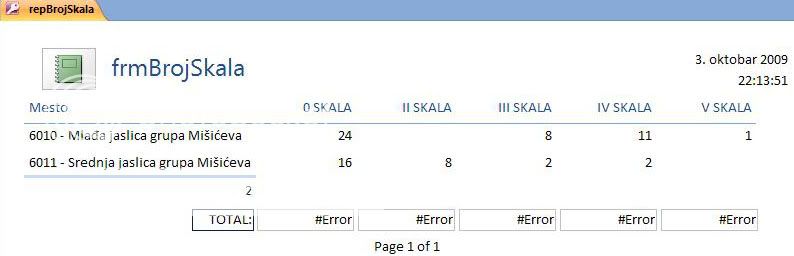
What type of form (table) is this and how to recreate it?

mcdhappy80

Registered User.
Local time
Today, 17:19
Joined
Jun 22, 2009
Messages
347
I'm gonna show the picture of what I need and then I'm gonna explain and ask a question(s):
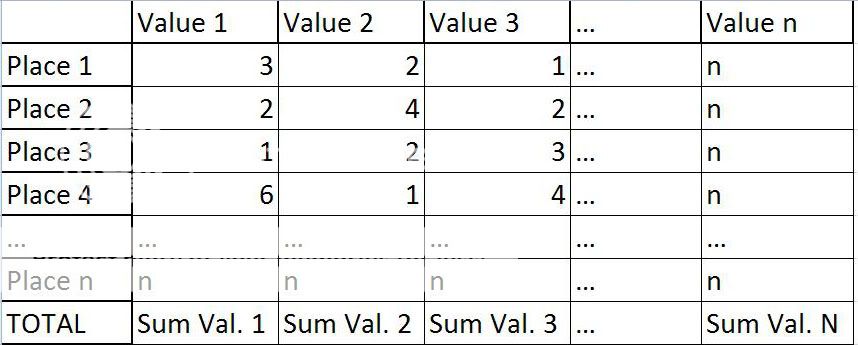
Table.jpg


So, I need to create form (table) that will count how many Values are there for each Place.
Values are stored in tblValues and there are six of them for now but that number might increase in future.
Places are also stored in separate table tblPlace. There are about 30 places so far.

So I was thinking of creating a form to display this and the create a button on the form which will open the report and then print this, or maybe just the report I'll see.

What I don't know here is:

1) Do I need to use some special type of form (maybe pivot table)?
2) Can this be done just via query (and how) or will I be forced to do it in VBA using FOR loops?

Thank You

 
Just to be sure:

You have three tables:

tblValues
tblPlaces
jctPlaceValues

Yes?

If so, then what you want is called a crosstab query. You would then create a query that joins all three tables together with all columns you need to be eventually displayed. Then, (for Access 2003 & earlier ) you go to the database windows and click on Query tab then 'New" you can choose crosstab wizard to help you or (For Access 2007) you would click on Create in ribbon, choose "Query Wizard".

The wizard will then guide you through the creating the crosstab query. Once you've created it, you can then use a form to contain it. Be aware, though, crosstab query is nonupdatable so you can't edit it, but can get the layout like what you asked for.
 
Just to be sure:

You have three tables:

tblValues
tblPlaces
jctPlaceValues

Yes?

No, I don't have jctPlacesVales. What does jct abbreviation stands for?

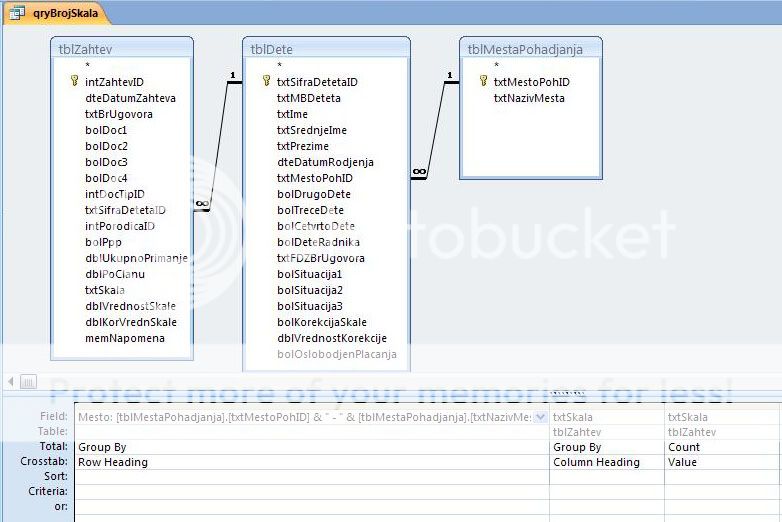
Here's what I've created using the design view, not wizard:

CrossSheet.jpg


Here's the design view of the query:

CrossDesign.jpg


And here's the SQL code:
Code:
TRANSFORM Count(tblZahtev.txtSkala) AS CountOftxtSkala
SELECT [tblMestaPohadjanja].[txtMestoPohID] & " - " & [tblMestaPohadjanja].[txtNazivMesta] AS Mesto
FROM tblMestaPohadjanja INNER JOIN (tblDete INNER JOIN tblZahtev ON tblDete.txtSifraDetetaID = tblZahtev.txtSifraDetetaID) ON tblMestaPohadjanja.txtMestoPohID = tblDete.txtMestoPohID
GROUP BY [tblMestaPohadjanja].[txtMestoPohID] & " - " & [tblMestaPohadjanja].[txtNazivMesta]
PIVOT tblZahtev.txtSkala;

Now as You see I miss the TOTALS row from the first picture.
Can I create it here using SQL as well, and position it just like on the first post picture?

How do I do it?

Thank You
 
jct = Junction table, usually for the many-many relationship. But that's okay, it looks like you have figured out the suitable query that gives you the result you wanted so don't worry about that.

As for the totals, while it could be done in SQL, I would think it'd be better that you use calculated controls on the form. Say, put on the form footer a bunch of textboxes and make its controlsource "=Sum([CountOfTxtSkala])" or something like that.

See how that get you.
 
jct = Junction table, usually for the many-many relationship. But that's okay, it looks like you have figured out the suitable query that gives you the result you wanted so don't worry about that.

As for the totals, while it could be done in SQL, I would think it'd be better that you use calculated controls on the form. Say, put on the form footer a bunch of textboxes and make its controlsource "=Sum([CountOfTxtSkala])" or something like that.

See how that get you.
That also came to my mind but I wanted to ask if there is maybe a way to do it all in the query.

Thanks Banana ;)
 
Yes, it's done by doing two almost-identical cross-tab query then UNION'ing

pseudo-code:

Code:
TRANSFORM ...
SELECT ..., 0000 As SortOrder
...
ORDER BY SortOrder ...
UNION 
TRANSFORM ...
SELECT ...., 9999 As SortOrder
....

The idea is that you add an arbitary column and use to "force" the total to be always the last, and instead of Count as the value, you use Sum as the value to give you the total.

HTH.
 
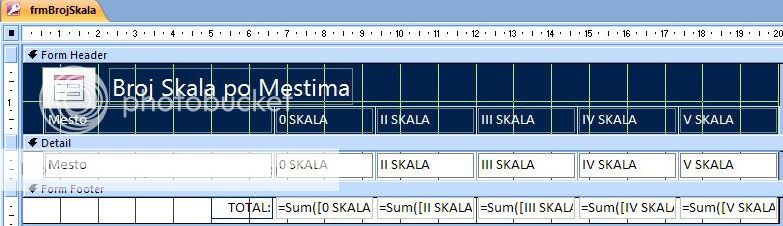
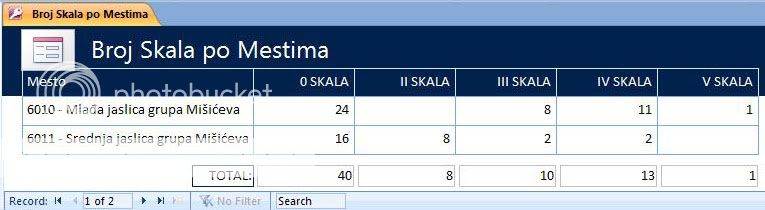
I've created this with controls on form that are calculated fields.
When I try to create a report from that form the report doesn't show totals. Here's what I mean:

frmBrSkala.jpg


frmBrSkalaNor.jpg


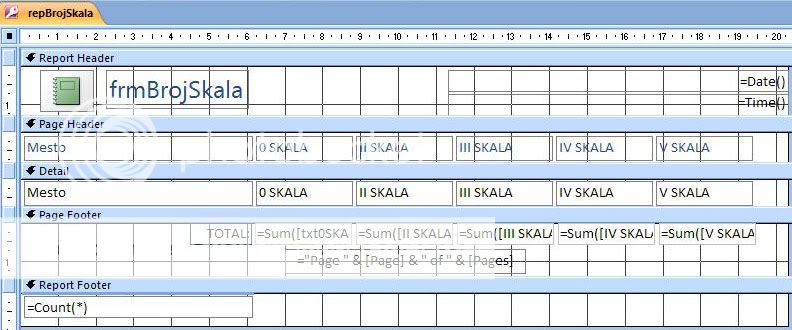
So, the form works but the report with same settings doesn't:

repBrSkala.jpg


repBrSkalaNor.jpg


As You see the controls on report are set the same as those on the form but I'm getting #ERROR.
Why is that?

@Banana:
Could You please write that union query example but on the SQL example I've provided:
Code:
TRANSFORM Count(tblZahtev.txtSkala) AS CountOftxtSkala
SELECT [tblMestaPohadjanja].[txtMestoPohID] & " - " & [tblMestaPohadjanja].[txtNazivMesta] AS Mesto
FROM tblMestaPohadjanja INNER JOIN (tblDete INNER JOIN tblZahtev ON tblDete.txtSifraDetetaID = tblZahtev.txtSifraDetetaID) ON tblMestaPohadjanja.txtMestoPohID = tblDete.txtMestoPohID
GROUP BY [tblMestaPohadjanja].[txtMestoPohID] & " - " & [tblMestaPohadjanja].[txtNazivMesta]
PIVOT tblZahtev.txtSkala;
I think that would be the best way for me to understand and learn what You meant, because I didn't quite get it in the previous example You posted.

Thank You
 
I'd bet that the reason you get an error is because the sum are on the page footer, which aren't really the same thing as the report footer. I'd bet if you move the fields from page footer to report footer, it'll work.

But if you want to keep it on page, then I believe we need a different approach.

For now, try the UNION.

Code:
TRANSFORM Count(tblZahtev.txtSkala) AS CountOftxtSkala
SELECT [tblMestaPohadjanja].[txtMestoPohID] & " - " & [tblMestaPohadjanja].[txtNazivMesta] AS Mesto, 0000 As SortOrder
FROM tblMestaPohadjanja INNER JOIN (tblDete INNER JOIN tblZahtev ON tblDete.txtSifraDetetaID = tblZahtev.txtSifraDetetaID) ON tblMestaPohadjanja.txtMestoPohID = tblDete.txtMestoPohID
GROUP BY [tblMestaPohadjanja].[txtMestoPohID] & " - " & [tblMestaPohadjanja].[txtNazivMesta]
ORDER BY SortOrder
PIVOT tblZahtev.txtSkala
UNION
TRANSFORM Sum(tblZahtev.txtSkala) AS CountOftxtSkala
SELECT [tblMestaPohadjanja].[txtMestoPohID] & " - " & [tblMestaPohadjanja].[txtNazivMesta] AS Mesto, 9999 As SortOrder
FROM tblMestaPohadjanja INNER JOIN (tblDete INNER JOIN tblZahtev ON tblDete.txtSifraDetetaID = tblZahtev.txtSifraDetetaID) ON tblMestaPohadjanja.txtMestoPohID = tblDete.txtMestoPohID
GROUP BY [tblMestaPohadjanja].[txtMestoPohID] & " - " & [tblMestaPohadjanja].[txtNazivMesta]
ORDER BY SortOrder
PIVOT tblZahtev.txtSkala;

You may need to omit the GROUP BY statement in 2nd statement. See how it takes you.
 
I'd bet that the reason you get an error is because the sum are on the page footer, which aren't really the same thing as the report footer. I'd bet if you move the fields from page footer to report footer, it'll work.

You are right. When I moved them it works. I've solved this problem by passing the values from form to report and then storing them in controls.

But if you want to keep it on page, then I believe we need a different approach.

For now, try the UNION.

Code:
TRANSFORM Count(tblZahtev.txtSkala) AS CountOftxtSkala
SELECT [tblMestaPohadjanja].[txtMestoPohID] & " - " & [tblMestaPohadjanja].[txtNazivMesta] AS Mesto, 0000 As SortOrder
FROM tblMestaPohadjanja INNER JOIN (tblDete INNER JOIN tblZahtev ON tblDete.txtSifraDetetaID = tblZahtev.txtSifraDetetaID) ON tblMestaPohadjanja.txtMestoPohID = tblDete.txtMestoPohID
GROUP BY [tblMestaPohadjanja].[txtMestoPohID] & " - " & [tblMestaPohadjanja].[txtNazivMesta]
ORDER BY SortOrder
PIVOT tblZahtev.txtSkala
UNION
TRANSFORM Sum(tblZahtev.txtSkala) AS CountOftxtSkala
SELECT [tblMestaPohadjanja].[txtMestoPohID] & " - " & [tblMestaPohadjanja].[txtNazivMesta] AS Mesto, 9999 As SortOrder
FROM tblMestaPohadjanja INNER JOIN (tblDete INNER JOIN tblZahtev ON tblDete.txtSifraDetetaID = tblZahtev.txtSifraDetetaID) ON tblMestaPohadjanja.txtMestoPohID = tblDete.txtMestoPohID
GROUP BY [tblMestaPohadjanja].[txtMestoPohID] & " - " & [tblMestaPohadjanja].[txtNazivMesta]
ORDER BY SortOrder
PIVOT tblZahtev.txtSkala;
You may need to omit the GROUP BY statement in 2nd statement. See how it takes you.
When I run this query I get an error message:
Code:
Syntax error (missing operator) in query expression 'tblZahtev.txtSkala
UNION
.... up until ....
FROM tblMestaPohadjanja INNER JOIN (tblDete INNER JOIN'
What could be wrong here?

Thank You.
 
When I run this query I get an error message:
Code:
TRANSFORM Count(tblZahtev.txtSkala) AS CountOftxtSkala
SELECT [tblMestaPohadjanja].[txtMestoPohID] & " - " & [tblMestaPohadjanja].[txtNazivMesta] AS Mesto, 0000 As SortOrder
FROM tblMestaPohadjanja INNER JOIN (tblDete INNER JOIN tblZahtev ON tblDete.txtSifraDetetaID = tblZahtev.txtSifraDetetaID) ON tblMestaPohadjanja.txtMestoPohID = tblDete.txtMestoPohID
GROUP BY [tblMestaPohadjanja].[txtMestoPohID] & " - " & [tblMestaPohadjanja].[txtNazivMesta]
ORDER BY SortOrder
PIVOT tblZahtev.txtSkala
UNION
TRANSFORM Sum(tblZahtev.txtSkala) AS CountOftxtSkala
SELECT [tblMestaPohadjanja].[txtMestoPohID] & " - " & [tblMestaPohadjanja].[txtNazivMesta] AS Mesto, 9999 As SortOrder
FROM tblMestaPohadjanja INNER JOIN (tblDete INNER JOIN tblZahtev ON tblDete.txtSifraDetetaID = tblZahtev.txtSifraDetetaID) ON tblMestaPohadjanja.txtMestoPohID = tblDete.txtMestoPohID
GROUP BY [tblMestaPohadjanja].[txtMestoPohID] & " - " & [tblMestaPohadjanja].[txtNazivMesta]
ORDER BY SortOrder
PIVOT tblZahtev.txtSkala;
You may need to omit the GROUP BY statement in 2nd statement. See how it takes you.[/quote]
When I run this query I get an error message:
Code:
Syntax error (missing operator) in query expression 'tblZahtev.txtSkala
UNION
.... up until ....
FROM tblMestaPohadjanja INNER JOIN (tblDete INNER JOIN'
What could be wrong here?

How can I display the fields that contain NULL values in my initial query?
Code:
TRANSFORM Count(tblZahtev.txtSkala) AS CountOftxtSkala
SELECT [tblMestaPohadjanja].[txtMestoPohID] & " - " & [tblMestaPohadjanja].[txtNazivMesta] AS Mesto
FROM tblMestaPohadjanja INNER JOIN (tblDete INNER JOIN tblZahtev ON tblDete.txtSifraDetetaID = tblZahtev.txtSifraDetetaID) ON tblMestaPohadjanja.txtMestoPohID = tblDete.txtMestoPohID
GROUP BY [tblMestaPohadjanja].[txtMestoPohID] & " - " & [tblMestaPohadjanja].[txtNazivMesta]
PIVOT tblZahtev.txtSkala;

Thank You.
 
I need to display couple of more fields in this query, but the problem is I don't know how to create this query.
If You look at the cross tab query in previous post (the one with relationship window) and You see the second column "0 SKALA", I want to display ow many "0 SKALA" fields in places column "Mesto" are there, that have tblDete.bolDrugoDete field equal to True.
this should be displayed as another column in the following cross tab query names as "0 Skala - Drugo dete".
I tried changing one of the previous queries to achieve this but had no luck with it.
In the query I refer to in previous post how can I display in the first row of "II Skala" coulmn number 0 instead of blank field?
Thank You
 

Users who are viewing this thread

Back
Top Bottom