Deployment of Demo Application

FrankRuperto

Member
Local time
Yesterday, 23:38
Joined
Mar 6, 2021
Messages
182
I am planing to distribute via CD-ROM a demo version of my Access 2010 pawnshop management app to select pawnbrokers in a geographic area. I was thinking about combining the frontend objects and backend tables into a compiled password-encrypted accde, and using 2010's packaging wizard to sign it, and include the runtime in an msi executable. I know Access is not the best tool for protecting and selling packaged off-the shelf apps, but my marketing thrust is to get prospective customers to request custom modifications to the demo version and split it into FE/BE when they go live. I will also offer them the option of using the browser-based intranet version of this app.

Is my demo deployment design good?
 

Attachments

  • SampleFormSubform.PNG
    SampleFormSubform.PNG
    686.4 KB · Views: 594
Last edited:
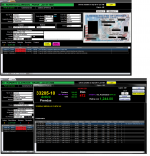
color should have some meaning. It should be used judiciously to draw attention to something important. But scattered as it is on your form, the colors are distracting rather than helpful. I can't tell when I look at the forms why things are colorized the way they are.

I agree with that. Keep it either soft or firm but relatively neutral; use colors as visual cues.

To me, providing appropriate visual cues (color, placement, movement, enable/disable, appear/disappear, dynamic captions) is one of the holy grails of UI dev
 
Hi Pat, the dark theme is popular and the color-coded text has meaning, e.g. green money, red warning, blinking red requires immediate action, yellow and large fonts important, etc.... I have 65 sites using this app's theme and they say the black background is a lot easier on their eyes than lighter colors. Some may say it looks like a busy Xmas tree, others say it looks ancient retro lol, but it doesn't bother my users because the colors have meaning. Most values in datasheets are centered for easier readibility, mmm-dd-yyyy format, etc. Anyway, I can easily change theme if requested. Do you have any advice for packaging and deploying demo template?... Is combining objects and data into one file a good idea?
 
If you're going to send a demo, it is best to limit it to a small number of customers and/or transactions rather than to try to limit functionality.

I have an app that I sell. The current installation uses Visual Installer. It allows me to install the Access runtime engine if needed. I also rename the FE from .accde to .accdr. It doesn't add any real security but it does make it harder for someone wo doesn't have a full version of Access installed to get in and see the objects. I use an annual license for x audits. I don't try to control how many "seats" access the app. If they buy a license for 3 audits, that is all they can do at one time. There is an install menu and the BE is installed first and then the FE so the FE can link to the BE. The menu does validation to ensure the steps are done in order.
Thanks for the advice. For the demo I am limiting the number of customers, contracts, transactions that can be added. I was thinking that by combining the frontend objects with backend tables into one password-encrypted accde that it will only work for one seat. If a prospect likes the demo and decides to purchase/lease the app, they will surely want mods and I will split into FE/BE. I won't restrict the number of seats, rather make sure no one can get into the code, table designs, queries, change hardcoded pawnshop name, address, etc. so if another pawnbroker pirates my app they can't effectively leverage it. I was tinkering with 2010's packaging wizard, seems basic, not sure signing the file helps, it generates an msi.exe install file, but with no packaging of runtime. I would think its safe to provide an x86 compiled 2010 version with corresponding runtime, but perhaps best to test if demo recipient already has Office installed, bitness, etc. so I will eval Visual Installer, Inno, SSE packaging software... thanks again (y)
 
Last edited:
The free live version, sans any customisations, will be split FE/BE. I will do my best, hopefully with @isladogs help, to lock down the demo and live password-encrypted accde FE. Meantime, for the demo version I just deleted all the BE table links, imported sanitised/compressed BE tables to the demo FE, replaced any live user references with anonymised values, but now I have this customised table relinking frm getting in the way and have to bypass it in the vba code :mad:

ADDENDUM: As to user's data, my policy is to lockout users from directly accessing BE data. They can do lots of damage. If they want exports, I can provide it on demand..
 

Attachments

  • CustomRelinker.PNG
    CustomRelinker.PNG
    20.5 KB · Views: 567
I am planing to distribute via CD-ROM a demo version of my Access 2010 pawnshop management app to select pawnbrokers in a geographic area. I was thinking about combining the frontend objects and backend tables into a compiled password-encrypted accde, and using 2010's packaging wizard to sign it, and include the runtime in an msi executable. I know Access is not the best tool for protecting and selling packaged off-the shelf apps, but my marketing thrust is to get prospective customers to request custom modifications to the demo version and split it into FE/BE when they go live. I will also offer them the option of using the browser-based intranet version of this app.

Is my demo deployment design good?

Hi @FrankRuperto
I would be inclined to try to build any modifications into a single standard version with flags and switches to manage improvements where necessary. Assuming you sell a few of these, you don't want to have multiple versions, and then have to maintain each one separately for all further improvements going forward.

Good luck by the way. I hope it goes well.
 
@gemma-the-husky
Thanks for the well wishes. A lite standard version is what I am providing for free and the desire is for each pawnbroker to request customisations in order to offset the loss of revenue from giving away the lite version. All versions are table-driven and allow users to change certain control parameters.
 
But there's always something different that each customer wants and I am willing to accomodate them as long as it makes sense and does not detract too much from the standard design. Many a times I end up talking users out of making their suggested mods because they're spontaneous "what if" ideas which after further discussion they realize is not a good idea. I am by no means trying to tell them exactly how to run their busineess. However, this is a vertical market app and the industry is closely regulated by State, County, and even Municipal regulations. One of my fiduciary responsibilities is to make sure the app is compliant with Laws, Rules and Regs. So I actually have to customize the app according to the users jurisdictions, e.g. reporting requirements, rates, terms, data gathering, etc. and standardize all users on x86 Access 2010 msi version to avoid the Office and Windows compatibility nightmares I see several other developers experiencing. The demo and free lite version is intentionally meant to give prospective users a teasing taste, adapt it to their jurisdiction, and induce them to request sensible customisations. We're up to it!
 
Last edited:
But there's always something different that each customer wants and I am willing to accomodate them as long as it makes sense and does not detract too much from the standard design. Many a times I end up talking users out of making their suggested mods because they're spontaneous "what if" ideas which after further discussion they realize is not a good idea. I am by no means trying to tell them exactly how to run their busineess. However, this is a vertical market app and the industry is closely regulated by State, County, and even Municipal regulations. One of my fiduciary responsibilities is to make sure the app is compliant with Laws, Rules and Regs. So I actually have to customize the app according to the users jurisdictions, e.g. reporting requirements, rates, terms, data gathering, etc. and standardize all users on x86 Access 2010 msi version to avoid the Office and Windows compatibility nightmares I see several other developers experiencing. The demo and free lite version is intentionally meant to give prospective users a teasing taste, adapt it to their jurisdiction, and induce them to request sensible customisations. We're up to it!

What I meant is to try to give every user everything on the standard system.
You can certainly hide some functionality by not activating it, but its easier to try to have just one system.

If you have 4 active versions, then every time you had a new feature, you have to program it 4 times - or worse, you can't include it in one of your versions, because it's missing something else.
 
Understood. The demo will have everything the standard version has. However, the demo will only allow limited number of records, ficticious store name/address, and all objects, including the tables, will be together in one encrypted accde. I have been maintaining several customized versions of this app, and although users can change certain control parameters, if regulators significantly change the rules, then I have to update all of them to be compliant. This has happened several times within the last 30 years I have specialized within this space. Some jurisdictions even require my app to be certified by their regulatory agency. Some require realtime reporting to police databases, etc. so there's really no one size fits all, but maybe so for a small geopolitical area. The standard version provides the fundamental features , e.g. customers pawn/redeem/forfeit items, sell their items, and buy items from the store's inventory.
 
Last edited:
The main reason I am keeping the Access versions of my pawn app around is because most of my clients prefer the rich functionality it offers, e.g. office automation, and they feel their data is more protected by being offline. However, a browser-based version on a private-facing on-premise intranet, which can also support extranet remote users, is now very appealing. Have you noticed with this pandemic how many Access users now have to work remotely? RDP is really the only acceptable solution, but that's expensive and users are looking elsewhere for better solutions.
 
Last edited:
I think there is a big difference in skillset for small developers. Some of us can construct an excellent access database. The number of access developers who can build the same functionality into a web based non-access solution must be vanishingly small. There isn't much help to be had even here, for a web-based developer. This probably means that for niche applications (eg such as your dedicated pawn shop) there are very few non in-house server solutions available. It could be a great opportunity to corner the market with a web based solution.
 
The number of access developers who can build the same functionality into a web based non-access solution must be vanishingly small.
There's only so much you can do in a browser-based app versus desktop Access. Web browsers are stateless clients, which means everything is done server-side and the browser just displays it and accepts keystrokes, kinda like a dumb terminal, or a streaming terminal server. For security reasons, client-side filesystems are never exposed to JavaScript. This means no features like Office Automation, FSO. There once was a time (think IE5-6?) when ActiveX allowed IE to interact with the filesystem, and we all know what a disaster that turned out to be. Today we have much better JS libraries which add richer functionality. Yeh, we can download/upload files and send/receive emails, but that's all being done server-side via ftp, smtp. However, now there are many Rest/OData API's which allow web-server apps to talk to e.g. Online Office Outlook, Excel, Dropbox, Google Docs, but still nowhere near the richness of desktop Office VBA. Access Web Apps (AWA) was the missong piece of Online Office, but it got canned because virtually no one used it, and many desktop Access developers complained it did not have VBA, and that was never a possibility to begin with for the above mentioned reasons. So now PowerApps took AWA's place...

Now getting back to my Demo Deployment topic, "Houston We Have A Problem!"

I have 3 identical laptops with Win7(x64) Ultimate installed:
  1. Development laptop with 32-bit Office 2010 Pro msi version, which never connects to the web.
  2. Web surfing laptop with no programs or sensitive info installed on it, except FireFox browser connected to a private network proxy.
  3. Standby laptop with nothing on it except the OS, in case I need to replace one of the two above, or for unit testing.​
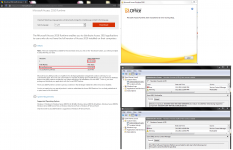
So in order to test my demo app deployment with the Access runtime, I used laptop #3 with no Office on it, downloaded 32-bit Access 2010 Runtime, and when I launched the msi installer it bombed out throwing an "Office Software Protection Platform not found" error message ugh :mad:

Isin't the Runtime install supposed to include the OSPP and the OSE source engine? I also noticed the Runtime size is much larher than previous versions, and this version's timestamp is late 2019. That msi is 174MB's so it must have an awful lot of libraries, dll's, in it, including OSPP & OSE?... Has anyone else experienced problems installing this runtime?

After encountering that error, I doubt uninstalling Office 2010 Pro from another box to see if the Runtime installs will work.

UPDATE: I just tried installing the Runtime on the web only laptop, it threw the same error :(
 

Attachments

  • Access2010Runtime.PNG
    Access2010Runtime.PNG
    304.8 KB · Views: 585
Last edited:

Users who are viewing this thread

Back
Top Bottom