
Adding multiple records using form with incremental field values

AnilBagga

Member
Local time
Today, 16:47
Joined
Apr 9, 2020
Messages
223
I have a continuous form based on a table "tblCustRFQCorrection" as below
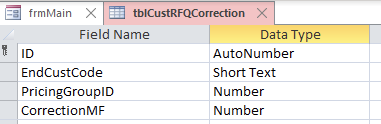
1629113236594.png


In the form when a enters a new EndCustCode, I would line the form to add 16 records with the same EndCustCode and PricingGroupID from 1 to 16 with blank CorrectionMF fields which the user will fill up

If the End CustCode is already available in the table, then the control should go to the first Record of the series, ie with PricingGroupID=1

Is this possible?

Will appreciate some help!
 
Hi. I'm pretty sure it's possible, but I'm not sure if it's a good idea to create placeholder records.
 
Hi. I'm pretty sure it's possible, but I'm not sure if it's a good idea to create placeholder records.
The problem is that the user needs to add these 16 records every time and it is not only time consuming but also is prone to errors!
 
Do they add all 16 records in one sitting? What errors are you trying to avoid? How many fields are we talking about?
 
This has been asked before and a Cartesian join was one suggestion.

See this thread, and search here on Cartesian.
 
Do they add all 16 records in one sitting? What errors are you trying to avoid? How many fields are we talking about?
Yes. For a new code, values have to be added in CorrectionMF field for all 16 ID's. So the 16 records will have same EndCustCode, Pricing GroupID from 1 to 16 and all cells of Correction MF blank. The user now has to enter all 16 values in the CorrectionMF field
 
So they could just as easy enter the CorrectionMF field data in a fomr and THEN add all the records?
 
So they could just as easy enter the CorrectionMF field data in a fomr and THEN add all the records?
If this multi record feature is not available, user needs to add the cust code for each record, add the ID 1, for first record and then add the Correction MF ad applicable for this ID. For the next record, add the same custCode, ID 2 and the CorrectionMF for ID 2. he needs to do this for all the 16 ID's.

The "automation" will make entries easier and less prone to error
 
see this demo.
Super Arnel as always. You guessed my need so easily.

This is exactly what I needed. I gave up trying to understand the vba code logic but it works perfectly in the test. The format of the form is split form which I have not used before.

I wanted to add the Description of tblPricingGroup in the form, for each ID as an unbound txtbox for ease of understanding of user and make entry easier but dont know how to do it? Should I use a Dlookup in the txtbox or there is a more efficient way?
 
If this multi record feature is not available, user needs to add the cust code for each record, add the ID 1, for first record and then add the Correction MF ad applicable for this ID. For the next record, add the same custCode, ID 2 and the CorrectionMF for ID 2. he needs to do this for all the 16 ID's.

The "automation" will make entries easier and less prone to error
Of course it will, BUT I was thinking of giving them a sub form with 16 empty records with only the CorrectionMF field in it, or all the fields, but the others locked. Then when they press a button, YOU check ALL 16 are completed and only then do you add the records.?
 
Of course it will, BUT I was thinking of giving them a sub form with 16 empty records with only the CorrectionMF field in it, or all the fields, but the others locked. Then when they press a button, YOU check ALL 16 are completed and only then do you add the records.?
Yes, that would be better
 

Users who are viewing this thread

Back
Top Bottom