Solved Determine time of activity.

NauticalGent

Ignore List Poster Boy
Local time
Today, 16:53
Joined
Apr 27, 2015
Messages
6,872
Good afternoon esteemed AWF members!

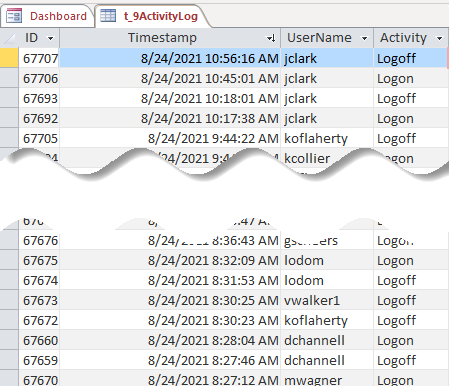
Below is a screen shot of a table in a DB I am working with. What I would like to do is dertermin how long a given member was logged into the Application.

I've tried a few queries but I THINK the best way to do this would be something to the effect of using a Recordset that sorts on UserName and then Timestamp, finds the first Logon, marks the time and then finds the next Logoff after that time. A RBAR Sub. Any ideas?

1629819551230.png
 
Nah, this should be possible using queries. Are you looking for the total time for the day or each individual session?
 
Individual session...
 
I thought so too, but I ran out of ideas quick. The cartesian joins could not be measured with modern technology!
Right or wrong, this is why I prefer to have two separate columns for LogIn and LogOut instead of separate records.

Are you able to post a small sample db (or Excel) with test data, so we can run some SQL queries against it?
 
Right or wrong, this is why I prefer to have two separate columns for LogIn and LogOut instead of separate records.
Agreed, and I may convert this table to something like that but then I would still need this query/sub to make it.
Are you able to post a small sample db (or Excel) with test data, so we can run some SQL queries against it?
Sure thing. Give me a second to port it over from the source. Appreciate you taking a look!
 
I was thinking a Dmin() to get the logoff time and have that as a separate field in a query, then subtract one from the other.?
I bit like a running sum query?

Query only for logon records and that Dmin() for the respective logoff timestamp.?
 
Agreed, and I may convert this table to something like that but then I would still need this query/sub to make it.

Sure thing. Give me a second to port it over from the source. Appreciate you taking a look!
Hi. I did a quick test, and here's the result.

1629822059623.png


1629822085132.png


SQL:
SELECT tblLogs.User, tblLogs.[LogDate] AS Login,
  (SELECT Min(T1.LogDate) FROM tblLogs T1
    WHERE T1.LogAction="logout" AND T1.User=tblLogs.[User] AND T1.LogDate>=tblLogs.[LogDate]) AS Logout,
  DateDiff("n",[Login],[Logout]) AS Duration
FROM tblLogs
WHERE (((tblLogs.LogAction)="login"));
Hope that helps...
 
This is also one of the few places I deliberately flout normalisation by having two fields for login time & logout time.
As @theDBguy has shown, it is possible to get around issues with only using a single field together with an identifier.
However, problems still occur where a user doesn't logout due to e.g. an illegal shut down or a power failure.
This leaves an orphan login which can cause misleading values for session duration
 
Here is the actual data. Takes a LONG time to execute!
Unfortunately, that's the side effect of using correlated subqueries. As @isladogs said, denormalizing this table (i.e. separate login and logout fields/columns) would speed it up a bit.
 
I haven't looked at your data but as you have the same issue with 'non logouts', I would definitely restructure your table.
In my opinion, that would speed up the duration calculation a lot as the query needed to do so would be much simpler
 
My plan exactly. I will use this query to make a proper table and then go forth and sin no more (within the limits of this subject at least).

Great job. Sub-queries have always been a mystery to me. Damn impressive how you threw that together so quickly. The query is STILL running - approaching 20 min now but the meter is still showing progress.

Holy SugarHoneyIcedTea, Batman...
 
My plan is to store the Logon and Logoff as TempVars and then write one "Insert Into" statement to the table. That is unless of course someone convinces me that the idea is flawed...
 
Why not create a make table query based on what DBG gave you but minus the duration calculation.

That will probably be far quicker than waiting for the query results to complete
 
When I had this same goal and this same kind of problem, I quickly realized that I needed a couple of facts. One of them was whether it was EVER reasonable to log in to the DB twice from two different terminals as the same user AND from a separate window to allow two simultaneous sessions from the same terminal. I got permission from the security guy to say "NO" to both questions. My login table included username and computername from the session login and also had session start date/time and end date/time - plus the "Abnormal" flag. (If that seems a bit strict, remember I was working for the U.S. Navy at the time. Their idea of security includes some things I wouldn't have guessed.)

That table enabled me to open a recordset to the session table to find the session record with the highest start date/time (before I wrote the current record) for the username logging in again. Relatively easy. If the record had an end date/time, I was done. If not, I updated that record to (a) put the current date/time as "END" for that session and (b) set a flag in the record that said "Abnormally terminated." Once that record was done, I could then enter a new session. I made it a point to, after the fact, capture the session number (which was an autonumber for that session table.) That way, if the user was exiting normally, in the dispatcher form's Close routine I could write a simple

"UPDATE SESSIONS SET ENDSESS= Now() WHERE SESSID = " & Me.SessionID & ";"

That way I could count sessions, abnormal sessions, and the duration of normal sessions easily. There was just about NEVER a chance to capture the correct session end for an aborted session, so the question was what to do about it. Therefore, by having a way to at least know the difference between orderly and disorderly session terminations, I had very few dangling sessions. I ALSO had a supervisor's maintenance tool that I ran during scheduled maintenance when the DB was still "officially down" and thus could not be logged in. It looked for sessions with no end date/time and immediately capped those off, too.

I don't know if that will help, but it was how I approached the problem.

 
My plan is to store the Logon and Logoff as TempVars and then write one "Insert Into" statement to the table. That is unless of course someone convinces me that the idea is flawed...

That still leaves you vulnerable to the issue Colin described, "where a user doesn't logout due to e.g. an illegal shut down or a power failure." In this case you wouldn't have an orphaned login, but no record at all of activity. I suppose that could be a preference in some situations, but I wouldn't go this way. I did what Pat described.
 

Users who are viewing this thread

Back
Top Bottom