
You are using an out of date browser. It may not display this or other websites correctly.
You should upgrade or use an alternative browser.
You should upgrade or use an alternative browser.
Solved Extract Forms/Reports/Scripts/Modules/Queries from external database
- Thread starter Alt
- Start date
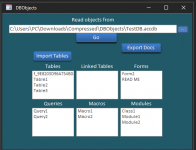
Object requiredWhat is the error message?
Everything is well attached... You have the error message when you press "Export Docs" buttonOn what line of code? Did you include the database you are linking to?
When you want us to debug something, you need to give us all the pieces and tell us where the error is happening.
you can read any external db but I've revised the zip files to include this testDB.accdb.1. This is the message I get. I'm assuming it thinks some db named TestDB.accdb should be in the folder but of course, it wasn't included in the download so it isn't there. Am I supposed to create an empty database with this name?
View attachment 105432
2. I created the db but of course that wasn't the problem at all. It needs to be a db with objects in it.
3. VOILA! Turns out the problem is caused by sloppy coding. EVERY module should have as its first two lines:
So, start by changing the Access option to require variable declaration. Then fix the compile errors to fix your problem.Code:Option Compare Database Option Explicit
If you want to see my error message, press "Go" button (this will fill the form) then "Export Docs". You cna chech "mod_ExportDocs" (into VB editor)That's fine but we don't know you your app works so you might have mentioned that. Did you fix the Option Explicit since that was what hid the problem from you?
yes I put those two lines in every module and I no longer have an error message (Thanks... zip file is updated)Did you understand my instruction on HOW TO FIX THE ERROR? You have dim'd the database name as dbs but most of the references are to db. If you had Option Explicit turned on, you would see this because of the compile errors it causes!!
But I'm still unable to create txt files when I hit Export Docs" (mod_ExportDocs).
Application.SaveAsText acForm, doc.Name, sExtDbPath & Format(Date, "yyyymmdd") & doc.Name & ".txt"
SaveAsText creates text files. These are to be stored in a folder in the file system, not in an access file. Consequently, one would not use a file selection dialog here, but a directory selection dialog to generate valid paths for the export.
SaveAsText creates text files. These are to be stored in a folder in the file system, not in an access file. Consequently, one would not use a file selection dialog here, but a directory selection dialog to generate valid paths for the export.

arnelgp
..forever waiting... waiting for jellybean!
- Local time
- Tomorrow, 06:41
- Joined
- May 7, 2009
- Messages
- 20,746
here test this one:
the reason that your code does not work is that you are using Application.SaveAsText.
the "Application" there pertains to the Currentdb's Application and not the External db's Application.
remember the Forms (or objects) you are trying to Export is in another db not in the Currentdb.
you need to Open an Access.Application, and open the external db using the New access instance.
the reason that your code does not work is that you are using Application.SaveAsText.
the "Application" there pertains to the Currentdb's Application and not the External db's Application.
remember the Forms (or objects) you are trying to Export is in another db not in the Currentdb.
you need to Open an Access.Application, and open the external db using the New access instance.
Attachments
working fine... Thanks a lot.here test this one:
the reason that your code does not work is that you are using Application.SaveAsText.
the "Application" there pertains to the Currentdb's Application and not the External db's Application.
remember the Forms (or objects) you are trying to Export is in another db not in the Currentdb.
you need to Open an Access.Application, and open the external db using the New access instance.
arnelgp provide a solution (no mention of compile errors...)If it is working, I guess you fixed the compile errors.

Gasman
Enthusiastic Amateur
- Local time
- Today, 22:41
- Joined
- Sep 21, 2011
- Messages
- 17,535
Really?arnelgp provide a solution (no mention of compile errors...)
Here are two
Code:
Private Sub Commande19_Click()
    Call ImportAllFrms(txtFilename)
End Sub

Private Sub Commande20_Click()
    Call ImportAllQrys(txtFilename)
End Sub
Functions do not exist. However there only appears to be one button now to import everything?
Any that did exist, arnel would have likely corrected anyway.
some modules was removed because I don't have any issue with.Really?
Here are two
Code:Private Sub Commande19_Click() Call ImportAllFrms(txtFilename) End Sub Private Sub Commande20_Click() Call ImportAllQrys(txtFilename) End Sub
Functions do not exist. However there only appears to be one button now to import everything?
Any that did exist, arnel would have likely corrected anyway.
Gasman
Enthusiastic Amateur
- Local time
- Today, 22:41
- Joined
- Sep 21, 2011
- Messages
- 17,535
Perhaps, but it still does let it compile?some modules was removed because I don't have any issue with.
Unless it does, how do you know what on earth you have?
 just in syntax alone?
arnelgp
..forever waiting... waiting for jellybean!
- Local time
- Tomorrow, 06:41
- Joined
- May 7, 2009
- Messages
- 20,746
with due respect to the OP, that is not the "original" error.Your original error was caused because you defined an object using one name and referenced it with another.
even if you resolved the missing object, or just delete every code in the form and just
leave the code on the "Export Docs" button, you will still get the "original error" which is
(by debugging):
that is Exporting an Object (on this case the Forms), that are Not in the Currentdb (see post #14).
arnelgp
..forever waiting... waiting for jellybean!
- Local time
- Tomorrow, 06:41
- Joined
- May 7, 2009
- Messages
- 20,746
if you will have time to test the db, before justifying, you will see that it never complains about any undefined sub/function.only that you couldn't get to the second error without fixing the compile error
when you press the "Export docs" button it goes directly to "ExportDocs" subs.
and will error on the first form name.
Similar threads

- Replies
- 18
- Views
- 1,196
- Replies
- 11
- Views
- 1,056

- Replies
- 14
- Views
- 1,745
- Replies
- 5
- Views
- 1,066

Users who are viewing this thread
Total: 1 (members: 0, guests: 1)