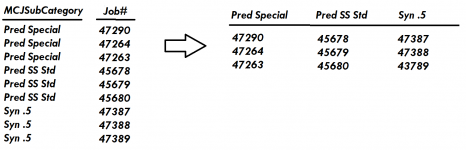
Recreating job board in Access

Yes. Breaking tables because you have too many columns is indicative of a bad allocation of attributes to begin with.

Here is a sample using the crosstab query. It needs adjustment though to work in the real world. Reports don't naturally grow columns. You either need to fix the number of columns by using the column headings property of the crosstab OR if you have a table that defines the SubCategory, you can open the crosstab query and add that table with a left join. That should produce a recordset with all the columns even when the recordset doesn't contain data with all values. HOWEVER, reports are limited to two pages in width (22") so if you have more columns than will comfortably fit in 22", you would have to export the crosstab to Excel and format it there.
Hi Pat,

I was curious as to what is the better way of dealing with a table that has too many fields rather than making a new table with the same primary key. Thanks!
 
Hi Larry,

Yes, that is basically correct as it pertains to machine sales. We also sell parts, but the job board is specifically for machine orders.

The PO is first assigned a sales order and the sales order is then assigned the job #.
If that's the case, then a design something like the following is needed, although I don't know ALL of the fields that are required, the tables and their relationships might work:
1683652530625.png

Of course, you will need input forms in order to enter data into each table and I can help you with that if you wish, but the basic design follows generally accepted rules. You keep each piece of information in one place only and use referencial integrity (Primary Keys and Foreign Keys) to keep track of all of it.

For example, as you can see, each customer may have multiple Orders and Jobs so the TblJobs holds Sales Order and Job Number data. It has a Foreigh Key CustomerID which is related to the Primary Key CustomerID in the TblCustomers table. When we build the input form for Sales Orders and Job numbers, we will automatically fill in the CustomerID from the TblCustomers table. That process gives us the link for each customer and sales order and job.

Also, you NEVER use special symbols (#, -, +,@ etc. etc.) in table or field names so I got rid of your # symbols in the old field names.

This example is VERY preliminary, but you can get the idea of how relational systems work.
 
@2RUEXX
What makes you believe that you have too many fields in a tble? Did ACCESS give you a warning message?
 
@2RUEXX
What makes you believe that you have too many fields in a tble? Did ACCESS give you a warning message?
The example database I uploaded has much less than the actual tables. In the actual MCJ table, we have around 67 fields. Access didn't warn us but the table was already so large so that new fields have been added to tables like MCJFreight which I realize now doesn't seem to be good practice.

Based on what we have though, I have made the crosstab query and it is so close to what I'm needing. However in this crosstab query, I am only able to show the first job within each subcategory and ship week. See this attached example that Pat provided. It only shows the first or last job tag depending on how you setup the Total field for the OptionsDesc field. How can I get the query to show every job that exists within a MCJSubCategory for a given ship week and not just the first one? Perhaps it is not possible based on our table structure?

The attached photo shows what I'm looking to do based on our current data.
 

Attachments

Last edited:
The example database I uploaded has much less than the actual tables. In the actual MCJ table, we have around 67 fields. Access didn't warn us but the table was already so large so that new fields have been added to tables like MCJFreight which I realize now doesn't seem to be good practice.

Based on what we have though, I have made the crosstab query and it is so close to what I'm needing. However in this crosstab query, I am only able to show the first job within each subcategory and ship week. See this attached example that Pat provided. It only shows the first or last job tag depending on how you setup the Total field for the OptionsDesc field. How can I get the query to show every job that exists within a MCJSubCategory for a given ship week and not just the first one? Perhaps it is not possible based on our table structure?

The attached photo shows what I'm looking to do based on our current data.
If your table structure followed the ACCESS relational model, you probably could do what you want, but your model doesn't use relational concepts so, no it won't. I believe Pat is doing the best she can do for you using your current design, but it will never give you what you want until you re-design the structure from the beginning. I am working on a model that may work for you using the relational model and will attach it for you to study soon.

I have one additional question. When you view the tag form you have created, what do you want to do with it? Just view it on a screen, print it on a report for viewing or what?

Are you taking about the MCJFreight table? Why is there 67 fields? Please go ahead and attach the real table so we can see what is in there.
 
Last edited:
@2RUEXX
Attched is an example file using relational theory. I took your example data and converted it so you can see what a relational system looks like. It uses input forms where you keep data in only one place and can see everything in one place. I was able to create a job tag report like you wanted and there is a button at the bottom to open it. The input form appears when you open the file and disappears when you open the report, but then re-appears when you close the report. I hope this gives you some idea of what Pat and I and others were talking about. Good Luck.
 

Attachments

I told you back in post #25 that your structure was incorrect. your relationship is 1-1-1 so there can NOT BE many in the right most table. You need to rethink the schema so you can figure out what occurs "many" times for a job.
Hi Pat, I am studying Larry's example and it is making more sense now. I was confused at first but am working through understanding it better. Thanks for your help!
 
@2RUEXX
Attched is an example file using relational theory. I took your example data and converted it so you can see what a relational system looks like. It uses input forms where you keep data in only one place and can see everything in one place. I was able to create a job tag report like you wanted and there is a button at the bottom to open it. The input form appears when you open the file and disappears when you open the report, but then re-appears when you close the report. I hope this gives you some idea of what Pat and I and others were talking about. Good Luck.
Thanks Larry! I am analyzing it and I may reply later with questions.
 
It appears those products are industrial wrapping machines. Do you manufacture them? I asked because maybe the machine and its options should be selected and assigned with the order and not with the Finished Products form and table.
 
Last edited:
It appears those products are industrial wrapping machines. Do you manufacture them? I asked because maybe the machine and its options should be selected and assigned with the order and not with the Finished Products form and table.
Hi Larry,

Yes, they are stretch wrap machines. This is our company: Highlight Industries | Home
 
Hi Larry,

Yes, they are stretch wrap machines. This is our company: Highlight Industries | Home
OK, yes I thought so. Please understand the file I attached is JUST AN EXAMPLE. There are many duplicate records that were converted and some of the fields will certainly belong in a different table.

Each ACCESS application table design is always driven by the business process. So that said, if you wish to continue down this path using ACCESS, I have a few more questions:
  1. When a customer issues a Purchase Order, do they ever order more than 1 machine from you?
  2. Does each PO result in a single sales order number? Or a can a single PO result in multiple sales order numbers?
  3. Does each sales order number result in a single job number? Or could it result in multiple job numbers?
  4. What does the B or BB designation mean? You had it in a table with a # name, which we cannot use in ACCESS. Is it a machine number of some sort?
The answers will determine which tables need to be developed.
 
Last edited:
@2RUEXX
The attached file probably more closely resembles what your business processes are and is much simpler than the previous file. You can see:
  1. Each customer
  2. May have multiple PO's
  3. Which may have multiple different Sales Orders (PO line items)
  4. Which may have multiple Machine build Jobs (In fact one of the PO's has multiple build jobs)
  5. Each build job with a specific build week, options, MCJ and MCJ Category selections, ship dates and ship check box.
You can open a Machine form to add or delete machine products (This could also be done with parts if you wanted to add parts to Sales Orders)
The Tag Report gives you all the information for each build. I have been using ACCESS since 1999 and it will not format the tags as you drew on your request for help, but I came close.
 

Attachments

Last edited:
@2RUEXX
I don't know if you are still interested in a solution to your question, but if you are, I have a question:
  1. Are you interested in actually tracking the Current Position on the floor. Currently it is just a field in a table that can be changed at will, and that is perfectly OK. But if you wish to track current positions so there is a history, then there needs to be a separate table for floor positions. ACCESS could also record the date and time each status was started and changed and you could determine time elapsed within each status if you so desired. That means you could determine how long in hours and minutes a machine took to paint, weld etc. You could then sum the times to determine how long a machine took to build.
If not, the floor position can remain as it is.
 
@2RUEXX
I don't know if you are still interested in a solution to your question, but if you are, I have a question:
  1. Are you interested in actually tracking the Current Position on the floor. Currently it is just a field in a table that can be changed at will, and that is perfectly OK. But if you wish to track current positions so there is a history, then there needs to be a separate table for floor positions. ACCESS could also record the date and time each status was started and changed and you could determine time elapsed within each status if you so desired. That means you could determine how long in hours and minutes a machine took to paint, weld etc. You could then sum the times to determine how long a machine took to build.
If not, the floor position can remain as it is.
Hey Larry,

Sorry for not getting back earlier to your posts. I have been busy this week and have not had time to work on this project. Let me get back to you about some of your posts. Regarding this question, I believe that right now they are mostly interested in displaying just the current position without seeing a history, although that sounds like it'd be nice. I am only an assistant here when it comes to the databases, so I don't have too much control over how it is done.
 
Hey Larry,

Sorry for not getting back earlier to your posts. I have been busy this week and have not had time to work on this project. Let me get back to you about some of your posts. Regarding this question, I believe that right now they are mostly interested in displaying just the current position without seeing a history, although that sounds like it'd be nice. I am only an assistant here when it comes to the databases, so I don't have too much control over how it is done.
OK. I'll wait to hear.
 
OK. I'll wait to hear.
Hi Larry,

I appreciate the time and the posts you wrote. I messed around with the queries and tables and I have been able to create a suitable jobboard format for our needs. For now, I don't need further assistance, but I appreciate all the help and all of what I learned through the various replies to this thread!
 
Hi Larry,

I appreciate the time and the posts you wrote. I messed around with the queries and tables and I have been able to create a suitable jobboard format for our needs. For now, I don't need further assistance, but I appreciate all the help and all of what I learned through the various replies to this thread!
Perfect. Let us know if you need further assistance.
 

Users who are viewing this thread

Back
Top Bottom