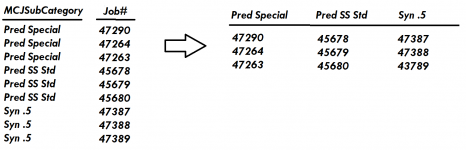
Hi Pat,Yes. Breaking tables because you have too many columns is indicative of a bad allocation of attributes to begin with.
Here is a sample using the crosstab query. It needs adjustment though to work in the real world. Reports don't naturally grow columns. You either need to fix the number of columns by using the column headings property of the crosstab OR if you have a table that defines the SubCategory, you can open the crosstab query and add that table with a left join. That should produce a recordset with all the columns even when the recordset doesn't contain data with all values. HOWEVER, reports are limited to two pages in width (22") so if you have more columns than will comfortably fit in 22", you would have to export the crosstab to Excel and format it there.
I was curious as to what is the better way of dealing with a table that has too many fields rather than making a new table with the same primary key. Thanks!