
Changing date formulas via drop-down list (listbox) in a report

FrankD

New member
Local time
Today, 19:57
Joined
Nov 13, 2021
Messages
4
For my financial follow-up, I have a report that consists of several hundred fixed text fields per month, each with its own formula.
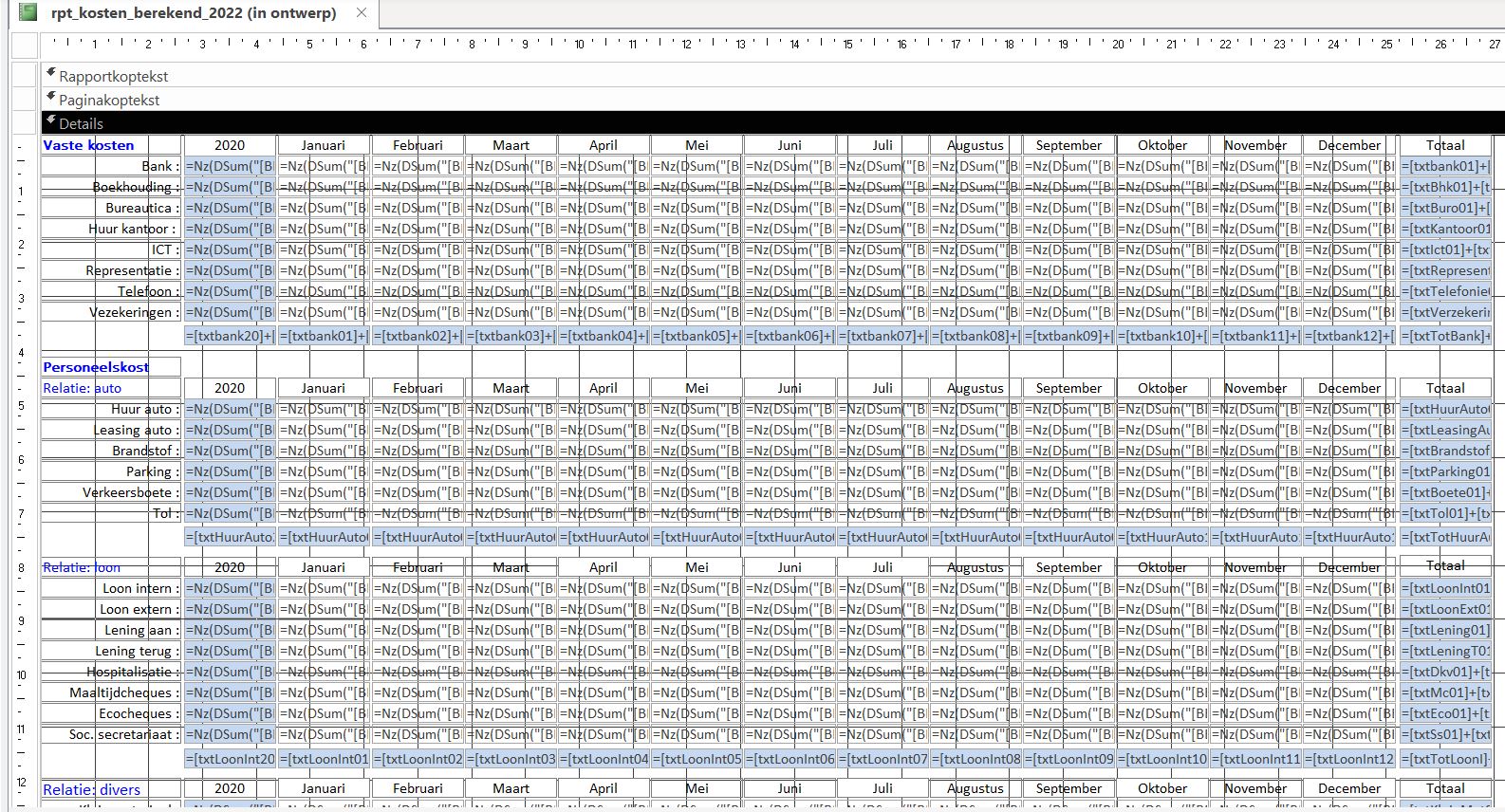
financial_report.JPG

So every year I make a copy of the report and I have to adjust all formulas. We are talking about 504 formulas. Depending on the type of INFO
=Nz(DSum("[AMOUNT]";"[tbl_BE27001856500073]";"[CURRENCY DATE] between #2022/01/01#and#2022/01/31# AND [INFO]=""ict"""); 0)

I would like to have only 1 report instead of “one report at year”.
Is there the possibility to open the report via a kind of popup form where only a selection list (Listbox) is displayed?
This selection list (Listbox) is only filled with years.

After selecting the year, the calculated values are displayed according to the chosen year in the report.
=Nz(DSum("[AMOUNT]";"[tbl_BE27001856500073]";"[CURRENCY DATE] between #2022/01/01#and#2022/01/31# AND [INFO]=""ict"""); 0)

Is there anyone who can help me with this, please?
 
does table [tbl_BE27001856500073] also change every year?

you need to change every occurrence of #2022/01/01# to DateSerial(Tempvars!tvarRptYear, 1, 1)
and every occurence of #2022/01/31# to DateSerial(Tempvars!tvarRptYear, 1, 31)

on the pop-up form (that you will be making), set the Rowsource of
your listbox to:

SELECT Year([Currency Date]) From [tbl_BE27001856500073] GROUP BY Year([Currency Date]);

then you add code to the listbox's AfterUpdate Event:

private sub listbox1_AfterUpdate()
If IsNull(TempVars!tvarRptYear) Then
Tempvars.Add "tvarRptYear", 0
End If
Tempvars!tvarRptYear = Clng(Nz(Me.listbox1, Year(Date())))
end sub
 
Last edited:
you need to change every occurrence of #2022/01/01# to DateSerial(Tempvars!tvarRptYear, 1, 1)
and every occurence of #2022/01/31# to DateSerial(Tempvars!tvarRptYear, 1, 31)
What would resolve faster? Using between or the Year()?
Code:
Year([CURRENCY DATE] ) = YourListBoxYear
 
does table [tbl_BE27001856500073] also change every year?

you need to change every occurrence of #2022/01/01# to DateSerial(Tempvars!tvarRptYear, 1, 1)
and every occurence of #2022/01/31# to DateSerial(Tempvars!tvarRptYear, 1, 31)

on the pop-up form (that you will be making), set the Rowsource of
your listbox to:

SELECT Year([Currency Date]) From [tbl_BE27001856500073] GROUP BY 1;

then you add code to the listbox's AfterUpdate Event:

private sub listbox1_AfterUpdate()
If IsNull(TempVars!tvarRptYear) Then
Tempvars.Add "tvarRptYear", 0
End If
Tempvars!tvarRptYear = Clng(Nz(Me.listbox1, Year(Date())))
end sub
Thanks for the support, program code, and additional explanation.
I'll get on with this and come back to it later.

The layout and formats of the table tbl_BE27001856500073 have been unchanged for years.
This table is used to register all banking transactions made.
This is done via a CSV file that is uploaded on a weekly basis.
 
Hi. Another possible approach is to simply change your Year textbox to refer to the popup form and adjust all your expressions to use it.
 
This is an Access forum. Sure looks like you are working with Excel. The whole problem can almost certainly be solved by using a totals query that takes a variable for year. You would do the overall summing and grouping in the report.

If you want help creating the query, please post your tables or preferably a database.
Maybe I didn't define it clearly.

The CSV file is exported from my bank account and imported into the temporary Access table.
After checking, the new data is added to the correct table via an append query.

In the past, I had experimented with a crosstab query in a report, but I was unable to do any calculations on the results displayed.

This may be due to my lack of Access knowledge.
 

Users who are viewing this thread

Back
Top Bottom