
Code Error - 32 Bit - How To Update to 64 Bit

Ashfaque

Search Beautiful Girls from your town for night
Local time
Today, 11:53
Joined
Sep 6, 2004
Messages
897
Hi,

I have a function that copying PC Address from pc for further process. It works in my pc prefectly but when install same db to other pc the attached msg for a module is appearing even the Access version is same is same on both pc. Whereas my pc and the other PC are also of 64 Bit. - Please see the attached error.

But the problem still persist.

Can somebody help me to overcome this issue?

Thanks in Advance.
Ashfaque
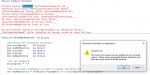
 

Attachments

  • CODE ERROR.jpg
    CODE ERROR.jpg
    104 KB · Views: 918
add Conditional compiler directive:
Code:
#If VBA7 Then
    'must add PtrSafe.
    'if there is a Window Handle must use LongPtr instead of Long
    Private Declare PtrSafe Function/Sub
...
...
#Else
    'the "normal (32bit) declaration here
    Private Declare Function/Sub
#End If
 
add Conditional compiler directive:
Code:
#If VBA7 Then
    'must add PtrSafe.
    'if there is a Window Handle must use LongPtr instead of Long
    Private Declare PtrSafe Function/Sub
...
...
#Else
    'the "normal (32bit) declaration here
    Private Declare Function/Sub
#End If
Thanks Arnep,

Below is my overall code:
Code Tags Added by UG
Please use Code Tags when posting VBA Code

Please feel free to Remove this Comment
https://www.access-programmers.co.u...e-use-code-tags-when-posting-vba-code.240420/

Code:
Option Compare Database

Private Declare Function GetVolumeInformation Lib _
"kernel32.dll" Alias "GetVolumeInformationA" (ByVal _
lpRootPathName As String, ByVal lpVolumeNameBuffer As _
String, ByVal nVolumeNameSize As Integer, _
lpVolumeSerialNumber As Long, lpMaximumComponentLength _
As Long, lpFileSystemFlags As Long, ByVal _
lpFileSystemNameBuffer As String, ByVal _
nFileSystemNameSize As Long) As Long

Function GetSerialNumber(strDrive As String) As Long
    Dim SerialNum As Long
    Dim Res As Long
    Dim Temp1 As String
    Dim Temp2 As String
    Temp1 = String$(255, Chr$(0))
    Temp2 = String$(255, Chr$(0))
    Res = GetVolumeInformation(strDrive, Temp1, _
    Len(Temp1), SerialNum, 0, 0, Temp2, Len(Temp2))
    GetSerialNumber = SerialNum
End Function

Where you want me to add you code?

Thanks,
 
Code:
Option Compare Database
'always add this
Option Explicit

#If VBA7 Then
Private Declare PtrSafe Function GetVolumeInformation Lib _
"kernel32.dll" Alias "GetVolumeInformationA" (ByVal _
lpRootPathName As String, ByVal lpVolumeNameBuffer As _
String, ByVal nVolumeNameSize As Integer, _
lpVolumeSerialNumber As Long, lpMaximumComponentLength _
As Long, lpFileSystemFlags As Long, ByVal _
lpFileSystemNameBuffer As String, ByVal _
nFileSystemNameSize As Long) As Long
#Else

Private Declare Function GetVolumeInformation Lib _
"kernel32.dll" Alias "GetVolumeInformationA" (ByVal _
lpRootPathName As String, ByVal lpVolumeNameBuffer As _
String, ByVal nVolumeNameSize As Integer, _
lpVolumeSerialNumber As Long, lpMaximumComponentLength _
As Long, lpFileSystemFlags As Long, ByVal _
lpFileSystemNameBuffer As String, ByVal _
nFileSystemNameSize As Long) As Long
#End If

Function GetSerialNumber(strDrive As String) As Long
    Dim SerialNum As Long
    Dim Res As Long
    Dim Temp1 As String
    Dim Temp2 As String
    Temp1 = String$(255, Chr$(0))
    Temp2 = String$(255, Chr$(0))
    Res = GetVolumeInformation(strDrive, Temp1, _
    Len(Temp1), SerialNum, 0, 0, Temp2, Len(Temp2))
    GetSerialNumber = SerialNum
End Function
 
Thanks a ton arnelgp,

It is working now. (y) (y) (y)

Regards,
Ashfaque
 

Users who are viewing this thread

Back
Top Bottom