Compile error 64-bit system

LanaR

Member
Local time
Today, 21:42
Joined
May 20, 2021
Messages
113
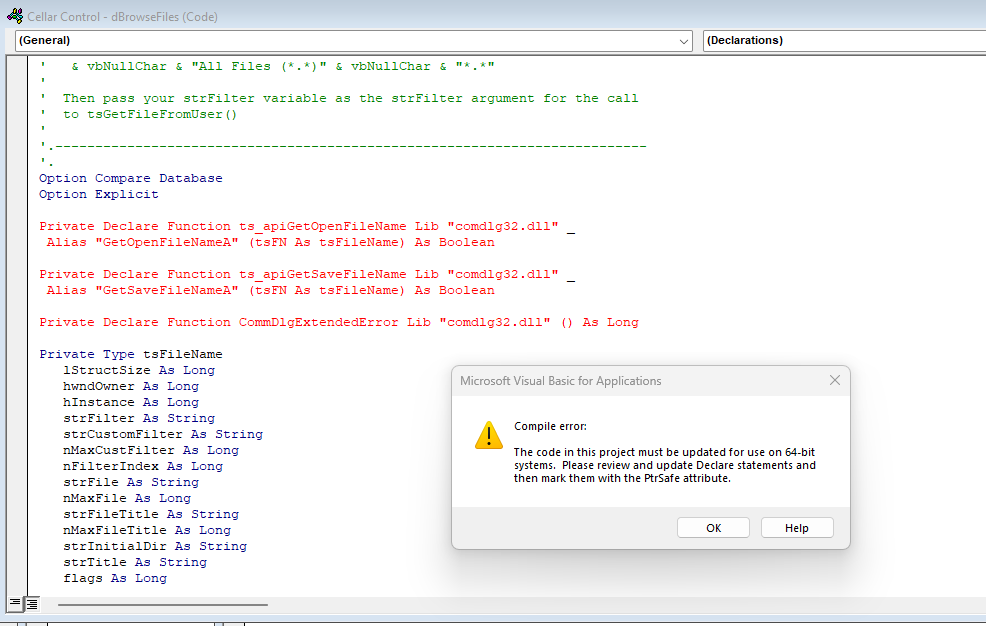
I've just taken possession of a new pc with windows 11, and of course the latest version of access. One of my DB's (I'm sure there will be others) is now giving me the following error, which I have no idea how to fix. I'm pretty sure it is code I found in these forums sometime ago.

1669988125642.png
 
Easiest way would be to revert back to Access 32 bit, unless you specifically need 64 bit, else would need to add PtrSafe as it mentions.

Plenty of threads on here about conversion to 64 bit.

You would think MS would have a converter by now? :(
 
LanaR,

I agree with Paul. You have met a common problem when moving from 32bit to 64bit Access/Office.
You may find some insight in this Richard Rost video.
There are other videos and various posts in the forums.
That's the one I was looking for but you were quicker on the "draw"...
 
I've just taken possession of a new pc with windows 11, and of course the latest version of access.
One of my DB's (I'm sure there will be others) is now giving me the following error, which I have no idea how to fix. I'm pretty sure it is code I found in these forums sometime ago.

View attachment 105013
What others have alluded to, but not made explicit, is that you installed the 64 bit version of Office when you installed "...of course the latest version..."

Office has been available in both 32 bit and 64 bit versions from some time, but up until recently, the 32 bit version was the default. In the recent past, that changed and now the default installation will be the 64 bit version, which you have.

While you could uninstall the 64 bit version and install the 32 bit version, it's probably a good idea to modify your code, and there are lots of resources available to show you how to do that.
 
Easiest way would be to revert back to Access 32 bit, unless you specifically need 64 bit, else would need to add PtrSafe as it mentions.

Plenty of threads on here about conversion to 64 bit.

You would think MS would have a converter by now? :(
Your VBA is custom code, created by you , for your application. You REALLY want MS trying to convert your custom code for you? I sure don't.
 
Thanks for all the advice. Most appreciated :)
 
check if this will work for you:
Code:
' updated for x64 by arnelgp
'
#If VBA7 Then
    Type tsFileName
        lStructSize As Long
        hwndOwner As LongPtr
        hInstance As LongPtr
        strFilter As String
        strCustomFilter As String
        nMaxCustFilter As Long
        nFilterIndex As Long
        strFile As String
        nMaxFile As Long
        strFileTitle As String
        nMaxFileTitle As Long
        strInitialDir As String
        strTitle As String
        flags As Long
        nFileOffset As Integer
        nFileExtension As Integer
        strDefExt As String
        lCustData As Long
        lpfnHook As LongPtr
        lpTemplateName As String
    '#if (_WIN32_WINNT >= 0x0500)
        pvReserved As LongPtr
        dwReserved As Long
        FlagsEx As Long
    '#endif // (_WIN32_WINNT >= 0x0500)
    End Type
#Else
    Type tsFileName
        lStructSize As Long
        hwndOwner As Long
        hInstance As Long
        strFilter As String
        strCustomFilter As String
        nMaxCustFilter As Long
        nFilterIndex As Long
        strFile As String
        nMaxFile As Long
        strFileTitle As String
        nMaxFileTitle As Long
        strInitialDir As String
        strTitle As String
        flags As Long
        nFileOffset As Integer
        nFileExtension As Integer
        strDefExt As String
        lCustData As Long
        lpfnHook As Long
        lpTemplateName As String
    End Type
#End If

#If VBA7 Then
    Declare PtrSafe Function ts_apiGetOpenFileName Lib "comdlg32.dll" Alias "GetOpenFileNameA" (pOpenfilename As tsFileName) As Long
    Declare PtrSafe Function ts_apiGetSaveFileName Lib "comdlg32.dll" Alias "GetSaveFileNameA" (pOpenfilename As tsFileName) As Long
    Private Declare PtrSafe Function CommDlgExtendedError Lib "comdlg32.dll" () As Long
#Else
    Declare Function ts_apiGetOpenFileName Lib "comdlg32.dll" _
        Alias "GetOpenFileNameA" (OFN As tsFileName) As Boolean
        
    Declare Function ts_apiGetSaveFileName Lib "comdlg32.dll" _
        Alias "GetSaveFileNameA" (OFN As tsFileName) As Boolean
    Private Declare Function CommDlgExtendedError Lib "comdlg32.dll" () As Long
#End If
 
Your VBA is custom code, created by you , for your application. You REALLY want MS trying to convert your custom code for you? I sure don't.
For an expert, I would have thought it would be relatively easy to copy the lines, comment them out and amend for 64bit?
It is only the API calls after all, is it not?

I am on 2007, so no big deal for me. :)
 
There are two schools of thought on this problem. If you don't need million-row spreadsheets or million-character Word documents, it might be easier to back out of 64-bit Office and install the 32-bit Office version. You will not see any negatives in anything unless and until you create something SO large that it becomes a mental challenge to understand it. 32-bit Office runs absolutely fine on a 64-bit machine. (I'm doing it now!)

Further, note that due to reasons known only to Microsoft, SOME of the possible libraries you might use in your References list were not converted to use 64-bit addressing, thus adding to the fun of conversion. I don't know if all of the unconverted libraries have been updated as of this date but I know that a lot of them were "left behind" when the default for Office became the 64-bit version.

In this thread's "Similar Threads" section (always after the last post in the thread) you might find some other articles on 32-bit vs. 64-bit issues.
 
There is only one real benefit to using 64-bit Access though it is important.
The 64-bit version has much better memory handling which means significantly reduced risk of Access crashing due to out of memory errors. It also means some very demanding process will be able to run or will run faster.

It is possible to alleviate this by adding large address awareness (LAA) to 32-bit Access running under 64-bit Windows though at the moment LAA gets overwritten each time Access is updated.
For more details, see

As for the 3 APIs above, I suggest you scrap the code you're using that the relies on the first two. Instead use File System Object (FSO) code which runs in both bitnesses. I've never used the ComDlgExtendedError API
 
The code looks like a FileDialog. You could also use the one from the MS Office object library, preferably in a variant using late binding by Daniel Pineault: Late Binding the FileDialog
The selection of directories is included, this will not be the case with your variant.
 
As a big fan of FSO, that's a helpful tidbit of information.

Book marked Phil's article for future refernce.
Preface: I feel the exact same way.

Nonetheless, it reminds me of a time when I was working in an ultra professional team of ETL developers at a major bank. A little over my head, as I was the lowest-skilled guy on the team, despite my love for SSIS and having produced hundreds of packages in my time.
Anyway, one of the main things that I was called out for was my Script Tasks.
Their first shock was that I was using vb.net option instead of c#.net option, they wondered why anyone under the age of 80 might be doing that. I didn't have any defense other than, I was used to "all things VB*", and therefore tried in vain to defend it but that was when I realized the frequent dev shop preference for c#.net over vb.net. In my defense I then tried to study the why's, but can't remember them any more. A lotta brackets was all I remember.
The second thing that DID make me flush briefly was they pointed out that while I had made a nice little vb.net Script Task, I wasn't even leveraging the .Net benefits in the first place!--pointing out my use of Createobject() for Office app instantiations, and as the icing on the cake that basically ended the meeting, my use of Scripting.FileSystemObject to work with files and folders...they were like "man, that stuff is so OOOLD and gross you're lucky the toilet down the hall didn't start leaking when you ran that". I had no defense other than OK, you got me -- I'm much more a VBA developer than I am a .Net developer but I will try to learn and be better.
In my defense I did then proceed to study a bit about .Net's ability to fly through files and folders and DAMN, it really WAS good. In the snap of literally a few words of code you could stack up an array of folders, files, and make all kinds of useful inquiries about them. Pretty slick.

I only stayed on that job 10 mo. I enjoyed learning from people "above" me, that wasn't the problem. What was ultimately my downfall was the stressful feeling of depending on offshore team (India) to get on the phone with me and explain exactly how to use all of the SSIS templates, env variables, dynamic server environments, etc. I love learning stuff but when you have to ask a person to repeat every single sentence or phrase they say 5-6 times before it is understood (or given up on), it becomes very uncomfortable for both parties, I'm sure.
Between that and the bank's E-X-T-E-N-S-I-V-E "change management" burearocracy that required a full time job to keep up with, I decided to move to another opportunity. But I learned a lot of great SQL Server tips on that job, like the usefulness of TVF's and the wisdom of deleting large amounts of records in looped batches to avoid the SQL job hanging indefinitely and the boss having to ask why the lights were dimming.

Good memories. Sorry to soapbox the thread, but you get all kinds of feedback sometimes!

 
Surely, reverting to the 32 bit version is just going to delay an inevitable crunch when MS stops supporting it? Along with creating, potentially, additional work in the future.
 
Just one BIG caveat to that advice.
APIs adapted to work in 64-bit Access will also run in 32-bit Office from A2010 onwards (VBA7)
For example, below I'm using conditional compilation so these 2 APIs will work in all versions and bitnesses:

Code:
'###############################################
'Updated by Colin Riddington - 26/01/2019
#If VBA7 Then 'A2010 or later (32/64-bit)
    Private Declare PtrSafe Function FindWindowA Lib "user32" _
        (ByVal lpClassName As String, ByVal lpWindowName As String) As LongPtr
       
    Private Declare PtrSafe Function SetWindowPos Lib "user32" _
        (ByVal handleW1 As LongPtr, ByVal handleW1InsertWhere As LongPtr, ByVal w As Long, _
        ByVal X As Long, ByVal Y As Long, ByVal z As Long, ByVal wFlags As Long) As Long
#Else 'A2007 or earlier (32-bit)
    Private Declare Function FindWindowA Lib "user32" _
        (ByVal lpClassName As String, ByVal lpWindowName As String) As Long
       
    Private Declare Function SetWindowPos Lib "user32" _
        (ByVal handleW1 As Long, ByVal handleW1InsertWhere As Long, ByVal w As Long, _
        ByVal X As Long, ByVal Y As Long, ByVal z As Long, ByVal wFlags As Long) As Long
#End If
'###############################################

But unless you also need to cater for users with A2007 or earlier there is no need to worry about conditional compilation so you just need this:
Code:
 '###############################################
Private Declare PtrSafe Function FindWindowA Lib "user32" _
        (ByVal lpClassName As String, ByVal lpWindowName As String) As LongPtr

Private Declare PtrSafe Function SetWindowPos Lib "user32" _
        (ByVal handleW1 As LongPtr, ByVal handleW1InsertWhere As LongPtr, ByVal w As Long, _
        ByVal X As Long, ByVal Y As Long, ByVal z As Long, ByVal wFlags As Long) As Long
'###############################################

In most cases, conversion isn't that difficult but its tedious and can be time consumimng.
So, if I were you, I would start converting your projects to work in both bitnesses as & when you have time to do so.
Look at example apps that have been converted.
For example, all of mine are supplied with conditional compilation

At some point, you will indeed have to deal with the situation.
Better to be prepared in advance rather than face the situation I had in 2014 of having to convert several huge applications in a two week timeframe ...when I really didn't know what I was doing
 
Surely, reverting to the 32 bit version is just going to delay an inevitable crunch when MS stops supporting it? Along with creating, potentially, additional work in the future.

Though modern machines are, more often than not, based on 64-bit architecture, there are tons of 32-bit systems still in the wild providing MS with a suitable market to continue to justify 32-bit support. Not to mention that the 64-bit machines are merely extensions of 32-bit
systems so there will be no cases of any merit in which a particular 32-bit package is missing an instruction because you are on a 64-bit platform.

As to work in the future, one would hope that eventually MS would "catch up" with the libraries they didn't convert yet. But here is the secret as to WHY they haven't converted everything. You see, about half of the utilities they run, including nearly ALL of the utilities that are accessible from the CMD prompt, are still 32-bit programs for which the 32-bit libraries are still needed. For them to abandon 32-bit systems in Office, it would imply that they had actually gotten around to "fixing" all of their own behind-the-scenes programs. Want to see how many there are? Start up your Task Manager and switch to the Processes tab. Now click on process name in the header area, which sorts processes alphabetically by name. Scroll down to SVCHOST.EXE and start counting. Most of those are SVCHOST 32-bit and are there because of all of the unconverted support libraries that Windows itself uses.
 

Users who are viewing this thread

Back
Top Bottom