
Conditional Formatting in Forms

jcbhydro

Registered User.
Local time
Today, 05:05
Joined
Jul 26, 2013
Messages
187
Good Afternoon,

I have some Conditional Formatting of a Currency Field in an Entry Form.
The cell is conditionally formatted with a yellow background when the value is zero.
I now wish to add an additional condition to the expression such that even if the value is zero it will not be formatted if a specific check box is TRUE.

I have tried modifying the expression such that it reads;

[currency field]=0 AND [check box]<>TRUE.

It correctly turns off the conditional formatting if the check box is ticked, but does not turn it on again when the check box is unticked.

Any suggestions would be gratefully received.

jcbhydro
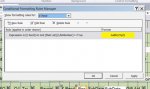
 
Are you using "Expression Is"? Can you show us a screenshot of what you did?
 
Yes,

I am using the 'Expression is' option.

I am attaching a Word file which shows the screen shot.

regards,

jcbhydro
 

Attachments

  • Condform.jpg
    Condform.jpg
    23.7 KB · Views: 121
Sorry,

I changed my file type. It's a jpg.

jcbhydro
 
What is [Mail List] the mainform or ??
Try to add Forms! to your expression.
Code:
[Forms]![Mail List]![LifeMember]
 
Thank you for the suggestion, but it doesn;t solve the problem.

My requirement is that when the [£Recd] field = 0 the background colour should be yellow, except when [LifeMember] is True.

I cannot understand whu 'AND plus <>TRUE' doesn't work.
In fact it turns off the conditional formatting in every instance where [£Recd] = 0.

Regards,

jcbhydro
 
might be true that's the problem.

try

[currency field]=0 AND [check box]<>-1
 
..
My requirement is that when the [£Recd] field = 0 the background colour should be yellow, except when [LifeMember] is True.

I cannot understand whu 'AND plus <>TRUE' doesn't work.
In fact it turns off the conditional formatting in every instance where [£Recd] = 0.
But you didn't tell what [Mail List] is and why you've included it in the expression.
Maybe gemma-the-husky is right.
 
But you didn't tell what [Mail List] is and why you've included it in the expression.
I was going to re-iterate your question.

MailList might be pointing to a subform.
 
But you didn't tell what [Mail List] is and why you've included it in the expression.
I was going to re-iterate your question.

MailList might be pointing to a subform in which case you might be reading the wrong record on the subform.
 
Thanks,
I haven't tried it yet as I am away from base for a day or so.
However, I do see the logic of the code and will try it soonest.

jcbhydro
 
I apologize for failing to answer your question, but I mistakenly thought that the element of the expression [Mail List].[LifeMember] pointed to [Mail List] being the table in which the field [LifeMember resides.

The solution suggested by Gemma the Huskey ie [Checkbox]<>-1, doesn't work either. It switches the conditional monitoring off for all instances of [Currency] = 0, irrespective of [Checkbox] status.

jcbhydro
 
JCB. I can only think it's something you have done, then. Can you confirm the field type of [Checkbox]. We are assuming it's a yes/no (Boolean). If it's something else that will probably explain.

Alternatively - you do mean zero for the currency field, don't you. A null is different to a zero.
 
I apologize for failing to answer your question, but I mistakenly thought that the element of the expression [Mail List].[LifeMember] pointed to [Mail List] being the table in which the field [LifeMember resides.
I forgot you replied until gemma-the-husky posted. :o

It might be obvious to you but not to us that's why we ask for clarity. I believe that Mail List is pointing to a table that's not part of your Record Source and if that's the case then your expression is invalid.
 
The data type of the check box is defintely yes/No. I have just noticed that the format was True/False, but switching that to Yes/No also has no effect.

The default value of the Currency field is most definitely zero (0) not Null.

The record source for the Currency field in the Entry Form is definitely the Table named [Mail List].

jcbhydro
 
Upload a cut down version of your db and I'll have a quick look.
 
Many thanks to all those who have made suggestions to solve this problem.

As a result of these contributions, I have eventually achieved success.
I have found that instead of defining the checkbox expression as [Mail List].[LifeMember], i have redefined it simply as [LifeMember] and then it functions perfectly.
The final Conditional Monitoring expression used is;
[£ Recd]=0 AND [LifeMember]<>-1

I don't understand why removing the [Mail List] reference to the Table should make the difference but it does.

Regards,

jcbhydro
 

Users who are viewing this thread

Back
Top Bottom