
You are using an out of date browser. It may not display this or other websites correctly.
You should upgrade or use an alternative browser.
You should upgrade or use an alternative browser.
Create QR code in access report
- Thread starter safeerbinsalih
- Start date
mohamed beder
New member
- Local time
- Today, 13:16
- Joined
- Aug 4, 2018
- Messages
- 2
At first I thank you, Mr. Arnelgp
Is there a way to make the code accept Arabic
I also want the code to contain email data
receiver 1
receiver 2
Title
Content of a message
Note that I use ACCESS 2016
Is there a way to make the code accept Arabic
I also want the code to contain email data
receiver 1
receiver 2
Title
Content of a message
Note that I use ACCESS 2016
mohamed beder
New member
- Local time
- Today, 13:16
- Joined
- Aug 4, 2018
- Messages
- 2
sorry, only english.
Thank for your replying, Mr. Arnelgp

but what about:
make code by email data
receiver 1
receiver 2
Title
Content of a message
Note that I use ACCESS 2016
zoc.online
New member
- Local time
- Today, 04:16
- Joined
- Sep 2, 2018
- Messages
- 3
Great work! Thank you very much.
It works fine as long as the text is short.
The QRCode genereted by the Excel sheet is Ok but the raster image in sheet 12 is truncated if the text is long. (more than 18 caracter?) like website adresses.
Is it my configuration or do you know this issue?
Have you an idea for this problem?
It works fine as long as the text is short.
The QRCode genereted by the Excel sheet is Ok but the raster image in sheet 12 is truncated if the text is long. (more than 18 caracter?) like website adresses.
Is it my configuration or do you know this issue?
Have you an idea for this problem?
Attachments

zoc.online
New member
- Local time
- Today, 04:16
- Joined
- Sep 2, 2018
- Messages
- 3
Thank you so much for your quick answer (and solution)
I will try this evening
I will try this evening
zoc.online
New member
- Local time
- Today, 04:16
- Joined
- Sep 2, 2018
- Messages
- 3
Hi Arnel,
it took me a while to understand and fix my layout errors, but now it works perfectly! A big thank you to you.
Have a good week-end!
it took me a while to understand and fix my layout errors, but now it works perfectly! A big thank you to you.
Have a good week-end!
arahman4650
New member
- Local time
- Today, 18:16
- Joined
- Oct 9, 2018
- Messages
- 2
if you have an internet connection, you may try the code in the class.
this one is written in vb. never tried it though.
first put an image control on your report for the qrcode.
on the load event of your report, get the qrcode:
dim qrCode As clsQRCode
private sub report_load()
set qrCode = New clsQRCode
' "text" means the text to make qr code, it can be from a textbox on your report
me.image_control.picture = qrCode.GetPictureQrCode("text", me.image_control.Width, me.image_control.Height)
If me.image_control.Picture Is Nothing Then MsgBox "Error!"
end sub
I can not done the work in MS access 2007 file, Please give me a complete MS access file in attachment.
based on the message, you need
a bmp file, so i've made changes
and instead of jpeg being produced,
a bmp file instead.
Hi Arnelgp,
I am also trying to generate the bar code for each individual device for my IT inventory management work. I have created the table in Access to store all the devices (computers). A field named QRCode is also created.
Now with a created FORM for this table, the code part is empty.
I would like to know what to do with your code in my scenario, so I could have the QRCode to be generated for each device listed in the Access FORM.
I am sorry that I almost have zero coding experience so my question might be sound stupid to you!
Any help is appreciated!

arnelgp
..forever waiting... waiting for jellybean!
- Local time
- Today, 19:16
- Joined
- May 7, 2009
- Messages
- 20,681
firstly you need to import the following from the sample db (latest) I made to your db:
tblQRSheet table
autoExec macro
modGeneral module
on your form you add an Image control, this will hold the qr generated.
I have a button there on my sample that generate the qr.
please follow the code.
if you have difficulty, plz. upload your db with your table and form and I will be glad to do it for you.
sorry it's hard to explain.
tblQRSheet table
autoExec macro
modGeneral module
on your form you add an Image control, this will hold the qr generated.
I have a button there on my sample that generate the qr.
please follow the code.
if you have difficulty, plz. upload your db with your table and form and I will be glad to do it for you.
sorry it's hard to explain.
firstly you need to import the following from the sample db (latest) I made to your db:
tblQRSheet table
autoExec macro
modGeneral module
on your form you add an Image control, this will hold the qr generated.
I have a button there on my sample that generate the qr.
please follow the code.
if you have difficulty, plz. upload your db with your table and form and I will be glad to do it for you.
sorry it's hard to explain.
Thank you very much Arnelgp!
I have uploaded & attached the TEST Access DB file with only 1 table - DIR. It only got a few devices recorded. It also has a created FORM named Label2Print, where you could see a number of fields I have added into.
I expect the QR code for each device could be shown in the square area in the FORM. When the label is printed I could also use mobile device to scan the QR code to get details of the device from the DB.
Now, the using cellphone to scan QR code task I will leave it temporarily. I just want to get the QR code could be successfully generated for each device from the DIR table.
Many thanks for your help in advance!
Attachments
If your data, the information you want to scan is just a simple serial number or part number, then QR codes are the wrong way to go. It's much easier to set up normal barcodes.
The only reason you should consider QR codes is if you want to incorporate a lot of information in the scan like the device name, type, location, serial number, IMEI number things like this.
However if you just want a quick way of scanning something and checking it against your database, a reference number stored in the database will suffice. Against that number in the database table, you have Fields containing all the other information.
Thanks Uncle Gizmo!
My scenario is I would like a label (with DeviceName, Model) to be printed and sticked on every staff;s computer. I can scan to the QR code (or maybe bar code) on the label so to get some more details of this device. e.g, CurrentUser, PreviousUser, and etc.
In such a case, what would you recommend?
AccessBlaster
Be careful what you wish for
- Local time
- Today, 04:16
- Joined
- May 22, 2010
- Messages
- 7,673
Thanks Uncle Gizmo!
My scenario is I would like a label (with DeviceName, Model) to be printed and sticked on every staff;s computer. I can scan to the QR code (or maybe bar code) on the label so to get some more details of this device. e.g, CurrentUser, PreviousUser, and etc.
In such a case, what would you recommend?
The barcode label is just a report but with smaller dimensions. The "devicename" and "model" are just fields within your database. The thing you want to capture with the barcode is something unique such as a serial number or a unique identifier like an asset number you contrive. That way your tracking something unique not just some random Apple Computer.
HTH

isladogs
Access MVP / VIP
- Local time
- Today, 11:16
- Joined
- Jan 14, 2017
- Messages
- 19,540
Unfortunately Arnel's QR code generator doesn't work for me though I know it does for others.
I get a file/permission error and the Excel file with QR code isn't generated.
For info, there is another utility by June7 based on a similar approach in sample databases https://www.access-programmers.co.uk/forums/showthread.php?t=299675. That one does work for me.
I get a file/permission error and the Excel file with QR code isn't generated.
For info, there is another utility by June7 based on a similar approach in sample databases https://www.access-programmers.co.uk/forums/showthread.php?t=299675. That one does work for me.
Last edited:
totally forgot about this.
Thanks a lot sir!
It was working in the TEST DB. However, once if I copy the form and script part into my original DB, it would pop up err about something missing.
May I send you my original DB via email? I am very sorry for the inconvience!
I've just updated my Bar-code Blog on the Nifty Access Website because the comment I made here was a good start for a blog about Bar Codes v QR Codes. Would have been a shame to waste it! I thought it might add some value to this thread hence, I have posted this link here.
Thank you for the nice share Gizmo!
Last edited by a moderator:

corentin
New member
- Local time
- Today, 12:16
- Joined
- Jan 22, 2020
- Messages
- 12
Good afternoon,
I am currently working on an access form and I would like it generates QR codes ...
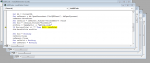
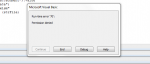
I have already downloaded xlQRCode database. It has worked the first time but now when I run it, there is a issue in the function InitQRCode (please, see the attachements).
Do you know how I could run it again please ? And how could I fit the functions with datas from a form. Thank you and sorry for my english (I am french)
I am currently working on an access form and I would like it generates QR codes ...
I have already downloaded xlQRCode database. It has worked the first time but now when I run it, there is a issue in the function InitQRCode (please, see the attachements).
Do you know how I could run it again please ? And how could I fit the functions with datas from a form. Thank you and sorry for my english (I am french
)Attachments
Similar threads
- Replies
- 13
- Views
- 1,697
- Replies
- 5
- Views
- 741


Users who are viewing this thread
Total: 1 (members: 0, guests: 1)