
Criteria Question on Expression

alnilla

Registered User.
Local time
Yesterday, 19:32
Joined
Jul 19, 2012
Messages
39
I have an expression

expcontribmargin: [exptotalcontrib]/[exptotalrevenue]


Now that comes out as a percentage. I already have everything in but I cant seem to sort it. I need to make two, One about 60% and one below. In the criteria section of access I tried the > and < with the amounts and nothing It giving me Enter a Parameter Value. What would be the correct syntax for it?

Thank you guys!!
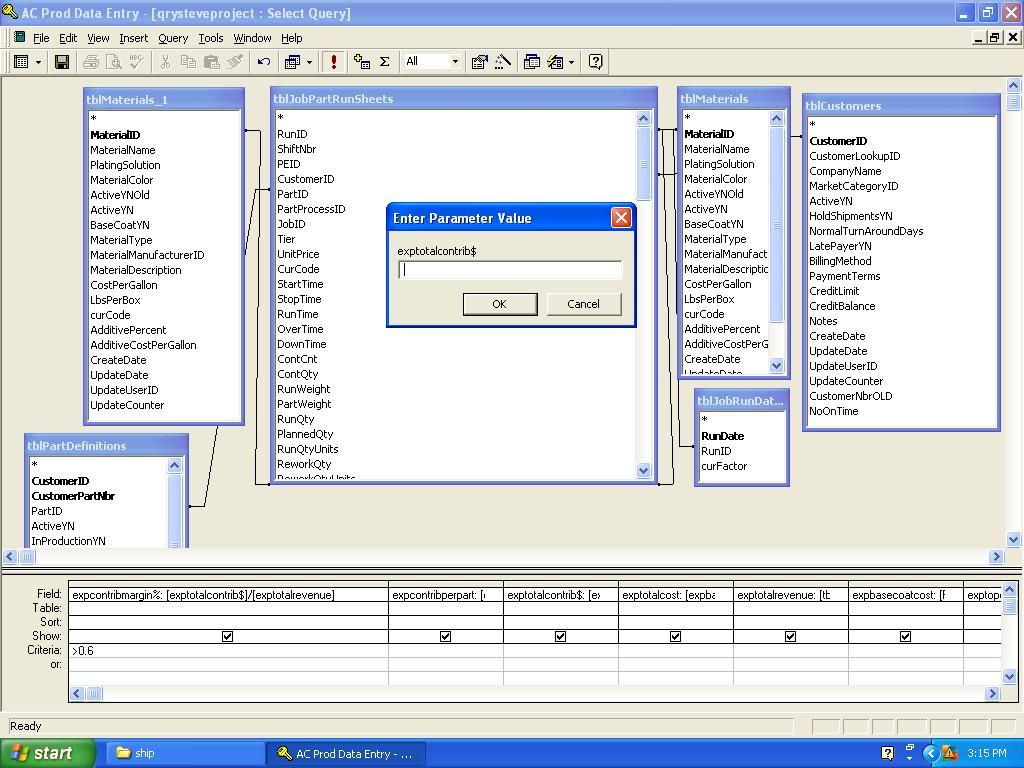
 
Plain English there is that expression. They are being divided together. I want to make it where to where it shows only the percent that are greater than x amount.


Here is an example of that formula.

expcontribmargin: [4375.52]/[5769.72]

that equals 75.84%

I want to put in the criteria for ones less then 60% so only they show
 
We are actually arguing semantics, but these semantics are important to solving your issue.

expcontribmargin: [4375.52]/[5769.72]

returns about .7584, it does not return 75.84%. Therefore if you want include in your results only those records who expcontribmargin is greater than 60% you would need to express that in terms of what is returned by expcontribmargin.

So, in design view, underneath expcontribmargin put this:

>.6
 
untitled-1.jpg


same deal
 
Plain English there is that expression. They are being divided together. I want to make it where to where it shows only the percent that are greater than x amount.


Here is an example of that formula.

expcontribmargin: [4375.52]/[5769.72]

that equals 75.84%

I want to put in the criteria for ones less then 60% so only they show

plog is right that the value <.6 or >= .6 should suit you, BUT, if you really want to feel like percentages, you can try the following formula where <60 or >= 60 would be acceptable.

expcontribmargin: ([4375.52]/[5769.72]) * 100

This should return 75.84
 
I did that in the formula and it still comes up with the prompt.
 
The good news is you resolved your initial issue. The bad news is you have another one.

That prompt is asking you for a field name it doesn't have in any of the underlying tables/queries. It seems you've calculated expcontribmargin% using exptotalcontrib$ which itself is a calculated field in the same query. That won't work. Either replace instances of 'exptotalcontrib$' with the calculation that makes it up, or use this query as a sub query and do that caluclation in a query that uses this query as its datasource.

Also, using non-alpha numeric characters in field and table names is a bad idea (i.e. exptotalcontrib$ and expcontribmargin%).
 
Either replace instances of 'exptotalcontrib$' with the calculation that makes it up

Explain how I would do that in this query? Sorry im a newbie to access. (You probably already figured that out)


Thanks again.
 
For simplicity's sake lets say this is exptotalcontrib$

exptotalcontrib$: [Field1] + [Field2] + [Field3]


Currently you have this for expcontribmargin%

expcontribmargin%: [exptotalcontrib$]/[exptotalrevenue]

You would replace instances of exptotalcontrib$ with what its equivalent to like this:

expcontribmargin%: ([Field1] + [Field2] + [Field3])/[exptotalrevenue]

You would do the same for any calculated fields you are using that themselves are calculated--it looks like exptotalrevenue is.
 
Ok thank you I will do that. Then i will be able to sort it since it is using fields and not expressions?
 
You can do anything you would normally do with any other query once you've written it correctly.
 

Users who are viewing this thread

Back
Top Bottom