
Hello again everyone.
Today, my issue is I am trying to filter a subform based on the data I am carrying over from another form.
I have a form "PatientForm" that has a button "cmdViewCalls" with the following code:
Private Sub cmdViewCalls_Click()
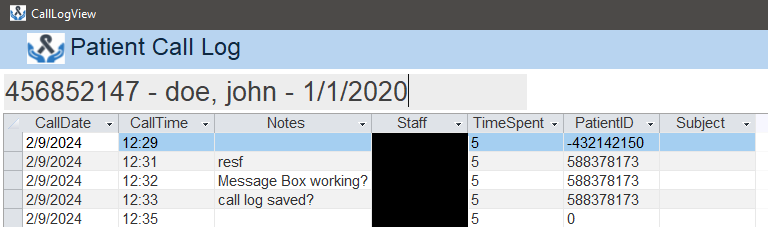
It opens form "CallLogForm" and fills in unbound boxes with info from the PatientForm form. I then use that data to create a header with those fields so the user will know they are looking at the correct person's data as below while the PatientIDCall box is the primary key for the patient which is hidden on the form.
The subform "PTCallSub" is based on a form PtCallLogF which is just a datasheet form of PtCallLogQ (query) which is a query of the CallLog Table.
What I am trying to do, is make it to where when the form/subform loads, it will filter the PtCallLogQ to display only records related to the patient that the primary key PatientIDCall hidden box has filled in. I can't for the life of me get anything to work.
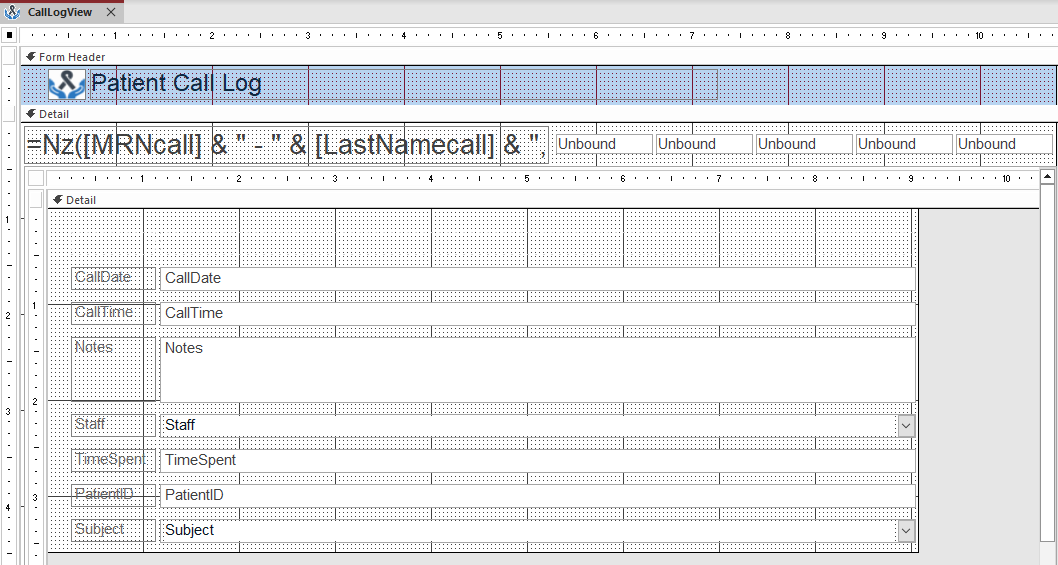
Those unbound boxes are the boxes I referred to.
If you need more information, let me know. Thanks!
Today, my issue is I am trying to filter a subform based on the data I am carrying over from another form.
I have a form "PatientForm" that has a button "cmdViewCalls" with the following code:
Private Sub cmdViewCalls_Click()
Code:
Private Sub cmdViewCalls_Click()

Dim strFrmName As String
strFrmName = "CallLogView"

    DoCmd.OpenForm strFrmName
        With Forms(strFrmName)
            .MRNcall = Me.MRN
            .LastNamecall = Me.LastName
            .FirstNamecall = Me.FirstName
            .DOBcall = Me.DOB
            .PatientIDcall = Me.ID
        End With
End Sub
It opens form "CallLogForm" and fills in unbound boxes with info from the PatientForm form. I then use that data to create a header with those fields so the user will know they are looking at the correct person's data as below while the PatientIDCall box is the primary key for the patient which is hidden on the form.
The subform "PTCallSub" is based on a form PtCallLogF which is just a datasheet form of PtCallLogQ (query) which is a query of the CallLog Table.
What I am trying to do, is make it to where when the form/subform loads, it will filter the PtCallLogQ to display only records related to the patient that the primary key PatientIDCall hidden box has filled in. I can't for the life of me get anything to work.
Those unbound boxes are the boxes I referred to.
If you need more information, let me know. Thanks!


