HELP ! Report Header User Names

riti90

Registered User.
Local time
Today, 07:11
Joined
Dec 20, 2017
Messages
44
Hi All,
I'm quite new on coding and I'd like to ask about an issue that I have with a report that I'm building.

I created an Database with login form. The logged in User Initials appear on the next form where I'm inputing data as Operator.
On the report that I created I have on the ReportHeader a few txtBoxes where I want to show the operators names(from the operators that filled the form of this report).
I managed to show only one Operator but when there are 2 or more I couldn't manage it. I don't know if that is possible.
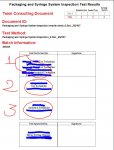
I attached 2 photos of my report.
the thing is that i have a lot of similar reports and I cannot manage to get the names from me Operators table.
:banghead: :banghead:
I'd appreciate a lot if you can Help me with that,
Thanks
 

Attachments

Last edited:
Hi, I have the txtBoxes under the "Test Performed by:" where i'd like to show the names of the Operators that have done this Test.
I did Use this code
"=Nz(DLookUp("[tblOperators]![UserName]& '
' & [tblOperators]![Position] &'
' & [tblOperators]![Company] ","tblOperators","Initials='" & [Operator].[Value] & "'"),"")"
but it is showing me only one of the operators not the other one.

Thanks
 
remove the Expression from your textbox on the Report.
(the =Nz(DLookup....)
Instead add code to the Report's Load Event.

Replace "TextBoxName" on the code with the
correct name of the textbox on the Report.
Code:
Private Sub Report_Load()
    Dim rs As DAO.Recordset
    Dim strSQL As String
    Dim strOperator
    strSQL = Replace(Me.RecordSource, ";", "")
    Set rs = CurrentDb.OpenRecordset( _
        "Select [Operator] From (" & strSQL & ")")
    With rs
        If Not (.BOF And .EOF) Then
            .MoveFirst
            While Not .EOF
                strOperator = DLookup("UserName & ' ' & Position & ' ' & Company", _
                                    "tblOperators", _
                                    "Initials=" & Chr(34) & !Operator & Chr(34)) & ""
                If strOperator <> "" Then
                    Me.TextBoxName = "" & Me.TextBoxName & strOperator & vbCrLf
                End If
                .MoveNext
            Wend
            .MoveFirst
        End If
    End With
    rs.Close
    Set rs = Nothing
End Sub
 
remove the Expression from your textbox on the Report.
(the =Nz(DLookup....)
Instead add code to the Report's Load Event.

Replace "TextBoxName" on the code with the
correct name of the textbox on the Report.
Code:
Private Sub Report_Load()
    Dim rs As DAO.Recordset
    Dim strSQL As String
    Dim strOperator
    strSQL = Replace(Me.RecordSource, ";", "")
    Set rs = CurrentDb.OpenRecordset( _
        "Select [Operator] From (" & strSQL & ")")
    With rs
        If Not (.BOF And .EOF) Then
            .MoveFirst
            While Not .EOF
                strOperator = DLookup("UserName & ' ' & Position & ' ' & Company", _
                                    "tblOperators", _
                                    "Initials=" & Chr(34) & !Operator & Chr(34)) & ""
                If strOperator <> "" Then
                    Me.TextBoxName = "" & Me.TextBoxName & strOperator & vbCrLf
                End If
                .MoveNext
            Wend
            .MoveFirst
        End If
    End With
    rs.Close
    Set rs = Nothing
End Sub

Hi,
Thank You very much, it is working OK but is it any way that I can split the names in 2 txtBoxes.
I mean 1 name in the first txtBox and the other name in the other txtBox.

Thanks a lot,
I really appreciate this
 
Hi, Thanks for the quick response.
I did try the code but it shows all the names in 1 txtBox.
is it any chance they can be in separate txtBoxes?
and It shows the names for all the report rows. I normally write more than 100 rows on the report. but it is only 2 different Operators. Can it be done to show each operator only once?
I attached a photo of how they look now.
they are all on the txtbox nr 1 but I'd like them to be each name on each txtbox.

Thanks again for the help.
You are really the best.
I really appreciate the help, really
 

Attachments

  • NewReportHeader.JPG
    NewReportHeader.JPG
    71.5 KB · Views: 153
Last edited:
Post 5 was moderated, I'm posting to trigger email notifications.
 
I'm not totally clear what you want, so apologies if I've got this wrong.

Is this idea any use to you?
Up to 3 teacher names shown in 1 textbox using this as the control source

Code:
=[Teacher1] & IIf([TeacherID2]<>""," / " & [Teacher2],"") & IIf([TeacherID3]<>""," / " & [Teacher3],"")

attachment.php


Obviously the names could be split into 3 textboxes just as easily
 

Attachments

  • Capture1.PNG
    Capture1.PNG
    4.6 KB · Views: 358
Hi,
I have at least 2 users for each report. So they are inputing data. And all the data on the report appear with their initial names in each row.
I want to have their names appeared on the report header in 2 different txtboxes.
They are inputing at least 100 rows per report so their name will appear in every row. But I'd like their names to appear only once..
I don't know if I'm explaining it ok..
Apologies for the bad language.. :)

Thanks
 
Sounds like my suggestion isn't what you want.
It should be easy enough to put each name in a separate text box
 
Last edited:
rename your textboxes to TextBox1, TextBox2, etc.

Code:
    Dim rs As DAO.Recordset
    Dim strSQL As String
    Dim strOperator
    Dim i As Integer
    strSQL = Replace(Me.RecordSource, ";", "")
    Set rs = CurrentDb.OpenRecordset( _
        "Select Distinct [Operator] From (" & strSQL & ")")
    With rs
        If Not (.BOF And .EOF) Then
            .MoveFirst
            i = 1
            While Not .EOF
                strOperator = DLookup("UserName & ' ' & Position & ' ' & Company", _
                                    "tblOperators", _
                                    "Initials=" & Chr(34) & !Operator & Chr(34)) & ""
                If strOperator <> "" Then
                    Me.Controls("TextBox" & i) = strOperator
                    i = i + 1
                End If
                .MoveNext
            Wend
            .MoveFirst
        End If
    End With
    rs.Close
    Set rs = Nothing
End Sub
 
Hi,
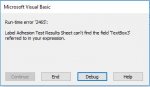
Thank you for your help but I'm getting the error that's attached to the photo.
i'm sorry if I didn't explain very well but I'd like in the txtboxes to have the Operator Name only once. I'm so sorry to disturb you but I really need to do this. Is it any way or anything like lookup for all the report to look for the Initials? because now I'm getting all the initials one by one when there are only 2 or 3 users. I just want only their names to show on the txtbox.

I uploaded a copy of my File maybe you can understand better what I mean Because I don't know exactly how to explain it.

Thank you so much.
:banghead: :banghead:
 

Attachments

  • error.JPG
    error.JPG
    19.8 KB · Views: 159
  • Test File.zip
    Test File.zip
    554.4 KB · Views: 159
Last edited:
Hi,
If this is a possibility can you please explain how can I do it? Because I find it a bit difficult..

Thank you.

How many controls do you intend to add to the report? Say you add three which is one more than "normal". Most of the time the third box will be empty. and then there's the day where you have four users for a report. What happens then?

Just do it right and make the subreport (no code required). You can format it to be unobtrusive. Or, live with the concatenation code. You do NOT want to have to figure out how many textboxes you might ever need to have and live with the consequences of that choice.
 
You may try this.

Hi Arnel, you just saved my life. :) :) :)

Thank You very much.

On the Test File the code works perfectly as I'd like it to be but when I'm trying it on my File it won't work. Am I doing something wrong?
 
Last edited:
Hi Arnel, you just saved my life. :) :) :)

Thank You very much.

On the Test File the code works perfectly as I'd like it to be but when I'm trying it on my File it won't work. Am I doing something wrong?

Fixed it. Didn't check the Join Properties in the query.

Thanks a lot.

Marking Thread as SOLVED!!! :)
 
You're welcome.
 

Users who are viewing this thread

Back
Top Bottom