Help with CrossTab Query

Acelink

Registered User.
Local time
Today, 15:22
Joined
Jun 10, 2010
Messages
16
I created a cross tab query that is based upon another query.

Crosstab Query
Code:
TRANSFORM First(Query_Reports_Range.[Vent]) AS FirstOfVent
SELECT Query_Reports_Range.[MedID]
FROM Query_Reports_Range
GROUP BY Query_Reports_Range.[MedID]
PIVOT Format([Daily_Rounds_Date],"Short Date");
It works perfectly until I add this:
Code:
WHERE (((Year(Patient_Rounds!Daily_Rounds_Date)) Like Forms!Frm_ReportInput!PickYear) And ((Month(Patient_Rounds!Daily_Rounds_Date)) Like Forms!Frm_ReportInput!PickMonth));
To the query the crosstab is based on
Code:
SELECT Patient_Rounds.MedID, Patient_Rounds.Daily_Rounds_Date, IIf([Patient_Rounds]![Vent]=True,[Patient_Rounds]![VentSetting_Number] & "  " & [Patient_Rounds]![VentSetting_Type],"/") AS Vent
FROM Patient_Rounds
Now I get an error when opening up the cross tab query: The Microsoft Office Access database engine does not recognize 'Forms!Frm_ReportImput!PickYear' as a valid field name or expression.

When I open up the query the crosstab query is based on. I get no problems. I am so confused... Can someone help me?
 
Ace: Happy to help.

vb: You would think so, wouldn't you?
 
Next problem.

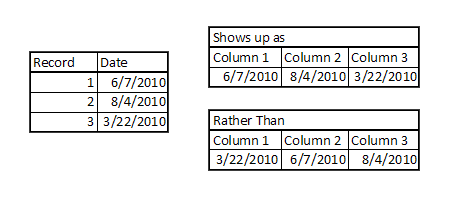
Now that i have the crosstab query working. I cannot get the column heading to sort by date.

It appears to go by what ever shows up first in the input record
Example:
Untitled-1-1.png

Any hints for solving this? I tried changing the SORT: to Ascending and it doesn't do anything.

Code:
PARAMETERS [Forms]![Frm_ReportInput]![PickYear] Value, [Forms]![Frm_ReportInput]![PickMonth] Value;
TRANSFORM First(Query_Reports_Range.Vent) AS FirstOfVent
SELECT Query_Reports_Range.MedID
FROM Query_Reports_Range
GROUP BY Query_Reports_Range.MedID
ORDER BY Format([Daily_Rounds_Date],"Short Date")
PIVOT Format([Daily_Rounds_Date],"Short Date");
 
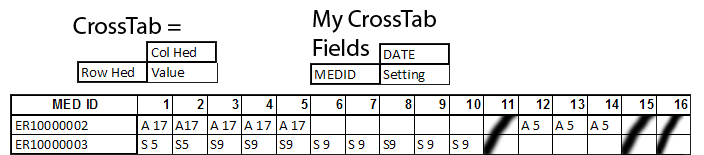
I already noticed a flaw that would happen with this crosstab query. When there is no value, there is no column header. See attached.
Untitled-1-2.png

Since 11, 15, 16 have no values... They will be no date header for those days, which is problematic. How would i make a crosstab query that shows all 31 days statically per month? When the column headers change, it messes with a report.

My goal is to make a report that looks similar to the way a crosstab query is setup. Is there a better way to do this, perhaps without a crosstab query?


EDIT: found my solution!
Code:
PIVOT Format([Daily_Rounds_Date],"dd") In ("01", "02", "03", "04", "05", "06", "07", "08", "09", "10", "11", "12", "13", "14", "15", "16", "17", "18", "19", "20", "21", "22", "23", "24", "25", "26", "27", "28", "29", "30", "31");
Forcing the days in the pivot code via IN
 
Last edited:
Glad you got it sorted out. The "In" clause is the normal way to do that.
 

Users who are viewing this thread

Back
Top Bottom