
Import text file and ignore first 2 rows

heathb

Registered User.
Local time
Today, 23:48
Joined
Mar 23, 2017
Messages
15
Hi all,

Looking to manually import a text file, and ignore the first 2 rows so that I can get to the header columns. Have had a look around, and all the previous talk is about macros etc

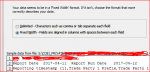
Attached is the screen shot as I import the file, (apologies for trying to redact some of the info), what steps do I take next please. This file will be uploaded daily but with different file names and storage areas.

Thanks
 

Attachments

  • text import.PNG
    text import.PNG
    16 KB · Views: 746
the code below will delete the 1st 2 rows then save, then import at button click.
note: you MUST put in the excel reference.

add the Excel app in the program REFERENCES, in VBE menu (Ctl-G): TOOLS , REFERENCES
'check the 'Microsoft Excel X.xx Object library'

place the sub into a module,
the calling code can come from a button click

Code:
                   'calling code
sub btnImport_click()
  FixXLfile txtFilePath
  docmd.transferspreadsheet acImport ,acSpreadsheetTypeExcel12 ,table, txtFilePath ,true
end sub

 'put code in module
Sub FixXLfile(pvFile)
Dim xl As Excel.Application

Set xl = CreateObject("excel.application")
With xl
    .Workbooks.Open pvFile
        'delete 1st 2 rows
    .Rows("1:2").Select
    .Selection.Delete Shift:=xlUp
    .Range("A1").Select
      
    .ActiveWorkbook.Save
    .Quit
End With
Set xl = Nothing
End Sub
 
From the png file it appears you are importing pre-formatted --a report with formatting.
Can you get the source data? It may save you a lot of parsing, but we don't know exactly what you're doing with the data.
 
thanks guys, but that is a lot of work. As it is all manual, I'll look at amending the file before I pull it in. Thought as there is an option to exclude columns, there would be a simple way to exclude rows.
 
The solution I gave works. All you do is paste the code. (Lot of work?)
 

Users who are viewing this thread

Back
Top Bottom