Importing Excel into Access (you think it would be easy)

kevlray

Registered User.
Local time
Yesterday, 23:04
Joined
Apr 5, 2010
Messages
991
I had been using DoCmd.TransferSpreadsheet to import data into a table. But now the user wants to change one of the column headings in Excel to a name that does not match the field name of table. I found some code that looked like it would work (using ADODB), but we are on Office 2016, 64 bit and apparently Microsoft does not support using ADODB anymore. So is there another solution? Also running on Windows 10 if that matters.
 
Microsoft does not support using ADODB anymore.
That is not a true statement AFAIK. However, easy solution is to import into table A and then do an append query into Table B mapping the correct fields.
 
Last edited:
apparently Microsoft does not support using ADODB anymore.
like Maj said, why do you think that? if the library is present in your operating system directory, you can use it. the resources inside of that don't just magically disappear on their own. ;)
 
I am just going by what I read on other posts on the internet. All I know I am attempting to use a ADODB connection and I am getting an error ("Could not find installable ISAM.") with following code snippet.

cnn2.Open "Provider=Microsoft.ACE.OLEDB.12.0; " & _
"File=" & filename & "; Extended Properties=""Excel 12.0 Xml; HDR=YES"""
 
Can you post some sample data -- an example of the spreadsheet and the structure of the table?
Details of the issue might help clarify things also. Seems you should be able to map fields???
 
The ability to edit Excel spreadsheets directly from Access was removed with Access 2002 following a copyright lawsuit.
It has never been restored.
Nothing to do with ADODB.
 
The ability to edit Excel spreadsheets directly from Access was removed with Access 2002 following a copyright lawsuit.
It has never been restored.
you can still do it with DAO - see this link https://www.access-programmers.co.u...t-an-excel-file-from-access-using-sql.310141/

For the OP to manually correct the header row each time, they would need to set HDR=No. That will then display the header as a record

cnn2.Open "Provider=Microsoft.ACE.OLEDB.12.0; " & _
"File=" & filename & "; Extended Properties=""Excel 12.0 Xml; HDR=YES"""

I think this connection string is wrong - pretty sure it should be 'Data Source=' rather than 'File='

Edit - beaten by Tony:(
 
"Could not find installable ISAM."

Just for clarification: If you have ever personally installed Access, you know that one step involves deciding which database types you want to be able to read for purposes of import or export. Choices like Paradox, DBase, Informix, etc. These provide the Indexed Sequential Access Method that is your "installable ISAM" and the message is really telling you (in effect) "You didn't install the right conversion option." As Colin points out, you might not be able to do so because the conversion is no longer supported. However, if that IS the correct reason, then DAO wouldn't work for that data set either.

EDIT: CJ says you can, through DAO. I defer that fine point to his expertise.
 
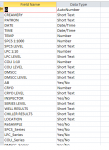
Of course my Access was installed by our organization. I have no idea what options they may have chosen. Attached is a screen shot of the table structure (at least what matters) and a test Excel file. The first column and the last column will not be imported (long story on why). So the scc column in Excel will be mapped to the DMSCC column in the table. And the columns B-L in the Excel sheet (except for the SCC column) should go in directly.
 

Attachments

  • Table structure.PNG
    Table structure.PNG
    19.4 KB · Views: 200
The ability to edit Excel spreadsheets directly from Access was removed with Access 2002 following a copyright lawsuit.
It has never been restored.
Nothing to do with ADODB.
I don't think I follow this idea at all Colin. Would you care to expand on this a little bit? Because using a d o d b allows you to edit Excel files so it doesn't really make sense what you said. What was the lawsuit about anyway? And who filed it?
 
I thought I was absolutely clear in post #6
Prior to Access 2002, just like linked Access or SQL tables, a linked Excel file could be DIRECTLY edited in Access. No need for ADODB or DAO.
As I stated earlier, that functionality was removed by MS in Access 2002 after it lost the court case mentioned in post #16
 
a linked Excel file could be DIRECTLY edited in Access. No need for ADODB or DAO.
I guess I missed the part about the "linking" and editing the excel file that way and through that medium. sorry about that, col. now I get it.
 
Okay, so back to the subject at hand. Any ideas on how to append the data to the table in question using the spreadsheet provided (with the notes I provide)?
 
easiest way is to create a linked table to the spreadsheet then use an update query where you can append field 'ABC' in your spreadsheet to your field 'XYZ' in your table.

Once the linked table is created, you do not need to delete and recreate next time. Just make sure the spreadsheet has the same name. I tend to use a routine along the lines of

copy spreadsheet to an 'import' folder changing the name to a standard name which your linked table is linked to. e.g. spreadsheets are called 'weekly output for week X' , remove the 'X'
run your import routine
move spreadsheet to an 'imported' folder
 
I am not sure I can get that to work. The import process will be done by non-technical staff in another office. I will to have work out the code (they just want to push a button and have the magic happen).
 

Users who are viewing this thread

Back
Top Bottom