Hi
I am just a beginner and am noticing that when starting a project that is not just a a simple one- or two-table DB that I am confronted with lots of roadblocks that raise questions that no intro course will answer anymore and my experience is sadly insufficient. This is highly frustrating but I am hanging in there because I am aware of the time saving potential of getting it right.
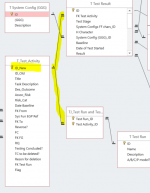
I am trying to create a DB to record electrical equipment tests (T_Test_Activity) and their individual results (T Test Results) and that has required multiple tables.
First of all I wonder if it is feasible to have multiple child tables (as shown) related to the parent's primary key (auto number), in this case I have the parent table describing the test details and a one-to-many child that records the results of this test. I am also trying to tie the test table to a test run table (via a join table many-many) where the aim is to select or identify a group of tests to be run for a particular purpose and that will be named. (forgive me my multiple syntax rule issues here...)
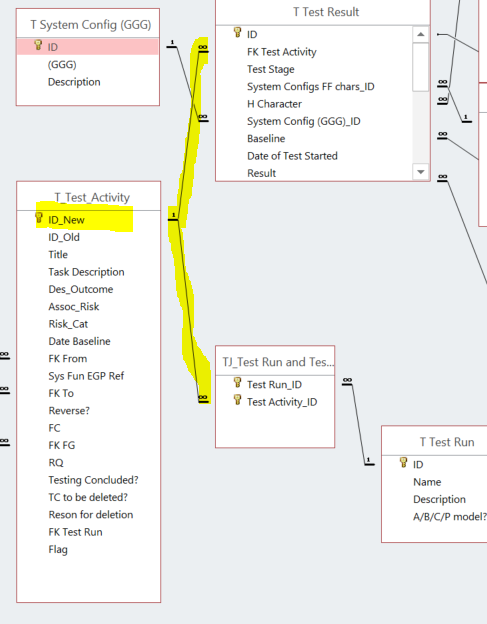
While Access appears to allow this I cannot see the original relation in the table view of the test activity table anymore (by pressing the little cross in the table line, this will now only show the join table relation:
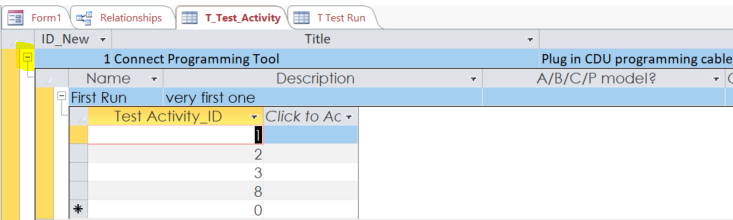
Even when I delete both relations (and refresh and save) it still and persistently shows the join table relation (that was deleted). I am a bit lost now as how to fix this, may I need to use SQL commands to fix the table setup?
Thanks for your patience, I probably have attempted to achieve much more than I have the skills to manage, the form side of it is an equally frightening prospect.
Cheers
Mike
I am just a beginner and am noticing that when starting a project that is not just a a simple one- or two-table DB that I am confronted with lots of roadblocks that raise questions that no intro course will answer anymore and my experience is sadly insufficient. This is highly frustrating but I am hanging in there because I am aware of the time saving potential of getting it right.
I am trying to create a DB to record electrical equipment tests (T_Test_Activity) and their individual results (T Test Results) and that has required multiple tables.
First of all I wonder if it is feasible to have multiple child tables (as shown) related to the parent's primary key (auto number), in this case I have the parent table describing the test details and a one-to-many child that records the results of this test. I am also trying to tie the test table to a test run table (via a join table many-many) where the aim is to select or identify a group of tests to be run for a particular purpose and that will be named. (forgive me my multiple syntax rule issues here...)
While Access appears to allow this I cannot see the original relation in the table view of the test activity table anymore (by pressing the little cross in the table line, this will now only show the join table relation:
Even when I delete both relations (and refresh and save) it still and persistently shows the join table relation (that was deleted). I am a bit lost now as how to fix this, may I need to use SQL commands to fix the table setup?
Thanks for your patience, I probably have attempted to achieve much more than I have the skills to manage, the form side of it is an equally frightening prospect.
Cheers
Mike