Multiple queries using one date range

Oh ok. Well, that worked with the query. When I went back to the Date Parameters form, I received the following error:
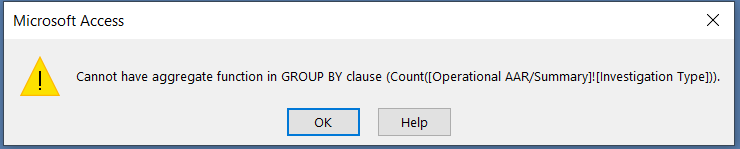
1635346572923.png
 
I received the following error when trying the form again after correcting the SQL
1635347390630.png

This popped up several times (obviously something with the queries), however this time when it brought up the report, several of the answers appeared however they were incorrect.

This is the SQL:

SELECT Count([Operational AAR/Summary]![Investigation Type]) AS NoKnocks, [Operational AAR/Summary].[Op Date]
FROM [Operational AAR/Summary]
WHERE ((([Operational AAR/Summary].[Op Date]) Between Forms![Date Parameters]![Start Date] And Forms![Date Parameters]![End Date]) And (([Operational AAR/Summary]![Investigation Type])=7))
GROUP BY [Operational AAR/Summary].[Op Date];
 
If [Operational AAR/Summary] is a query, does it run without error? If not, and it doesn't have an Expr1 field, keep drilling down until you find the offending query. Or can you attach the db here?
 
[Operational AAR/Summary] is the main table. I was able to get everything running until I had to add the date parameter....
Upload file is too large. =(
 
Try doing a compact/repair and then zipping it. Or just attach a db with that table.
 
The query above runs fine. The error comes from the item 10 subform:

SELECT Count([Operational AAR/Summary]![Person(s)/Animal(s) Injured/Killed]) AS InjuredKilled, [Operational AAR/Summary]![Person(s)/Animal(s) Injured/Killed] AS Expr1, [Operational AAR/Summary].[Op Date]
FROM [Operational AAR/Summary]
WHERE ((([Operational AAR/Summary]![Person(s)/Animal(s) Injured/Killed])=2) And (([Operational AAR/Summary].[Op Date]) Between Forms![Date Parameters]![Start Date] And Forms![Date Parameters]![End Date]))
GROUP BY [Operational AAR/Summary].[Op Date];

The field in Expr1 needs to be in the Group By clause, or have an aggregate function applied to it.
 
Or deleted, since I just noticed it's the same as the first field.
 
I deleted it. Same error appears this time only once. Again the answers provided are wrong.
 
I assume you have the same thing happening in another subreport. I'm on the phone so can't check right now.
 
No worries. I just keep trying it. I'm grateful for all/any help!
 
The other one is in the number arrested query for #7.
 
I hope you didn't spend too much time Pat, as I already identified those for the OP.
 
Hey guys, thank you both for the help. yesterday I was super busy but I'm back at it today. I'll let you know how it goes. Thank you both so much for the help. This is actually my first Access Report I've ever done...
 
No problem, post back if you're still stuck.
 
Good afternoon,
I have started back at it again and am a little confused and need help understanding.
So dat the beginning I tried and tested various text boxes and combo boxes which then supplied data to my table with an ID number. Well, at times I've had to delete rows and with multiple tables now, the ID numbers do not all match on some.
(I've included the file for reference)
The suspects/Occupants table has ID numbers that do not match up with the Operational AAR/Summary table (main table). I figure this was because of a relationship issue. I've tried "ID" to "ID", "incident number" to "related incident number" and nothing seems to change. I really need (or think I need?) the date field in this table for the query.
I think this may be why I'm having issues with the date parameters....
 

Attachments

Users who are viewing this thread

Back
Top Bottom
