
You are using an out of date browser. It may not display this or other websites correctly.
You should upgrade or use an alternative browser.
You should upgrade or use an alternative browser.
MySQL
- Thread starter zezo2021
- Start date


arnelgp
..forever waiting... waiting for jellybean!
- Local time
- Tomorrow, 04:50
- Joined
- May 7, 2009
- Messages
- 20,679

Isaac
Lifelong Learner
- Local time
- Today, 13:50
- Joined
- Mar 14, 2017
- Messages
- 11,668
RDBMS "files" are not plain text. You need to read them with some other program such as Access or Excel. MySQL probably has a GUI tool similar to SSMS but I don't know what it is called. However, you should be able to download it and use that.
Yes, and, that GUI may automatically associate itself to open files, once double-clicked, with a certain extension, such as SSMS will open .SQL files after a normal SSMS installation and all else being equal.
But any relational database GUI worth its salt will surely have a File > Open type of function you could use too, I would think?
Isaac
Lifelong Learner
- Local time
- Today, 13:50
- Joined
- Mar 14, 2017
- Messages
- 11,668
Hello friends;
What is the extension of MySQL (access for example mdb excel Xls)
How can I view these files via excel or access
please attach example of MySQL file can connect to access or excel
Assuming your immediate need is to see the contents, and if we are correct in assuming that the type of file you are in possession of is merely the text of SQL in its essence, then just right click and open in Notepad.
As I've said, no matter how long I go, Notepad, Notepad++, and Paint are still my best friends.
Isaac
Lifelong Learner
- Local time
- Today, 13:50
- Joined
- Mar 14, 2017
- Messages
- 11,668
What I mean is, if this person has "some" file that is supposedly for use in mysql, and if he uses a gui for mysql, that gui ought to have a file>open feature just like ssms does to open a .sql query file, at least I would assume any gui worth its salt would surely have that feature, wouldnl't you think.
- Local time
- Tomorrow, 07:50
- Joined
- Jan 20, 2009
- Messages
- 12,811
I realise this is an old post but Pat's contribution most clearly demonstrates a misunderstanding about databases. (I expect Pat actually knows better but her explanation as it was written is wrong and will be misleading the database newcomers.)RDBMS "files" are not plain text. You need to read them with some other program such as Access or Excel. MySQL probably has a GUI tool similar to SSMS but I don't know what it is called. However, you should be able to download it and use that.
Microsoft SQL Server Management Studio (MSSMS) cannot open a database file (.mdf). The file is opened by the MSSQL Server database engine which must be installed on a computer and runs as a service. The mdf file itself is not an RDMS.
MSSMS is a progam that connects to the database engine, sends text based commands to it and displays the results. That is what Pat is talking about in this post.
technically (at least according to Codd) a RDBMS has a text interface so you can create objects programmatically.
Although Access can open an mdb or accdb file, it only interacts with the Access objects in the file. It does not interact directly with the data in the tables or run the queries. That job is done using a database engine that is installed on the computer. That engine was originally JET which was part of the Windows operating system. Since the inception of the accdb format, Access now uses its own engine called ACE.
- Local time
- Tomorrow, 07:50
- Joined
- Jan 20, 2009
- Messages
- 12,811
The backup file extensions are bak. The actual database files are mdf with the log are ldf. The bak file contains the data plus some of the logs, depending on the type of backup used. The default location of the mdf, ldf and bak files can be configured. The tables and other objects don't live inside SSMS.
I can assure you that the engine is what reads and write these files. Absolutely every action that can be done in SSMS can be done by sending a text SQL command to the database engine. That includes restoring the backups. SSMS is simply a graphic application that constructs the SQL commands, sends them to the engine and displays the returned results.
SQL Server can function completely without SSMS being installed at all and there are several alternative SQL Studios that also work with the engine.
I can assure you that the engine is what reads and write these files. Absolutely every action that can be done in SSMS can be done by sending a text SQL command to the database engine. That includes restoring the backups. SSMS is simply a graphic application that constructs the SQL commands, sends them to the engine and displays the returned results.
SQL Server can function completely without SSMS being installed at all and there are several alternative SQL Studios that also work with the engine.

- Local time
- Today, 15:50
- Joined
- Feb 28, 2001
- Messages
- 30,898
The only comment I will make is that .BAK file extensions are not exclusive to databases. Many backup systems that make "containerized" user or enterprise-level backups of a file, folder, or partition of a disk will often create a .BAK file (analogous to a .ZIP file) to hold all the backed-up files together as a formal save-set. Therefore, I would question the actual meaning of a .BAK file with regard to what application is associated with it.
To see what .BAK means on an individual Windows system, use Start >> Settings >> Apps >> Default Apps and then look at the bottom for the link to "choose apps by file type" - which opens the "Associations" table that TELLS you what app runs for a given file type. As it happens, since I have neither a formal BACKUP program nor any variant of SQL Server, there IS no association for .BAK for me.
To see what .BAK means on an individual Windows system, use Start >> Settings >> Apps >> Default Apps and then look at the bottom for the link to "choose apps by file type" - which opens the "Associations" table that TELLS you what app runs for a given file type. As it happens, since I have neither a formal BACKUP program nor any variant of SQL Server, there IS no association for .BAK for me.
- Local time
- Today, 15:50
- Joined
- Feb 28, 2001
- Messages
- 30,898
Actually, I lied about "the only thing I will say." Here is the architecture of SQL Server.

 www.guru99.com
You will have one .MDF which is the primary metadata file. You may have multiple .NDF files which are secondary data files. However, it is also noted that the primary and secondary files can have ANY file extension. The layout of the data in an SQL server file is organized into file "extents" (essentially, groups of contiguous disk blocks) stored and optimized according many criteria. It may not be possible to directly read the secondary files even though they might contain the actual data you want. You have to be able to read the primary file, which contains the schema description and a pot-load of other stuff like file locations and such.
Therefore, @zezo2021, the only way to reliably read an SQL Server file is to have SQL Server itself on the machine to act as an intermediary in trying to analyze file contents. Unless, of course, you find a commercial utility that can read SQL Server files... but I don't happen to know of one.
SQL Server Architecture (Explained)
MS SQL Server is a client-server architecture. MS SQL Server process starts with the client application sending a request. The SQL Server accepts, processes and replies to the request with processed d
www.guru99.com
You will have one .MDF which is the primary metadata file. You may have multiple .NDF files which are secondary data files. However, it is also noted that the primary and secondary files can have ANY file extension. The layout of the data in an SQL server file is organized into file "extents" (essentially, groups of contiguous disk blocks) stored and optimized according many criteria. It may not be possible to directly read the secondary files even though they might contain the actual data you want. You have to be able to read the primary file, which contains the schema description and a pot-load of other stuff like file locations and such.
Therefore, @zezo2021, the only way to reliably read an SQL Server file is to have SQL Server itself on the machine to act as an intermediary in trying to analyze file contents. Unless, of course, you find a commercial utility that can read SQL Server files... but I don't happen to know of one.
- Local time
- Tomorrow, 07:50
- Joined
- Jan 20, 2009
- Messages
- 12,811
As it is with any Windows file. The extension is just a convenient way to associate the file with a program. For example, MS Word files don't need the docx extension to be able to be opened by Word. Information about the nature of files (other than simple text files) is stored in the first line which is read by the program to tell it how to handle it.However, it is also noted that the primary and secondary files can have ANY file extension.
SQL Server stores configurations for the connections between individual databases and the files that hold the data
- Local time
- Today, 15:50
- Joined
- Feb 28, 2001
- Messages
- 30,898
Might have been, but the question came up that sidetracked it towards SQL Server. Here's the architecture of MySQL, which looks only slightly less complex.
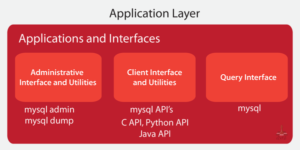
I think the MySQL setup allows for multiple internal formats and again, you need to know something about the specific schema and files, or you can just run MySQL to read the files.
MySQL Architecture and Layers - Qxf2 BLOG
This blog provides high level overview of MySQL Architecture and its componants
qxf2.com
I think the MySQL setup allows for multiple internal formats and again, you need to know something about the specific schema and files, or you can just run MySQL to read the files.
- Local time
- Tomorrow, 07:50
- Joined
- Jan 20, 2009
- Messages
- 12,811
Yes but the same principle applies. A MySQL database engine is required to read the files. I assumed the links in posts 3 & 4 covered that back in 2021. Pat raised a related discussion. The BTW parts of threads can be quite interesting.Wasn't this thread about MySQL?
Well, for what it's worth, here's yet another link, but to a portable MySQL server which needs no configuration, you run it and it starts the server and its services automatically. It's a 61MB file, so it's very convenient.
https://sourceforge.net/projects/usbwebserver/
I would have posted the tool's homepage but at the time of this post, I can't access it, they must be doing some maintenance.
In order to use it, you click on the phpmyadmin button and it opens your browser with phpmyadmin, a tool from which you can design your databases. Don't expect it to be as easy on the eyes as Access, but it's also not ugly.
I've developed extensively with this usb web server, so I can say it's really amazing. Give it a try, it can't get any easier. As for the thread's question about opening files, phpmyadmin's user interface lets you export the database or its individual tables in various formats, and it also allows you to import from different file formats. I mostly export/import *.sql and *.csv files.
https://sourceforge.net/projects/usbwebserver/
I would have posted the tool's homepage but at the time of this post, I can't access it, they must be doing some maintenance.
In order to use it, you click on the phpmyadmin button and it opens your browser with phpmyadmin, a tool from which you can design your databases. Don't expect it to be as easy on the eyes as Access, but it's also not ugly.
I've developed extensively with this usb web server, so I can say it's really amazing. Give it a try, it can't get any easier. As for the thread's question about opening files, phpmyadmin's user interface lets you export the database or its individual tables in various formats, and it also allows you to import from different file formats. I mostly export/import *.sql and *.csv files.
Similar threads
- Replies
- 5
- Views
- 1,047


Users who are viewing this thread
Total: 1 (members: 0, guests: 1)