
You are using an out of date browser. It may not display this or other websites correctly.
You should upgrade or use an alternative browser.
You should upgrade or use an alternative browser.
New to VBA and Access, Need General Help :)
- Thread starter Hek
- Start date
When you get a chance, open up your table in DESIGN view. Take a screen shot and post it here. That should give us an idea of what the actual fields are in your table and we can point out if any are CALCULATED or have oddities to them.


- Local time
- Today, 17:39
- Joined
- Jan 23, 2006
- Messages
- 15,483
As others have suggested, we really need a copy of the database (ideally). The one with the macros converted to vba.
Can you look at the relationships window and see if tables are represented? If so take a screen shot and post.
Also, showing each of the table designs would be helpful, as Mark said.
You are "experimenting" with a copy of the database, correct?
People here are not concerned with the "business info/trade secrets" type of thing. We're trying to sort through the logic to ensure that whatever processes/programming is involved, it is working/calculating/reporting values according to specification.
A further thought/concern is that if this is an operational database and nobody knows the details; there is no available IT person/people with knowledge of the database and application; little to no documentation, then this org is in a quite vulnerable situation.
It's difficult to say where this application fits with the org, but someone(s) within the org should consider the importance of this database/info to the viability of their business and make some fundamental decisions. I'm a little concerned that a company with this issue would contract an IT person (you) with no experience in Access, vba or macros. That is not meant to be negative to you, it is a question of managements approach to data management/discipline.
Enough soapbox. Send us what you can for more focused responses.
I sure hope you're also contracted for:
-some documentation including
-a practical overview of the components
-details of each table and form
-guides for operating this application including backups
-a list of things (shortcomings as well as great points that should be familiar)
-some longer term maintenance
Good luck.
Can you look at the relationships window and see if tables are represented? If so take a screen shot and post.
Also, showing each of the table designs would be helpful, as Mark said.
You are "experimenting" with a copy of the database, correct?
People here are not concerned with the "business info/trade secrets" type of thing. We're trying to sort through the logic to ensure that whatever processes/programming is involved, it is working/calculating/reporting values according to specification.
A further thought/concern is that if this is an operational database and nobody knows the details; there is no available IT person/people with knowledge of the database and application; little to no documentation, then this org is in a quite vulnerable situation.
It's difficult to say where this application fits with the org, but someone(s) within the org should consider the importance of this database/info to the viability of their business and make some fundamental decisions. I'm a little concerned that a company with this issue would contract an IT person (you) with no experience in Access, vba or macros. That is not meant to be negative to you, it is a question of managements approach to data management/discipline.
Enough soapbox. Send us what you can for more focused responses.
I sure hope you're also contracted for:
-some documentation including
-a practical overview of the components
-details of each table and form
-guides for operating this application including backups
-a list of things (shortcomings as well as great points that should be familiar)
-some longer term maintenance
Good luck.
Rhys,
Are you looking at the FORM in design view or the TABLE in design view?
Form

Thanks for helping
Regards, Rhys.
Please post
-a jpg/png of your table designs
and
-any form designs with properties showing.
How do i show properties on a form??
Regards, Rhys.
Rhys,
You want to bring up the properties for the TABLE in design view.
The FORM binds a control to the table, so you can think of it as a "Window" to the field in the table. We still need to know what the TABLE is doing.
Think of it this way, if the TABLE says "This is a number", but you have a text box on a form that is trying to put "One hundred" into the number, the TABLE will complain about it, since you are trying to put text into a number.
You want to bring up the properties for the TABLE in design view.
The FORM binds a control to the table, so you can think of it as a "Window" to the field in the table. We still need to know what the TABLE is doing.
Think of it this way, if the TABLE says "This is a number", but you have a text box on a form that is trying to put "One hundred" into the number, the TABLE will complain about it, since you are trying to put text into a number.
Rhys,
You want to bring up the properties for the TABLE in design view.
The FORM binds a control to the table, so you can think of it as a "Window" to the field in the table. We still need to know what the TABLE is doing.
Think of it this way, if the TABLE says "This is a number", but you have a text box on a form that is trying to put "One hundred" into the number, the TABLE will complain about it, since you are trying to put text into a number.
Thankyou man, i cannot find the table that corresponds to the inventory modification form. Any ideas?
Thanks heaps for helping, it is truly appreciated.
If you can see the FORM, can you bring of the FORM's properties while in design view? If so, you can see, on the "Data" tab, the "Record Source. This should point to either the TABLE or the QUERY.
If it is a query, you would need to look for that query to see what table(s) it is pulling from, and from there identify which table you need to look at.
If it is a query, you would need to look for that query to see what table(s) it is pulling from, and from there identify which table you need to look at.
If you can see the FORM, can you bring of the FORM's properties while in design view? If so, you can see, on the "Data" tab, the "Record Source. This should point to either the TABLE or the QUERY.
If it is a query, you would need to look for that query to see what table(s) it is pulling from, and from there identify which table you need to look at.
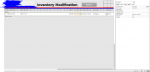
Here is a pic of where i am at now
(company name scribbled out for their sake xD)Regards, Rhys
EDIT: that "on order" column is the one showing the wrong values.
Attachments
- Local time
- Today, 17:39
- Joined
- Jan 23, 2006
- Messages
- 15,483
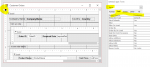
You want Form's properties. You are showing a control's properties.
In form design, right click on the little black square at upper left of form, select form properties.
Clicked that black square, and it brought this up.
Regards, Rhys.
Attachments
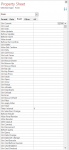
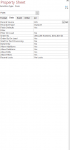
Click the DATA tab and show us the recordsource for the form
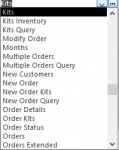
attached is two PNG, first one is the general data, and the second one shows how many different recordsource options there are.
Regards, Rhys.
Attachments
- Local time
- Today, 17:39
- Joined
- Jan 23, 2006
- Messages
- 15,483
OK so the Kits table is the table that underlies the inventory modification form That is the table involved.
The options (tables and/or query names) are for your ease of selection when you are designing the form. You are just looking at design to see what the developer/design chose when creating this form.
The options (tables and/or query names) are for your ease of selection when you are designing the form. You are just looking at design to see what the developer/design chose when creating this form.
OK so the Kits table is the table that underlies the inventory modification form That is the table involved.
I have found the Kits table with all the same incorrect values displayed, have any ideas on what i could do next?
Thankyou so much for your time and effort, you are truly helping me.
Regards, Rhys.
EDIT: when i try to open the table in design view, it gives me this caution notice, any idea why?
Attachments

Last edited:
Similar threads

- Replies
- 5
- Views
- 240
- Replies
- 10
- Views
- 921
Users who are viewing this thread
Total: 1 (members: 0, guests: 1)