
Problem with AuditTrail

daikaio94

Registered User.
Local time
Yesterday, 16:46
Joined
Jul 28, 2016
Messages
18
Hello,

I tried to follow Martin Greens example to implement an AuditTrail to my database. (I cannot post the link but you can find it easy using google/bing/whatever.)

At first sight everything went well, I tested the code using a test database and it worked just fine. But when I tried to use it in my existing project I encountered a problem. It seems like two of the comboboxes I use do not have an OldValue and I have no idea why. The third combobox I use works as intended.

The form I'm using is bound the a query and every control is bound aswell.

I created an example of my problem attached to this post, this is exactly the structure I'm using in my project.

I hope you're able to understand my problem, if there is anything unclear just ask.

Regards
daikaio
 

Attachments

Last edited:
No. All controls, including the comboboxes, are bound.
 
compact and repair.
 
Use MsgBox to return the offending controls oldvalue, you will then see what it is.

Sorry :banghead: I forgot to mention that it throws an error message when I try to get the OldValue:
"Run-time error ‘3251’: Operation is not supported for this type of object"


compact and repair.
Tried it, still doesn't work.


And btw: thank you for the fast responses and the help provided!
 
No, the error occurs only with the two comboboxes. Also I'm checking if the control is tagged to be audited, so I can add specific controls only and not Audit the entire form. It works fine on other controls and even another combobox I added works......

Just to be sure I deleted everything and rebuild the complete form testing only the two comboboxes but I still get the same error.

Maybe you can see something I'm missing in the code:
I'm calling it in the before_update event of the form.

Code:
 [COLOR=#000080]Sub[/COLOR] AuditChanges(IDField [COLOR=#000080]As String[/COLOR])
[COLOR=#000080]    On Error GoTo[/COLOR] AuditChanges_Err
[COLOR=#000080]    Dim[/COLOR] cnn [COLOR=#000080]As[/COLOR] ADODB.Connection
[COLOR=#000080]    Dim[/COLOR] rst [COLOR=#000080]As[/COLOR] ADODB.Recordset
[COLOR=#000080]    Dim[/COLOR] ctl [COLOR=#000080]As[/COLOR] Control
[COLOR=#000080]    Dim[/COLOR] datTimeCheck [COLOR=#000080]As Date
    Dim [/COLOR]strUserID[COLOR=#000080] As String[/COLOR]
[COLOR=#000080]    Set[/COLOR] cnn = CurrentProject.Connection
[COLOR=#000080]    Set[/COLOR] rst = [COLOR=#000080]New[/COLOR] ADODB.Recordset
[COLOR=#000080]    [/COLOR]rst.Open "SELECT * FROM tblAuditTrail", cnn, adOpenDynamic, adLockOptimistic
[COLOR=#000080]    [/COLOR]datTimeCheck = Now()
    strUserID = Environ("USERNAME")
[COLOR=#000080]    For Each[/COLOR] ctl [COLOR=#000080]In[/COLOR] Screen.ActiveForm.Controls
[COLOR=#000080]        If[/COLOR] ctl.Tag = "Audit" [COLOR=#000080]Then[/COLOR]
[COLOR=#000080]            If[/COLOR] Nz(ctl.Value) <> Nz(ctl.OldValue) [COLOR=#000080]Then[/COLOR]
[COLOR=#000080]                With[/COLOR] rst
[COLOR=#000080]                    [/COLOR].AddNew
[COLOR=#000080]                    [/COLOR]![DateTime] = datTimeCheck
[COLOR=#000080]                    [/COLOR]![UserName] = strUserID
[COLOR=#000080]                    [/COLOR]![FormName] = Screen.ActiveForm.Name
[COLOR=#000080]                    [/COLOR]![RecordID] = Screen.ActiveForm.Controls(IDField).Value
[COLOR=#000080]                    [/COLOR]![FieldName] = ctl.ControlSource
[COLOR=#000080]                    [/COLOR]![OldValue] = ctl.OldValue
[COLOR=#000080]                    [/COLOR]![NewValue] = ctl.Value
[COLOR=#000080]                    [/COLOR].Update
[COLOR=#000080]                End With[/COLOR]
[COLOR=#000080]            End If[/COLOR]
[COLOR=#000080]        End If[/COLOR]
[COLOR=#000080]    Next[/COLOR] ctl
AuditChanges_Exit:
[COLOR=#000080]    On Error Resume Next[/COLOR]
[COLOR=#000080]    [/COLOR]rst.Close
[COLOR=#000080]    [/COLOR]cnn.Close
[COLOR=#000080]    Set[/COLOR] rst = [COLOR=#000080]Nothing[/COLOR]
[COLOR=#000080]    Set[/COLOR] cnn = [COLOR=#000080]Nothing[/COLOR]
[COLOR=#000080]    Exit Sub[/COLOR]
AuditChanges_Err:
[COLOR=#000080]    [/COLOR]MsgBox Err.Description, vbCritical, "ERROR!"
[COLOR=#000080]    Resume[/COLOR] AuditChanges_Exit
[COLOR=#000080]End Sub[/COLOR]
 
I will try to update it but I don't have the time today. I'll test it tomorrow and let you know the results!

@jdraw: thanks, that is the link i couldn't use in post#1
 
Good morning,

I did some changes and testing and found out something interesting. I added the required fields to the query so I can create a new record now.

Unfortunately the code does still throw the same error when I try to update the two combo boxes on existing entries. What surprised me was, that the audit code worked for the new entry, the OldValue was simply written to tblAuditTrail as NULL.


After that I did some more testing and this is were I simply do not understand things anymore :confused:. I created a second, identical form and did some changes on the code. I deleted the loop that goes through all the controls and set the controll to active control.
Code:
Set ctl = Screen.ActiveControl
After that I called the Sub using the Before_Update event of the controls I want to audit.

This is were things get strange: The two combo boxes now work and the correct values are written to tblAuditTrail. Now if I try to update the text boxes below next it throws the same error as the combo boxes before. And to make the mess perfect: If I edit the textboxes first and the combo boxes second everything works without problems.....

I attached the updated version of the example database with both versions so you can see the changes and test it out yourself.

BTW: English is not my native language, I hope you can understand my explanation of the Problem.
 

Attachments

Yes, I can update and modify the records and create new ones without any Problems. The only thing I have to pay attention to is to use existing id's when the control is bound to an id.

This is regardless if I use combo- or textboxes, I tested both again just to be sure. And of course it works only without the AuditTrail routine.
 
Hello,

sorry for not posting any updates, I was busy last week and could not work on the project.

I tried to delet the relationships but without any success, still the same errors. I understand that the error comes propably from the query but I dont understand WHY. As fas as I understand the code and the OldValue property it should work.....

I found a way the code works with the query. If I refresh the form after calling the routine (in the afterupdate event of each controll) everthing works as intended. BUT this creates Problems with existing code I'm using, for example my cancel button would not work...

Is there maybe any other way to display the n:m relationship then a query as the recordsource? To the user it should still look like it's one form like in the example though...
 
Can you be explicit --details -- of what exactly is not working as expected?
 
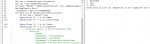
I looked quickly at your database. I commented some code as per attached jpg.
You'll see it fails on line 121 ---the Ctl.oldValue????

AcControlType enumerations

I'd like to hear the details of what you are trying to do with this set up.

I hope the above is helpful.

Good luck.
 

Attachments

  • error3251.jpg
    error3251.jpg
    44.7 KB · Views: 232
Hello,

Backstory: I'm working on an invetory database to document all the pc's and their users. I want to implement the AuditTrail to my Edit_Form so i can later view a log on what was changed to the selected entry.


The code itself should not be the problem, as @Uncle Gizmo pointed out it has something to do with the query behind the form.

What confuses me is that if you remove the tag "Audit" from the textboxes so only the top two comboboxes are monitored the code works just fine. In return, if i only tag the textboxes without the comboboxes the code also works fine. Only if I tag both, the comboboxes and the textboxes I get the same error as you pointed out.
 
Uncle Gizmo is probably correct. It may even be related to your data structure, I'm not sure.
Here is a free data model for the management of IT assets generally.

You can test your model using pencil and paper and some realistic test data.

According to my test of your Form the error 3251 occurs when you attempt to use the OldValue of the Hostname control.

Good luck.
 
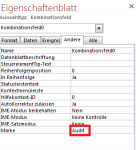
That is correct, but if you remove tag Audit (see screenshot attached) from every control but the Hostname the OldValue works.


I'll test the suggested data model tomorow and let you know any results.
 

Attachments

  • eigenschaft.PNG
    eigenschaft.PNG
    13 KB · Views: 216
As Gizmo said, and i agree, there is something in your design that is causing the issue.
Could be related to bound fields and adding new records??
I don't think the error is with martin green's code.
Can you tell us in simple terms, what exactly you are trying to do?
There may be some options for "how" to achieve it, that preclude the 3251 error.

Since the error seems to be with HOW you implemented your requirements, let's step back and see if there are options.
 
I want to search for pc's either by using the Servicetag, Username or the Usage (Verwendung).

Example:
The user "John Doe" has 3 laptops and 1 workstation
The user "Max Mustermann" has 1 workstation
10 laptops are used as "Pool" laptops (they do not have a user assigned, only a usage)
2 laptops are used as "Office" laptops (also, no user assigned only usage)

I have my main project split into two forms: the main form with the search function and the sub form looking like the one I uploaded. In the main form I can select a user (e.g. John Doe) and the sub form loads all pc's that are assigned to John Doe using the query in my example database and filter it.

I hope you can understand my explanation of what I'm trying to do. One other thing though: The database itself is finished and works very well, I'd prefer to Keep changes to the data model as minimal as possible :O
 
Just opened table tblUser_rechner
Code:
ID	User_ID	Rechner_ID	Verwendung_ID
1		6	2
2		7	2
3	4	1	1
4	3	2	1
5	1	3	1
6	4	4	1
7	2	5	1
11	3	11	1
13		14	1
14		15	1
15	3	16	1
16	3	17	2

and see a lot of "empty" User_ID which is confusing.

Where are records 8, 9 10?

Main and subform??

Perhaps you should do a compact and repair, then attach a copy of your database in zip format.
 
Last edited:

Users who are viewing this thread

Back
Top Bottom