
You are using an out of date browser. It may not display this or other websites correctly.
You should upgrade or use an alternative browser.
You should upgrade or use an alternative browser.
Solved Sales Database Relationships
- Thread starter iqJafa
- Start date

- Local time
- Today, 17:40
- Joined
- Feb 19, 2013
- Messages
- 17,754
my guess would be you are using a lookup field for customer in your invoices table.
lookup fields are a bad idea if you want to do anything significant
try linking it to customerID, remove the lookup functionality and rename it as customerID
lookup fields are a bad idea if you want to do anything significant
try linking it to customerID, remove the lookup functionality and rename it as customerID
Act
The subform is to enter the invoice details
I used a combobox where I can choose or enter a new customer on the header of the form. Then I tried to use a list box to be able to select more than one item but it didn't work either.my guess would be you are using a lookup field for customer in your invoices table.
lookup fields are a bad idea if you want to do anything significant
try linking it to customerID, remove the lookup functionality and rename it as customerID
The subform is to enter the invoice details
Customer name is actually the customer ID on the platform (Facebook, Instagram, WhatsApp) and the Name is the customer's realHi. For one thing, you are storing redundant information on customer names in multiple tables. It might be better for you to post a copy of your BE with test data.
1. Name is a reserved word and should not be used as a field/table name.
2. What does Name hold? You already have CustomerName in tblCustomers, so what's this the name of?
3. Tables with only 1 real field of data (autonumbers don't count) shouldn't exist. Instead of PlatformID in tblCustomers just store the Platform value and not the number reference of it.
4. tblInvlices should hold CustomerID from tblCustomers not CustomerName. Or ditch CustomerID and make CustomerName the primary key. The primary key of one table goes into another to JOIN them, not another field.
5. OrderID should not be in tblInvoices. InvoiceID in tblOrderDetails establishes that relationship, not the other way around
6. CustomerName should not be in tblOrderDetails. Nor should any data from tblCustomers. You obtain that information via tblInvoices which is connected to tblCustomers.
2. What does Name hold? You already have CustomerName in tblCustomers, so what's this the name of?
3. Tables with only 1 real field of data (autonumbers don't count) shouldn't exist. Instead of PlatformID in tblCustomers just store the Platform value and not the number reference of it.
4. tblInvlices should hold CustomerID from tblCustomers not CustomerName. Or ditch CustomerID and make CustomerName the primary key. The primary key of one table goes into another to JOIN them, not another field.
5. OrderID should not be in tblInvoices. InvoiceID in tblOrderDetails establishes that relationship, not the other way around
6. CustomerName should not be in tblOrderDetails. Nor should any data from tblCustomers. You obtain that information via tblInvoices which is connected to tblCustomers.
- Local time
- Today, 17:40
- Joined
- Feb 19, 2013
- Messages
- 17,754
I was referring to your customername field in the table, not whatever you might have on a formI used a combobox where I can choose or enter a new customer on the header of the form.
I don't have any look up field in the tables. However, I have changed the field name into Customer PLTID (Customer Platform ID).
What does BE stand for?Hi. For one thing, you are storing redundant information on customer names in multiple tables. It might be better for you to post a copy of your BE with test data.
Thank you so muchBE stands for Back End. All access applications are (or should be) split into two parts. The BE which is Jet/ACE (Access) or some other RDBMS and contains ONLY tables and the FE which is "Access" and contains all objects EXCEPT tables. In the FE (Front End) the tables are linked to the BE. Thy don't actually exist in the same file as the other objects. That allows you to place the BE on a shared drive or use a RDBMS on the server and distribute a separte copy of the FE to each individual user. The users NEVER, EVER share the same copy of the FE. They only share the BE. This minimizes the risk of corruption and allows you to support more concurrent users than a monolithic (all objects together in one big .accdb) would. In fact, if your BE is SQL Server or some other RDBMS, the number of concurrent users is only limited to the number of seat licenses you own for the RDBMS such as SQL Server. So instead of a theoretical max of 255 and a practical limit of ~ 50 concurrent users, you could have thousands. So Access really can support large companies, just not with Jet/ACE as the BE.
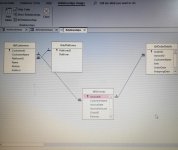
Thank you. It makes more sense to me now (I think). Now I changed both field names and structure and the relationships. Do they look all right now?1. Name is a reserved word and should not be used as a field/table name.
2. What does Name hold? You already have CustomerName in tblCustomers, so what's this the name of?
3. Tables with only 1 real field of data (autonumbers don't count) shouldn't exist. Instead of PlatformID in tblCustomers just store the Platform value and not the number reference of it.
4. tblInvlices should hold CustomerID from tblCustomers not CustomerName. Or ditch CustomerID and make CustomerName the primary key. The primary key of one table goes into another to JOIN them, not another field.
5. OrderID should not be in tblInvoices. InvoiceID in tblOrderDetails establishes that relationship, not the other way around
6. CustomerName should not be in tblOrderDetails. Nor should any data from tblCustomers. You obtain that information via tblInvoices which is connected to tblCustomers.
Attachments

I've just reposted the relationships #17You're welcome. Try making the suggested changes and repost the new picture.
Looks really good, 2 questions:
1. What is the Delivery field datatype and what is Delivered field datatype? Are they related in any manner?
2. Is NetAmount calculable from the other fields in tblInvoices? If so, you don't need it. Instead you do the math in a query and then refer to the query when you need that value.
1. What is the Delivery field datatype and what is Delivered field datatype? Are they related in any manner?
2. Is NetAmount calculable from the other fields in tblInvoices? If so, you don't need it. Instead you do the math in a query and then refer to the query when you need that value.
I ditched the platform table and replaced PlatformId with Platform name (Facebook, Instagram, etc).I still think you need five tables. I don't know what your application does but if your users can be on more than one SocialNetwork, this structure won't work. You removed the Platform table but you still have Platform. in the customer table.
Can you confirm that you will NEVER, EVER want to allow a Customer to have more than one Platform association?
I can confirm that all customers are allowed to use one Platform to make orders. Should any customer chooses to switch platform, his details will change accordingly.
My bad.Looks really good, 2 questions:
1. What is the Delivery field datatype and what is Delivered field datatype? Are they related in any manner?
2. Is NetAmount calculable from the other fields in tblInvoices? If so, you don't need it. Instead you do the math in a query and then refer to the query when you need that value.
1. Delivery I've changed it to Shipping. Data type is a Number which is P&P charge. Delivered is Yes/No field. Now I guess all the three fields: OrderDate, Shipping Date and Delivered don't belong.
InvoiceAmount is the subtotal. We'll add shipping charge to it and take away the discount if any to get the Amount a Customer needs to pay.
The net amount is a calculated field.
I didn't quite understand the point here. So, I should have a separate table for CustomerName and Platform? But what would the PK be here? And what is the FK in Customer's table?This is the kind of thing that can come back to bite you. It's like building an asset management system and a customer telling you that an employee will never have more than one computer. This kind of change is a big problem to fix but very easy to handle if you define the tables to handle "many" of something from the beginning. Would you believe the customer who said his employees never have more than one computer? Think of this as a lesson in defensive programming. Keep the schema as it is and if it turns out that the schema has to change, it will be a big job but more likely, you'll want to take the bandaid route and add a second set of columns for the second platform. That of course will cause a completely different set of issues and work arounds.
I would quietly talk to as many other people as I could before committing to a 1 Customer, 1 Platform model. If you have any doube at all, go with the 1-many schema. You can make the form look like 1-1. That will be easy to change should you need to show more than 1 platform. Everything else will already be in place.

mike60smart
Registered User.
- Local time
- Today, 17:40
- Joined
- Aug 6, 2017
- Messages
- 2,261
Hi
No what Pat is saying is that a Customer may have 1 or More Platforms.
To manage this you would create a table called tblCustomerPlatforms as follows:-
tblCustomerPlatforms
-CustomerPlatformID - PK - Autonumber
-CustomerID - FK - (Linked to CustomerID PK in tblCustomers)
-PlatformID - FK - (Linked to PlatformID PK in tblPlatforms)
No what Pat is saying is that a Customer may have 1 or More Platforms.
To manage this you would create a table called tblCustomerPlatforms as follows:-
tblCustomerPlatforms
-CustomerPlatformID - PK - Autonumber
-CustomerID - FK - (Linked to CustomerID PK in tblCustomers)
-PlatformID - FK - (Linked to PlatformID PK in tblPlatforms)

- Local time
- Today, 17:40
- Joined
- Sep 12, 2006
- Messages
- 16,072
I didn't look at your specification, but I am sure @Pat Hartman is correct.
You have to design a system for the outlier case. If 99% of your customers have one platform, and 1% have multiple platforms, you have to design for multiple platforms. It's not so hard to do this at the outset, but it becomes hard to do it later on . Even if you never get a customer with multiple platforms, it's still better to build it in.
It's similar to considering employee teams where very rarely an employee can be in more than one team, or can be a team leader for multiple teams, or where two people are designated as team leader for the same team. You have to get the data analysis right in the first instance.
Maybe you need to document it, and get it signed off, because clients (eg your boss) will always come back with "we thought you knew", about something that they "always do", but which you couldn't possibly know unless you were told.
You have to design a system for the outlier case. If 99% of your customers have one platform, and 1% have multiple platforms, you have to design for multiple platforms. It's not so hard to do this at the outset, but it becomes hard to do it later on . Even if you never get a customer with multiple platforms, it's still better to build it in.
It's similar to considering employee teams where very rarely an employee can be in more than one team, or can be a team leader for multiple teams, or where two people are designated as team leader for the same team. You have to get the data analysis right in the first instance.
Maybe you need to document it, and get it signed off, because clients (eg your boss) will always come back with "we thought you knew", about something that they "always do", but which you couldn't possibly know unless you were told.
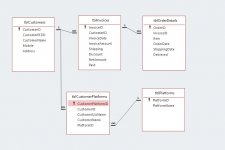
Hi again,
I applied the suggestions to my DB.
CustomerUsrName holds what I used to call CustomerName: cutomer ID in the releavant platforn.
CustomerName will be the customer real name
I haven't deleted the redundant fields in tblCustomers, yet. Just want to make sure I'm on the track.
Thanks
I applied the suggestions to my DB.
CustomerUsrName holds what I used to call CustomerName: cutomer ID in the releavant platforn.
CustomerName will be the customer real name
I haven't deleted the redundant fields in tblCustomers, yet. Just want to make sure I'm on the track.
Thanks
Attachments
Similar threads


- Replies
- 29
- Views
- 755

Users who are viewing this thread
Total: 1 (members: 0, guests: 1)