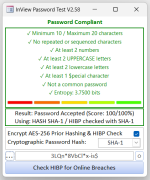
Simple Password Strength Checker with PWned Online Check

V2.52 Update:

🔍 Primary Functionality

This module powers a password input form that:

1. Evaluates Password Strength
• Checks for:
• Length (10–20 characters)
• Repeated/sequenced characters
• At least 2 numbers, 2 uppercase, 2 lowercase, and 1 special character
• Whether the password is common (e.g., "password", "admin")

2. Scores and Visualizes Strength
• Uses a scoring system (0–100) based on rule compliance
• Displays one of six images to represent strength
• Updates rule labels with ✓ or ✗ and color-coded feedback

3. Hashes Passwords
• Supports SHA-1 and SHA-256
• Implements SHA-1 and SHA-256 manually in VBA (no external libraries)

4. Checks for Breaches via HIBP
• Converts SHA-256 to SHA-1 if needed
• Calls the HaveIBeenPwned API using the k-anonymity model
• Displays breach count or confirmation of safety

5. Polishes UX
• Toggle password visibility
• Double-click to clear field and reset UI
• Dynamic font fallback for rule labels
• Real-time feedback on password changes

🔐 Security Awareness
• Integrates HIBP breach checking
• Encourages strong password practices
• Avoids sending full hashes (uses prefix model)

🎯 User-Centric UX
• Immediate feedback on password quality
• Visual indicators (images, color-coded labels)
• Conditional prompts (e.g., SHA-256 to SHA-1 conversion)
• Cursor placement and input masking handled gracefully

🛠️ Robust Error Handling
• used consistently
• Debug logging throughout for diagnostics
• Graceful fallback behavior (e.g., font selection, control existence)

🧪 Custom Cryptographic Implementation
• Implements SHA-1 and SHA-256 from scratch
• Handles bitwise rotation and 32-bit wrapping manually
• Demonstrates deep understanding of hashing internals
 

Attachments

  • Screenshot 2025-11-06 173621.png
    Screenshot 2025-11-06 173621.png
    33.5 KB · Views: 48
V2.52 Update:

🔍 Primary Functionality

This module powers a password input form that:

1. Evaluates Password Strength
• Checks for:
• Length (10–20 characters)
• Repeated/sequenced characters
• At least 2 numbers, 2 uppercase, 2 lowercase, and 1 special character
• Whether the password is common (e.g., "password", "admin")

2. Scores and Visualizes Strength
• Uses a scoring system (0–100) based on rule compliance
• Displays one of six images to represent strength
• Updates rule labels with ✓ or ✗ and color-coded feedback

3. Hashes Passwords
• Supports SHA-1 and SHA-256
• Implements SHA-1 and SHA-256 manually in VBA (no external libraries)

4. Checks for Breaches via HIBP
• Converts SHA-256 to SHA-1 if needed
• Calls the HaveIBeenPwned API using the k-anonymity model
• Displays breach count or confirmation of safety

5. Polishes UX
• Toggle password visibility
• Double-click to clear field and reset UI
• Dynamic font fallback for rule labels
• Real-time feedback on password changes

🔐 Security Awareness
• Integrates HIBP breach checking
• Encourages strong password practices
• Avoids sending full hashes (uses prefix model)

🎯 User-Centric UX
• Immediate feedback on password quality
• Visual indicators (images, color-coded labels)
• Conditional prompts (e.g., SHA-256 to SHA-1 conversion)
• Cursor placement and input masking handled gracefully

🛠️ Robust Error Handling
• used consistently
• Debug logging throughout for diagnostics
• Graceful fallback behavior (e.g., font selection, control existence)

🧪 Custom Cryptographic Implementation
• Implements SHA-1 and SHA-256 from scratch
• Handles bitwise rotation and 32-bit wrapping manually
• Demonstrates deep understanding of hashing internals

V2.53 Update

Supports SHA-1, SHA-256, SHA-512, MD5, RIPEMD150 for password scoring; Auto convert to SHA-1 for Online breach check; PURE VBA - No external DLL's, No .Net dependancy.
 

Attachments

  • Screenshot 2025-11-07 171143.png
    Screenshot 2025-11-07 171143.png
    33.4 KB · Views: 41
@Jason Lee Hayes
I would like to download v2.52 and 2.53 for testing, but unless I'm being very dense, you haven't uploaded the files here (screenshots only)
 
V2.56 Update News

This release adds a built‑in entropy calculation to the password validator and explains what entropy means, how it’s measured, and how to improve it.

Why Entropy Matters

Password entropy measures how unpredictable a password is and therefore how resistant it is to guessing or cracking attacks such as brute force, credential stuffing, and dictionary attacks. Higher entropy means more possible combinations and a much longer time required for an attacker to succeed.

How Entropy Is Calculated

The entropy formula is:
E is the entropy in bits.
R is the size of the character set used (for example, 26 for lowercase only, 62 for letters plus digits, 94 for most printable ASCII).
L is the password length.

Example calculation: for an 8‑character password using a 94‑character set,
Guideline: aim for 75 bits for high‑security accounts; 60 bits is generally considered strong for everyday use.

How to Increase Entropy
• Use diverse character sets. Include uppercase, lowercase, digits, and symbols to increase R.
• Increase length. Each additional character multiplies the search space and raises entropy significantly.
• Avoid predictable patterns. Do not use dictionary words, repeated characters, or simple sequences like or .
• Prefer passphrases or random generation. A memorable passphrase of several unrelated words or a randomly generated string gives high entropy with fewer usability tradeoffs.
• Use a password manager. It generates and stores high‑entropy passwords, so you don’t have to memorize them.
Practical Guidance
• Balance security and usability. Very high entropy is ideal, but if users resort to insecure workarounds, overall security falls.
• Examples: is stronger than; a truly random string like is stronger still but harder to remember.
• Policy suggestion: require a minimum entropy target (for example 60–75 bits) and offer a password generator and passphrase guidance to help users meet it.

Password entropy is a core concept for protecting accounts and should guide password policies, user guidance, and automated password generation.


Attachments

  • Screenshot 2025-11-08 203134.png
    Screenshot 2025-11-08 203134.png
    33.8 KB · Views: 41
Why is the password length limited to 20 characters? That's too short in my opinion.
 
Why is the password length limited to 20 characters? That's too short in my opinion.

It's limited because MS access only supports a maximum of 20 characters; anything after that is trimmed... Blame MS lol
 
InView Password Checker V2.58 Final (PureVBA)

Added: AES-256 Encryption of Raw Password & UI Updates

No .Net or .DLL Dependency

InView Hybrid Password Strategy

Workflow Overview:
    • Hash the password using a strong algorithm (e.g., SHA-512) for internal scoring and uniqueness.
    • Encrypt the original password using AES-256 to protect it in memory and optionally for secure storage.
    • Convert the raw password to SHA-1 to meet HaveIBeenPwned (HIBP) compatibility requirements.
    • Transmit only the SHA-1 prefix (first 5 characters) to HIBP using their k-anonymity model.
Although this layered approach isn't conventional, it offers distinct advantages in runtime safety, privacy preservation, and breach detection accuracy.

✅
Key Advantages

1. Memory Protection
Encrypting the raw password immediately after hashing minimizes its exposure in RAM. Even if memory is inspected or dumped, the plaintext is no longer accessible — only the encrypted version remains.

2. Separation of Duties
    • Hashing supports internal scoring, entropy analysis, and uniqueness checks.
    • Encryption enables optional reversible storage for syncing, auditing, or rehashing — without compromising hash integrity.
3. Hash Isolation
Hashes used internally (e.g., SHA-512) are never reused for external breach checks. HIBP queries rely solely on SHA-1 of the raw password, preventing cross-system hash leakage.

4. Privacy-Preserving HIBP Queries
Only the first 5 characters of the SHA-1 hash are sent to HIBP, ensuring that full hashes or passwords are never exposed — even in transit.

5. Entropy Enhancement
Transforming the password through SHA-512 before converting to SHA-1 ensures that even common inputs like "123456" yield non-standard SHA-1 values. This reduces false positives and avoids leaking canonical forms of weak passwords.

🧠
Best Practice for HIBP Integration
To maximize security and compatibility:
    • Hash the password (e.g., SHA-512) → for scoring and internal use
    • Encrypt the raw password (AES-256) → for optional secure storage
    • Convert the raw password to SHA-1 → for HIBP breach check
    • Send only the SHA-1 prefix → to HIBP API using k-anonymity
 

Attachments

  • Screenshot 2025-11-09 222335.png
    Screenshot 2025-11-09 222335.png
    35.7 KB · Views: 48
  • Screenshot 2025-11-09 223026.png
    Screenshot 2025-11-09 223026.png
    41.2 KB · Views: 49
  • Screenshot 2025-11-09 225947.png
    Screenshot 2025-11-09 225947.png
    52 KB · Views: 49
Gustav Brock has a cryptology module for Access using bcript.dll and Kernel32.dll which I believe is available on all modern versions Windows. The only reference you need is Microsoft ActiveX Data Objects 6.1 Library.

(c) Gustav Brock, Cactus Data ApS, CPH
https://github.com/GustavBrock/VBA.Cryptography
License for this module is MIT, see

I have been using a variant of that module converted to a class for about 6 months.
 
Gustav Brock has a cryptology module for Access using bcript.dll and Kernel32.dll which I believe is available on all modern versions Windows. The only reference you need is Microsoft ActiveX Data Objects 6.1 Library.

(c) Gustav Brock, Cactus Data ApS, CPH
https://github.com/GustavBrock/VBA.Cryptography
License for this module is MIT, see

I have been using a variant of that module converted to a class for about 6 months.

Using a DLL can simplify the implementation, but my solution deliberately avoids external dependencies. All encryption and hashing routines are implemented in native VBA, with no reliance on external DLLs, COM objects, or the .NET Framework. This makes the system fully self‑contained and deployable in restricted environments where external libraries cannot be registered or where .NET is unavailable.

A pure‑VBA approach offers several technical advantages:
• Zero external dependencies:
The code runs on any standard Office installation without requiring admin rights, DLL registration, or additional runtime components.
• High portability:
Because everything is embedded directly in the VBA project, the cryptographic routines travel with the database or workbook. This is ideal for distributed Access applications or locked‑down corporate environments.
• Predictable execution environment:
DLL‑based solutions depend on OS‑level architecture (32‑bit vs 64‑bit), versioning, and registry entries. Pure VBA avoids these compatibility issues entirely.
• Security through controlled surface area:
Eliminating external binaries reduces the attack surface. There’s no risk of DLL hijacking, version mismatch, or tampering with external components.
• Easier maintenance and auditing:
All logic is visible, editable, and reviewable directly in the VBA editor. No black‑box binaries, no unmanaged code, and no dependency chain to track.
• Ideal for sandboxed or restricted deployments:
Many enterprise environments block DLL calls or disable .NET interop for security reasons. Pure VBA continues to function even under these constraints.
In short, while DLLs can offer performance benefits, a pure‑VBA cryptography stack provides maximum portability, compatibility, and deployment flexibility—especially when you have no control over the target environment.
 
Using a DLL can simplify the implementation, but my solution deliberately avoids external dependencies. All encryption and hashing routines are implemented in native VBA, with no reliance on external DLLs, COM objects, or the .NET Framework. This makes the system fully self‑contained and deployable in restricted environments where external libraries cannot be registered or where .NET is unavailable.

A pure‑VBA approach offers several technical advantages:
• Zero external dependencies:
The code runs on any standard Office installation without requiring admin rights, DLL registration, or additional runtime components.
• High portability:
Because everything is embedded directly in the VBA project, the cryptographic routines travel with the database or workbook. This is ideal for distributed Access applications or locked‑down corporate environments.
• Predictable execution environment:
DLL‑based solutions depend on OS‑level architecture (32‑bit vs 64‑bit), versioning, and registry entries. Pure VBA avoids these compatibility issues entirely.
• Security through controlled surface area:
Eliminating external binaries reduces the attack surface. There’s no risk of DLL hijacking, version mismatch, or tampering with external components.
• Easier maintenance and auditing:
All logic is visible, editable, and reviewable directly in the VBA editor. No black‑box binaries, no unmanaged code, and no dependency chain to track.
• Ideal for sandboxed or restricted deployments:
Many enterprise environments block DLL calls or disable .NET interop for security reasons. Pure VBA continues to function even under these constraints.
In short, while DLLs can offer performance benefits, a pure‑VBA cryptography stack provides maximum portability, compatibility, and deployment flexibility—especially when you have no control over the target environment.

Just looked at the link and the code provided

Be careful here if using this in a real security environment.

BCryptGenerateSymmetricKey(Algorithm, Key, KeyObject(0), ...)

This means Enc and Dec may use different key object memory alignment and can cause intermittent failures thus undefined behaviors on different OS's

Also, the code does not enforce AES key length requirement - Must be 128Bit minimum but the code accepts any byte array!

EG: Key = "ABC" windows WILL accept it, pad or truncate it and produce a weak key which is a real security risk!

I'm very surprised this has not been flagged.

Another observation: CBC mode is being used without authentication?
CBC & no MAC is venerable to padding oracle attacks, cyphertext manipulation and silent corruption.
 
Just looked at the link and the code provided

Be careful here if using this in a real security environment.

BCryptGenerateSymmetricKey(Algorithm, Key, KeyObject(0), ...)

This means Enc and Dec may use different key object memory alignment and can cause intermittent failures thus undefined behaviors on different OS's

Also, the code does not enforce AES key length requirement - Must be 128Bit minimum but the code accepts any byte array!

EG: Key = "ABC" windows WILL accept it, pad or truncate it and produce a weak key which is a real security risk!

I'm very surprised this has not been flagged.

Another observation: CBC mode is being used without authentication?
CBC & no MAC is venerable to padding oracle attacks, cyphertext manipulation and silent corruption.
FIPS186 DSA RNG has been deprecated since February 2023 for general random number generation and should not be used. Instead the ECDSA (Elliptic Curve Digital Signature Algorithm) should be used...
 
Last edited:
There seems to be some misunderstanding here regarding my VBA.Cryptography

First, Microsoft ActiveX Data Objects 6.1 Library is not referenced anywhere. The library uses native Windows API calls only. Although you can do many things in VBA, native calls will always be way faster.

Next, the random generator by default uses the RNG algorithm value; FIPS186DSARNG is optional and not used anywhere in the library, only included to tell that the function could be used for something else, and the included Random function is for demonstration only.
(I will include a note on this with the next update).

For reference, look up CNG Algorithm Identifiers on Microsoft Learn. I am a novice here, so I had to include the URL as an attachement(!)

It is correct, that FIPS 186 DSA RNG has been deprecated since February 2023 for general random number generation and should not be used. Instead, a NIST-approved DRBG such as those implemented in CNG should be used. Those do not incluce ECDSA which is recommended for signatures, not for RNG.
So, use BCryptGenRandom with BCRYPT_RNG_ALGORITHM (literal "RNG") for salts, nonces, and general randomness.

If you (the system, the workstation) must be FIPS compliant, this is an additional step that must be done separately:

Group policy:
Computer Configuration, Windows Settings, Security Settings, Local Policies, Security Options
Enable:
System cryptography: Use FIPS compliant algorithms for encryption, hashing, and signing

Registry:
HKEY_LOCAL_MACHINE\SYSTEM\CurrentControlSet\Control\Lsa\FipsAlgorithmPolicy
Enabled = 1

However, enabling FIPS mode is not just a registry tweak, it changes the cryptographic behavior system-wide. There are potential drawbacks:
  • Performance impact: Some FIPS-approved algorithms are slower than non-FIPS equivalents.
  • Compatibility issues:
    • Applications that use non-FIPS algorithms (e.g., MD5, SHA-1 in non-compliant ways, or RC4) may fail or throw exceptions.
    • .NET applications using System.Security.Cryptography can break if they rely on non-FIPS algorithms.
  • User experience:
    • Certain features in apps (like older VPN clients, RDP, or legacy software) may stop working.
    • Some browsers or TLS stacks might restrict cipher suites.
If FIPS mode is off, BCryptGenRandom still uses a strong cryptographic RNG, but it may not be strictly FIPS-validated.
This is fine for general security, but not for formal FIPS compliance.
 

Attachments

Users who are viewing this thread

Back
Top Bottom