V2.52 Update:

Primary Functionality
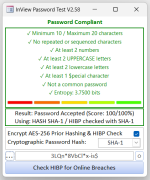
This module powers a password input form that:
1. Evaluates Password Strength
• Checks for:
• Length (10–20 characters)
• Repeated/sequenced characters
• At least 2 numbers, 2 uppercase, 2 lowercase, and 1 special character
• Whether the password is common (e.g., "password", "admin")
2. Scores and Visualizes Strength
• Uses a scoring system (0–100) based on rule compliance
• Displays one of six images to represent strength
• Updates rule labels with ✓ or ✗ and color-coded feedback
3. Hashes Passwords
• Supports SHA-1 and SHA-256
• Implements SHA-1 and SHA-256 manually in VBA (no external libraries)
4. Checks for Breaches via HIBP
• Converts SHA-256 to SHA-1 if needed
• Calls the HaveIBeenPwned API using the k-anonymity model
• Displays breach count or confirmation of safety
5. Polishes UX
• Toggle password visibility
• Double-click to clear field and reset UI
• Dynamic font fallback for rule labels
• Real-time feedback on password changes

Security Awareness
• Integrates HIBP breach checking
• Encourages strong password practices
• Avoids sending full hashes (uses prefix model)

User-Centric UX
• Immediate feedback on password quality
• Visual indicators (images, color-coded labels)
• Conditional prompts (e.g., SHA-256 to SHA-1 conversion)
• Cursor placement and input masking handled gracefully

Robust Error Handling
• used consistently
• Debug logging throughout for diagnostics
• Graceful fallback behavior (e.g., font selection, control existence)

Custom Cryptographic Implementation
• Implements SHA-1 and SHA-256 from scratch
• Handles bitwise rotation and 32-bit wrapping manually
• Demonstrates deep understanding of hashing internals