Still struggling with Bound Forms

Shep

Shep
Local time
Today, 14:53
Joined
Dec 5, 2000
Messages
364
Can someone help, please?

I have a simple form to add a new record.

Form is
Single
Bound
DataSource is a simple select query which includes all records in a table.

All I want to do is validate what is typed into the textbox.

I have the following code in the BeforeUpdate Event of txtTest:
Code:
Private Sub txtTest_BeforeUpdate(Cancel As Integer)
If Me.txtTest = "Test" Then
    Cancel = vbCancel
    Me.txtTest.Undo
End If
End Sub

It works fine on an Edit but when I type "Test" into a new record and try to move or save I get the error: The value in the field or record violates the validation rule blah blah BLAH.

Why doesn't vbCancel kill this nonsense?
 
Code:
Private Sub txtTest_BeforeUpdate(Cancel As Integer)
If Me.txtTest = "Test" Then
    Cancel = [B][COLOR="Red"]True[/COLOR][/B]
    Me.txtTest.Undo
End If
End Sub
 
Well I appreciate the effort sir...but if Cancel = True and Cancel = vbCancel were designed to do different things, it might be helpful. However, they are one and the same statement.
 
Well I appreciate the effort sir...but if Cancel = True and Cancel = vbCancel were designed to do different things, it might be helpful. However, they are one and the same statement.
I would have to disagree with you Shep - they aren't exactly the same.

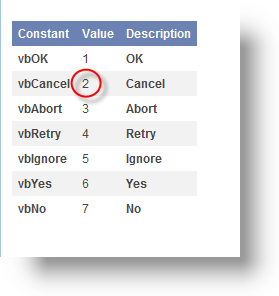
The value of VbCancel (at least when I tested it) was a constant of 2

The value of True is -1

2<>-1 in my opinion.
 
Also, to back up my statement - from the Access VBA helpfile:

vbcancelconst.png
 
vbCancel is the value returned from a message box when the user clicks the Cancel button.
Did you try my suggestion?
 
Of course I tried it. Hours ago. There is no difference.

And yeah Bob, I realize the vbCancel constant equates to integer 2. But the BeforeUpdate Cancel variable is an integer. Therefore, any non-zero integer value assigned to Cancel will cancel the BeforeUpdate.

Cancel = vbYes
Cancel = vbNo
Cancel = -10000
Cancel = 2
Cancel = vbRed

...will all Cancel the BeforeUpdate Event.

Functionally,
Cancel = True and
Cancel = vbCancel

...are identical.
 
That's definitely something I wasn't aware of and I did test it and you are correct. I stand corrected. Interesting.
 
Sounds like you have a validation rule defined, and it hits that first, I believe. You may be able to trap it with a form error trap, if you intend to leave it in.
 
Can someone help, please?

I have a simple form to add a new record.

Form is
Single
Bound
DataSource is a simple select query which includes all records in a table.

All I want to do is validate what is typed into the textbox.

I have the following code in the BeforeUpdate Event of txtTest:
Code:
Private Sub txtTest_BeforeUpdate(Cancel As Integer)
If Me.txtTest = "Test" Then
    Cancel = vbCancel
    Me.txtTest.Undo
End If
End Sub

It works fine on an Edit but when I type "Test" into a new record and try to move or save I get the error: The value in the field or record violates the validation rule blah blah BLAH.

Why doesn't vbCancel kill this nonsense?

I just tried this myself using the same code and it worked for me. That is strange. I wonder if you delete the text box and put a new one on and try it again whether it might not work.

But then again, what are you using for a primary key? Is it an autonumber or one you are defining? I used autonumber for my test.
 
I was confused why a Boolean served in an instance where an integer is called for as well, until I realized that True itself stores an integer. False returns zero, so it doesn't cancel the event.

At any rate, I continue to bang my head against the wall trying to elegantly validate a control on a bound form. Why I can't cancel and undo a control on a new record is ticking me off.

I'm still a babe on bound forms. Am trying hard to complete this project as "bound" as possible, in order to save time. But I'd have been 3 forms past this point were I going "unbound".

Sorry for being so easily frustrated today...it's Friday and I just want to go home and have a good English ale.
 
I wondered also whether the control were corrupt in some way. I'll give it a try. I am using an autonumber as PK.

Actually I recreated this in a new database with a new table, PK and a text field, and a form with one textbox on it. But I will try again. Thanks.
 
Well I tried a brand new control, both in my project and in a new database. There is no difference.

On an existing record, it works as intended. On a new record, no dice.

Me.Undo works for both an edited record and a new record. I don't want to wipe out the whole form for validation of one field, however.
 
Well I tried a brand new control, both in my project and in a new database. There is no difference.

On an existing record, it works as intended. On a new record, no dice.

Me.Undo works for both an edited record and a new record. I don't want to wipe out the whole form for validation of one field, however.

And I tried the Me.YourTextBoxName.Undo along with Cancel = True with a text box on a form and it stopped the update of the text box as it should and didn't do anything to the record. Which version of Access are you using?
 
2003 (11.6566..8132) SP2

This is only on a new record, mind you. I did further notice that after receiving the error one time, it all acts normally. Form remains dirty, so it's not because of that...

I'll post my little example in a few mins. Thanks for taking a look Bob.
 
While creating the example, I spotted the likely reason I get the error. The field is indexed, no duplicates.

I still don't understand why a Cancel doesn't stop it. And the corresponding field in my project must be indexed.
 

Attachments

Well, I tried it and it stopped the update whenever I entered "Test" or even "test".

I'd suspect something is off with your Access if the exact same copy is acting differently. Might a compact and repair fix this?
 
FOUND IT!!! It was due to the field being set as REQUIRED in the table.
 
Yes, but you can validate in the form's BEFORE UPDATE event and thus remove the problem.
 

Users who are viewing this thread

Back
Top Bottom