Tax

Could someone explain the meaning of the word "Show"

OK, you wanted me to explain, so this is what I would think of a show. We whent to the Kid Fest show. That is not a show, that is a "Event". The Kid Fest is a Event. We went to it on 2013. Now, we have a show. The Kid Fest 03-2013 Show. We went to it in 2014, that is a show. Its now the Kids Fest 03-2014 Show. Is that about what you were thinking wiklendt?
 
OK, you wanted me to explain, so this is what I would think of a show. We whent to the Kid Fest show. That is not a show, that is a "Event". The Kid Fest is a Event. We went to it on 2013. Now, we have a show. The Kid Fest 03-2013 Show. We went to it in 2014, that is a show. Its now the Kids Fest 03-2014 Show. Is that about what you were thinking wiklendt?
I'm sorry, I cannot make sense of what you've written. Do you mean I had the right idea but the wrong way around? Like:
Event: kid fest
Show: 03-2013 (for march 2013?)
Show: 03-2014
Show: 03-2015

All shows were part of the kid fest event, but each show of the kid fest event is in a different year.?
Can you give some example data from those two tables?
 
Events are really events, more of...shows, I guess. We have shows, and those shows we do multiple times a year sometimes. So, there kinda shows, not events. But, instead of having a single show ID for each show, we just have a ShowID, and a EventID. That way its easier to keep track. I am afraid though that we have gotten waaaay of track. Do you really need to know the difference between a show and a event? I mean ya, that would be nice to know, But, this post was started to figure out how to get my Tax.
 
Events are really events, more of...shows, I guess. We have shows, and those shows we do multiple times a year sometimes. So, there kinda shows, not events. But, instead of having a single show ID for each show, we just have a ShowID, and a EventID. That way its easier to keep track. I am afraid though that we have gotten waaaay of track. Do you really need to know the difference between a show and a event? I mean ya, that would be nice to know, But, this post was started to figure out how to get my Tax.
We need to know difference because it will impact where the best place is to put your tax. Did you read my previous post asking why it would not work in events?

Your explanation does not work. Here is how you sound:
"Yes cat and dog is different because cat is a cat and dog is not a cat but it is like a cat but a dog is a dog and we have more dogs."
From such an explanation all we know is that they are different, but we don't know how and we still don't know what is a dog and what is a cat.

What we need to know is what IS a show and what IS an event. Explain it to us *without* using the word "show" to define "show". How do the two relate to each other? Give some sample data that makes it obvious.

This is very important because it can make the tax data easy or very very hard to use if it is put in the wrong place.
 
@ Wiklendt you are doing a great job. However please tell me "Do you really understand what is what."

I am still lost and am about to give in unless I get a better understanding.

_________________________________________________________________________________________

@ INFINITE

What defines a SHOW, and what defines an EVENT.

If I had one list of Shows and Events that I need to sort into either Shows or Events.

How do I know where each belongs.

What is the difference between each and how do I tell them apart.

_________________________________________________________________________

Also you need to fix your relationships. You need to Enforce Referential Integrity. Please do that and post a new pic. BTW "DATE" is a reserved word. You cannot use it. If you don't understand then do a Google on Reserved words.
 
Last edited:
@ Wiklendt you are doing a great job. However please tell me "Do you really understand what is what."

I am still lost and am about to give in unless I get a better understanding.

No, i'm not really sure what's what yet, but we'll get there. It may be that Infinite think it's too obvious or too irrelevant to explain it properly, or perhaps Infinite believes the explanations are adequate.

@Infinite, you have to remember that we know nothing about your project except what you tell us. The fact that all of us are trying to understand the difference between what you call an "event" and "show" means there must be some importance in it. Also, you mentioned in a previous post that tax is related to:

I just sold a 22 Cowboy pistol and the show OFAST - 4 2015. The tax for OFAST that year was 8 percent. The 22 Cowboy Pistol sold for $9.97. The tax was?

I'm going to run with this and see if i can integrate this information with what we already know. But it would really help if we could also see some example data from tblShows and tblEvents.

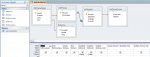
1) "OFAST - 4 2015" i am assuming this is what you are calling a "show" but this does not make sense because your tblShows does not have any date fields, it is your tblEvents that has dates. The way you already have your tables and relationships designed: the 'show' would be "OFAST", but the 'april 2015' is one of the show's "events" (you said earlier your shows have multiple events: this is what your relationship shows us in your screenshot too) - and you have start and end dates in tblEvents, so this would makes sense. so, sounds like you take a show and apply dates to it so that the show has date limitations to make an event of the show. so, your EventID in tblShowSales should actually have a direct relationship with the EventID in tblEvents.

2) "that year" - meaning the tax depends on the event (because an event has date limitations in tblEvents), so a tax field for your events should be in tblEvents. tblEvents has a ShowID, which is already link it to tblShows, so access will know which "show" (name) you mean when you select a particular "event" (dates).

3) Also, i note that your expenses (tblShowCosts) comes off tblEvents - this is what you should do with your incoming (tblShowSales), as i mentioned in (1).

4) Once you do that, certain queries will make it easy to apply the correct tax percentage to your prices - we can help you further there. but first you need to do the base work in your relationships and tables.

5) As has been mentioned, the word "date" (which you have in tblShowSales, and is a little off-topic) is a 'reserved word' meaning that that word is special in access for it to work properly and using that word to name your field will cause headaches in future. RainLover is right, you should google 'reserved words' to gain a better understanding of them and also to learn what other words are reserved. We are mentioning this because we have all, at one point or another, suffered from naively using a reserved word, and we want to spare you the same.

 
Last edited:
after sleeping on it and considering all information on hand, i have fashioned a solution for you based on your current design. however, be warned that your current design has confused even the experts on this forum and i had troubles with a basic mock-up (only the fields i needed) of your design. I have also made MANY assumptions, some of which i know will not match your current data - remembering we have seen none of your table designs.

This is a query SQL that you can make by creating a query in design view, then switch to "SQL" view and paste this directly in. if you get a mismatch error, this mean you have text on one side and a number on the other side of a relationship and you will have to amend your table structure and/or data to make it work. There is much that does not make logical sense in your structure and i had to deviate from good design practices to get even this basic calculation to display.

I did both calculations because i'm not sure exactly which you want. i suspect you want TaxPart, but now you have both.

Code:
SELECT tblShowSales.SaleID, tblShowSales.Date, tblItems.Model, tblItems.Price, tblEvents.StartDate, tblEvents.EndDate, tblShowCosts.TaxRate, [Price]*(1+[TaxRate]/100) AS TaxUp, [Price]-5/100 AS TaxPart
FROM ((tblItems INNER JOIN tblShowSales ON tblItems.ModelID = tblShowSales.Item) INNER JOIN tblShows ON tblShowSales.EventID = tblShows.ShowName) INNER JOIN (tblEvents INNER JOIN tblShowCosts ON tblEvents.EventID = tblShowCosts.SCEventID) ON tblShows.ShowID = tblEvents.ShowID
WHERE (((tblEvents.StartDate)<[Date]) AND ((tblEvents.EndDate)>[Date]));
attachment.php

(Edit: sorry, that should be "TaxPart: [Price]-[TaxRate]/100", so that the taxrate can change with the recods)

attachment.php


DISCLAIMER: i tested this on ONE record only. i don't know how it will behave on multiple records. also, you will probably want to make a form to display which event you want to limit the dates by.
 

Attachments

  • 2015-07-20_mockup.png
    2015-07-20_mockup.png
    28 KB · Views: 335
  • 2015-07-20_mockupresult.png
    2015-07-20_mockupresult.png
    6.9 KB · Views: 332
Last edited:
Or, instead of limiting by date you could try limiting by eventid.
 
Show = main Event
Event - is within a Show

So
Glastonbury is the Show
and the circus is an event within the show

a show being the main entity and there is only one- events are within that Show

Show:- Glastonbury Festival ( the whole )
events:- part of the whole

on a financial breakdown - the Show would have a budget of say 1,000,000
and the events would form part of this
event 1 -500,000
event 2- 250,000
event 3 - 150,000
event 4 -100,000
total 1,000,0000 (being the Show budget)

Still doesn't help on the tax -
If the tax is per show ( which would be weird) - as it usually per time frame (tax in 2015 is 8%) then set the tax rate to the Show and have your child form look at this.

but it would be better to have your tax at event tbl stage then you can change the tax rate when it goes up or down from date x onwards

so if the tax increases 01.09.15 from 6 to 10% then everything invoice after that date should have that tax - you would only need in this instance to record a tax rate and this would be 1 field and a default value of xx
 
Or, instead of limiting by date you could try limiting by eventid.


Based upon what Gary said it would appear wiklendt has proposed a good solution to at least part of the problem. :D
 
Given that you are USA based -
is there multi tax or different tax per state

So will your "boots " have a federal tax and also a state tax ? -
My knowledge on USA tax is zero
and does the tax apply to your you are based or where you sell the items

Tax is always a bitch to get right
are you selling on line then is the tax applicable to where the buyer lives ? (that's a new one for Europe - not sure when it comes in to effect )
you may need to have multi tax drop downs - or product code and tax applicable

example
Boots = code 001 if tax state = x then rate = y
boots 001= New York = Rate rate to apply = 7.5%
Boots 001 = Pennsylvania = Rate to apply = 4%

that will involve something slight different (Dlookup ) and drop downs from statelist box etc..
 
but it would be better to have your tax at event tbl stage then you can change the tax rate when it goes up or down from date x onwards

Yes, this is what i have been saying numerous times. However, something i noticed when i was doing the mock-up (based on OPs relationship view screenshot), and also from the OPs very first post, is that the tax rate he has listed in tblShowCosts - which appears to be a 1-1 relationship with tblEvents (which i can only assume is true because both tables' primary keys are the ones that are on either side of that relationship).

That said, i still believe that the tblShowSales should be directly linked to tblEvents rather than tblShows - however, when i was doing the mock-up, the PK and FK were all over the place (EventID != EventID between tables) and, i suspect, probably not autonumber.

I read somewhere (not this thread) an idea to name ID fields as, say EventPK and EventFK, depending on whether the EventID field is the primary or foreign key. Just like to mention that i like that idea.
 
Last edited:
I read somewhere (not this thread) an idea to name ID fields as, say EventPK and EventFK, depending on whether the EventID field is the primary or foreign key. Just like to mention that i like that idea.
You can find a copy of that in our archives.

It is under "Naming Conventions."

I am glad you like it because I am the Author.
 
Yeap - good practice to do this - (I wish I followed this myself - )

If the poster is hell bent on sticking to having the tax on the show - then Dlookup is the route
tax= dlookup xx on show table ...
but this just doesn't sound the right way to do stuff

Tax is a bitch - easy when you dealing with one tax rate - but having multiple taxes (federal/local) plus stamps duties /levies

- we deal in multiple countries so have all of the european taxes +Oz/NZ etc
so taxes are a nightmare
 
@Infinite, did my solution help you piece together a query for yourself? Are you still in need of assistance on this matter?
 
Sorry guys, you were talking back and forth a lot, so I just kinda ignored it :o
Ima check now and see and respond back soon hopefully and tell you if it worked, thanks!


Edit: Notifications wasn't working correct, sorry about not responding.
 
Last edited:
Sorry guys, you were talking back and forth a lot, so I just kinda ignored it :o
Ima check now and see and respond back soon hopefully and tell you if it worked, thanks!
That 'back and forth' was us desperately trying to understand what you needed. It would have been a lot easier if you'd clarified our uncertainties at the time instead of just ignoring us. It takes time and effort to help out and put in the brains to make sure you get a reasonably well working database. It would be nice for you to put in the same effort.
 
That 'back and forth' was us desperately trying to understand what you needed. It would have been a lot easier if you'd clarified our uncertainties at the time instead of just ignoring us. It takes time and effort to help out and put in the brains to make sure you get a reasonably well working database. It would be nice for you to put in the same effort.


Dont worry, I wasn't actually ignoring you. Just noticed my notifications for this wasnt turned on, so I wasn't getting the emails I should have been, sorry.
 
Ok, I just looked at (post 33) and I noticed that is exactly what I want! But, how would I be able to round it up to the nearest cent? I also tried it with a item that costs $8.50 and the tax rate is 1, and it comes out as $8.51 but when I get a online sales tax calculator, it says the tax rate should be $8.59. Is there something im doing wrong? Or is there something im not understanding? Thanks a TON for the help!
 
A point of interest.

The Sum of the Tax on each order does not necessarily balance. It may be Dollars out. This is simply written off.

If you notice GST the Tax department always rounds this off to the nearest dollar.
 

Users who are viewing this thread

Back
Top Bottom