The Val function

Hello All

For some reason only three PNGs were uploaded. So I am sending you three more Menus, these are:

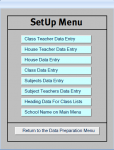
The Setup Menu
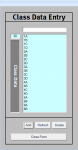
The Class Data Entry. From 1 to one hundred classes can be entered here.
The Subjects Data Entry. As many subjects as the school can handle can be entered here. This allows specialised subjects for gifted or remedial students.
Terence Driscoll, London
 

Attachments

  • Setup Menu.png
    Setup Menu.png
    14.6 KB · Views: 151
  • Class Data Entry.png
    Class Data Entry.png
    11.5 KB · Views: 141
  • Subjects Data Entry.png
    Subjects Data Entry.png
    15.6 KB · Views: 150
Hi. Congratulations! Glad to hear you got it sorted out. Good luck with your project.
 
Hello DBGuy
It was down to experts like yourself that this was sorted out.
I do however have one remaining problem that I have never been able to sort out.
I have a school in Uganda using the database. I have now updated their database to include the new features.
This is a boarding school has 850 students and in a very rural area. At the end of the academic year, which is in January, all classes have to be updated. At the moment it is a manual operation. The approximate size of each class is about 35 students.
How do I set up a form where the user enters a class name such as 3G2016 and updates the whole class to 4G2016? And then all the other classes that need updating. The 2016 is the year the student joined the school.
Terence, London
 
Hello DBGuy
It was down to experts like yourself that this was sorted out.
I do however have one remaining problem that I have never been able to sort out.
I have a school in Uganda using the database. I have now updated their database to include the new features.
This is a boarding school has 850 students and in a very rural area. At the end of the academic year, which is in January, all classes have to be updated. At the moment it is a manual operation. The approximate size of each class is about 35 students.
How do I set up a form where the user enters a class name such as 3G2016 and updates the whole class to 4G2016? And then all the other classes that need updating. The 2016 is the year the student joined the school.
Terence, London
Hi Terrence. Thanks! I'm not sure I understand your last question. Is 3G2016 a value in the data or is it the name of a field in a table? Basically, I'm trying to determine if you're trying to update data or an object.
 
Update problem

Hello isladogs
Sorry about that. I was so engrossed in the GCSE problem I had forgotten. Tried to run your SDA sample and received an error message, which I am uploading to you.
Terence
 

Attachments

  • SDA.png
    SDA.png
    21.7 KB · Views: 180
The SDA DEMO is a 32-bit ACCDE FE & ACCDB BE .
This means it won't run in 64-bit Access - sorry!
It should run in any 32-bit version of Access from 2010 onwards

However you don't need my DEMO for this purpose - the explanation was in the second part of that post
 
Hello isladogs
Thanks for the reply.
I am still updating only one student. What am I doing wrong? Sorry to be such a bore here, but most of the skills I had 20 years ago seem to be disappearing.
Terence
 
What is the SQL of the update query or the code you are using for the update?
 
Hello isladogs
My apologies. I have a number of developmental copies of my database, and I used a class with only student in it. Otherwise it works fine. Thank you so much.
I am at the present to work out how to award two 9s for Combined Science.
Under the new GCSE 9 to 1 guidelines, any student who gains a 9 in Combined Science is awarded two 9s. Trust them to make our lives more exciting.
Terence
 
It used to be far more complicated. Ten years ago we had a wide range of GCSE equivalent courses including short GCSEs (0.5), double GCSEs (2), diplomas (5) and BTECs/NVQs (anything from 0.2 to 6)

To cope with such variations, I use an integer field called Weighting with default value = 1. For Combined Science the value = 2.
Just use the value as a multiplier where needed
 
Hello isladogs
What would have done without your help?
Regards Terence
 
You're welcome.
This is one of the reasons I was pointing you at my DEMO database.
Pity your setup meant you were unable to look at it
 
Hello Again
I must admit this one is giving my problems.
The Combined Science field is a text field and can occur randomly when the teacher selects the GCSE subjects. So how do assign any kind of variable to the text field to add one?
Sorry about this, I'm sure you don't want such nonsense on your weekends.
Terence
 
Hello
I have just installed WOW64, which is a Windows 32bit emulator. For some reason I cannot find your demo. Would you kindly send it to me again so that I can check it out on the emulator? If that is possible.
Terence
 
I'm really not sure what you mean here
If you are using 64-bit Windows it includes a folder SYSWOW64 which is used to handle 32-bit files. Nothing needs to be downloaded - its already supplied.
This link may help explain the idea https://www.samlogic.net/articles/32-64-bit-windows-folder-x86-syswow64.htm

However having that will not allow you to run 32-bit ACCDE files in 64-bit Access. That requires 32-bit Access - it doesn't matter which Windows bitness you have

If there is a 32-bit emulator that does allow that, I've never heard of it before.
If you have found something that does work, then I (and I suspect other members) would like to know where you downloaded it from as it could be very useful to others .

The link for the DEMO is http://www.mendipdatasystems.co.uk/school-data-analyser/4584605482
Even if, as I suspect, you still cannot run it, have a look at the top two screenshots on the right on that web page. Those both include exam weightings. Unfortunately the images are fairly low resolution.
You could also look at the program features PDF - link on same page

NOTE:
The exam weighting needs to be applied to the subject itself. Doing so will mean that all students taking that exam will automatically have the double weighting applied
 
Hello
My Access 2007 is a 32 bit version. Why can I not run your demo?
Terence
 
Ah. Nothing to do with 64-bit Access. Its the Access version in your case.

As it says on the DEMO web page:
The demo versions are split databases with a 32-bit ACCDE frontend and password protected ACCDB backend.

These will run in any version of Windows and require the use of 32-bit Microsoft Access (version 2010 or later). The demo versions cannot be used with 64-bit Access
 
Hello Colin ???
Forgive the lapse in Windows. It's been a long time since I dealt with such problems.
I am very impressed with your DB program, but I can't believe that the target audience is a teacher on the chalk face.
The data presentation looks like it is prepared for the deputy head or some administrator at the school/college.
Regard
Terence
 
Hi Terrence
I used to be a Deputy Head in charge of data analysis (and of course many other things). Several of the application features were indeed designed so I had all the information I needed in one place. However other parts were targeted at heads of faculty, pastoral heads, individual teachers, TAs and admin staff. If you look at the list of features, there's almost everything needed by school staff.
 

Users who are viewing this thread

Back
Top Bottom