
Unexpected behaviour when assign value to "Default Value" property

ADIGA88

Member
Local time
Today, 20:25
Joined
Apr 5, 2020
Messages
93
hi guys

I have weird behavior when i am tring to assign value from textbox to another textbox default value, the example will make it clear.
Environment:
windows 10
office 365
access VBA

Code:
' this is not working
Me.Txt_Vendor_Name.DefaultValue = """ & Me.Txt_DefaultVendorName & """

' this is working just fine
Me.Txt_Vendor_Name.DefaultValue = "'" & Me.Txt_DefaultVendorName & "'"


the not working example just use Me.Txt_DefaultVendorName as text and put it as it's.
knowing multiple threads suggest the not working example.
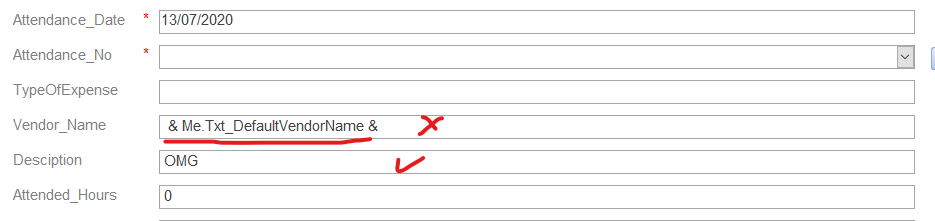

1594673103707.png
 
all you need is

Me.Txt_Vendor_Name.DefaultValue = Me.Txt_DefaultVendorName

note that default value will only populate for new records - if the record already exists, although the defaultvalue property will be populated, it will not appear in an existing record.
 
all you need is

Me.Txt_Vendor_Name.DefaultValue = Me.Txt_DefaultVendorName

note that default value will only populate for new records - if the record already exists, although the defaultvalue property will be populated, it will not appear in an existing record.
In this case both date and text textboxs is not working
1594718483626.png


You don't have enough double quotes:

Me.Txt_Vendor_Name.DefaultValue = """" & Me.Txt_DefaultVendorName & """"

You need four in this case. The outer two enclose the literal. Since the literal is a delimiter it needs to be "escaped" and so it must be entered twice.

In order to not have to deal with reading bunches of quotes, I create a global constant named QUOTE:
Code:
Option Compare Database
Option Explicit

Public Const QUOTE = """"

I keep a standard module where I define all public variables and TempVars so they are all located in one place. Using the constant, the expression would be:
Me.Txt_Vendor_Name.DefaultValue = QUOTE & Me.Txt_DefaultVendorName & QUOTE

Code:
If Not IsNull(Me.Txt_DefaultDate) Then Me.Txt_Attendance_Date.DefaultValue = "'" & Me.Txt_DefaultDate & "'"
If Not IsNull(Me.Txt_DefaultVendorName) Then Me.Txt_Vendor_Name.DefaultValue = """" & Me.Txt_DefaultVendorName & """"

the four quote make sense for the need of escaping the literal, but why the second case is working " ' " & variable & " ' "
I will go with 4 quotes for now as the second case maybe failed in some exception.
 

Users who are viewing this thread

Back
Top Bottom