
Using Custom Shortcut Menus as Control

MajP

You've got your good things, and you've got mine.
Local time
Today, 00:39
Joined
May 21, 2018
Messages
10,064
A long time ago I explored doing this, and I thought it would have a lot of utility, but have not seen this technique catch on. Does any one use the shortcut bars as controls? There are some pretty cool things that can be done, and I only scratched the surface. But the menu can make a real cascading text box. The other form was the user wanted to have a set of common values to paste in a memo field so you can right click and always have it. Just curious if others have explored this. There have been some recent threads that I think now this could have come in handy.
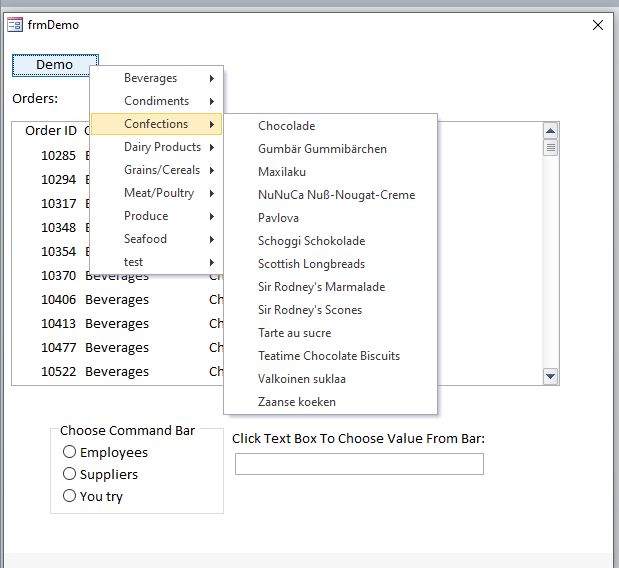
ShortcutControl.jpg
 

Attachments

I dabbled in it, mostly because Office 2003(?) was replaced and all the menu building capability was removed so I had to figure out how to create it all in code when the db opened. I had no interest in learning how to manipulate the ribbon at the time. Once I got it working, I pretty much forgot most of what I learned although I still have the code.

There have been some posts for custom menus lately here and there, but in some cases I think they've confused the commandbar with the commandbarpopup. I think I'd rather learn how to effectively create customized ribbons. You can create a small ribbon that applies only to a particular situation and show that on a main ribbon, so whether or not there's a preference for context menus or ribbons is probably personal preference.
 
commandbarpopup
That is the correct term. Those seem kind of cool because you can tie them to a control.
 
Strange. Might be security issues with this @#$& DoD computer.
 
Downloads fine for me also.
 
I just successfully downloaded another attachment in the RegEx thread with no issues. No sure WHY this one is being a puta...
 
downloads OK for me. I also dabbled some time ago but have restricted current use to menus for sorting/searching when used in runtime and/or when form is based on an ado recordset - i.e. the menus look like the default ones. Quite like your demo (not experimented as you have) but I tend to deal with very large datasets which would typically result in 50+ options and I would rather keep a consistent approach using cascading combo's. One of the benefits of cascading combos is you don't need to complete all of them. i.e. in your example you can't list all confections, you also have to select a product

Having said that, I am doing a pro-bono development for a friend with fewer options but very complex relationships so I might give that a go there.
 
I was able to DL it at home with no issues. Strange...
 

Users who are viewing this thread

Back
Top Bottom