Solved Access not displaying properly

Those 3 lines are not the critical difference.

 
I am not. I need the time. I ran twice an Office repair. Obviously, it didn't work. I ran scannow. I will restart later tonight and evaluate. The, if needed I will reinstall office.
 
If the last thing you did didn't fix the problem, why are you avoiding reinstalling Office? No wonder we're up to 70+ posts with no results.
Up to #46 on the other site :)
 
I have reinstalled A2003Pro. The DB still does not open properly.
 
Maybe there are updates and/or service packs for Office/Access 2003 available, which are not installed, and maybe fix the behaviour?
 
I want to rewrite the problem. This may help.
When you open a blank DB you get the following

Ribbon.jpg
Notice how all but 2 icons are not enabled on the ribbon.
If the program was displaying a DB all the icons would be enabled.

When I open a DB the ribbon is enabled for a fraction of a second, then it changes to the picture above.
 
I have reinstalled A2003Pro. The DB still does not open properly.
post #74

A2003 is discontinued. MS lo longer supports the product
post #76

Is there a lesson in there somewhere? Did I miss the part where it is impossible to upgrade Access because of reasons?
 
Office Pro 2003 is no longer supported by MS. However it still runs. I have been running this set of programs for 20 years with no problem. Sure, I can install O365 but sinv=ce I write VB6 code and interface it with Excel, Word and Access, I cannot use any newer Office product.
 
I would get a new PC or install windows again from scratch. Or take over your colleague's PC and they get to reinstall WIndows. :)
It is obviously something to do with your PC, but I cannot think what it might be.

I don't suppose you are at a workplace where they keep a copy of the standard PC image? How much have you tailored your PC from stock?
 
There is no workplace. We are both retired. The computers are at home. I am the computer person. When I worked, I was an application developer in several languages and computers. Re-installing windows is way beyond my abilities.

right now there is a workaround. After opening the DB, I use File/Open and walk through a dir structure to find the DB. Or I use the last 9 DBs is was in as they are listed. Then the DB opens correctly.
 
Live with that then, though installing windows it not particularly hard, it walks you through the process.
The trouble is with clean install is putting all your programs back. Data is dead easy, it is the programs you have accumulated over the years that are difficult.

This has been going on for so long (on both sites) I have forgotten a lot of it, such is my memory. Did you try just double clicking a mdb file to open it?
 
LarryE, I followed your instructions. On the "Set defaults by App" screen, there are entries for MS Office Excel, and MS office Word. I cannot add an entry.
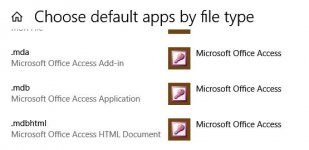
On the "Choose default apps by file type" page I see the following
-choose default apps by file type.jpg
I'm not sure that's enough
 
If not mentioned yet, maybe try checking some of your registry settings. Should be something like:


HKEY_CURRENT_USER\software\microsoft\office\11.0\access\settings\commandbars
 
adhoustomj, what does this tell me
My computer
Registry.jpg


The other computer
Registry.jpg


What does this tell me?
 
adhoustomj, what does this tell me
My computerView attachment 113335

The other computerView attachment 113337

What does this tell me?
That's a good question. My registry for 365 access looks similar to the image of your PC.

acc_reg.JPG


Maybe share images of the settings registry values as well and we can see if something sticks out.
I just thought I would throw that out there as you mentioned only having those 2 toolbar options available in the Access application settings window.

Not sure if you can find default values with google or another A2003 member here could compare with you. Maybe there is a value under settings or commandbars that you are not seeing on the in app settings menu or something.
 
I am a little hesiitant is suggesting you match the working computer, if you are not even comfortable with installing windows.

I myself in that situation would export that key to save it as it is. Do the same on the working computer.
Then I would delete your keys and import the keys from the other computer.

If that fails, then delete those keys and reimport your original ones, and you are back where you started. :(

A reboot will probably be needed. Do so however at your own risk. I take no responsibility if it does not work. :)

FWIW mine on 2007 are completely different.
1711655318040.png
 
Well, Gasman, that is way beyond my comfort zone.
Not suggesting you change anything just curious of the registry values if you want to share a screenshot of them.
How does this registry path look: Computer\HKEY_CURRENT_USER\SOFTWARE\Microsoft\Office\16.0\Access\Settings?
 

Users who are viewing this thread

Back
Top Bottom
