
Bad Dates - mm/dd/yy vs dd/mm/yy

widemonk

Registered User.
Local time
Today, 11:04
Joined
Jun 16, 2005
Messages
48
Using Access 2013 I have a form of continuous records with a custom search/filter text boxes in the form header .
In the date fields I have purposefully formatted the display of the dates as dd-mmm-yyyy for the avoidance of any doubt so 01/10 shows as 01-Oct instead of 10-Jan.

However when inputting the fields, the dates are still being interpretted as mm/dd where possible and only dd/mm where the first digit is over 12 and therefore cant represent the month.

In the examples below,
Pic2 shows 02-Jan but because the record for 21-Jan is missing, the system is actually reading that as 2/1, or Feb 1st.
Pic3 shows 10-Jan but because ALL records are missing, the system is actually reading that as 10/1, or Oct 1st.
Pic4 shows all correct because there is no 17th month so must be 17-Jan.

Format(txtPurchFrom, "dd/mm/yyyy") is used in the VBA that defines the custom SQL filter for the query.

Where else on earth is the date being interpreted as potential mm/dd ??
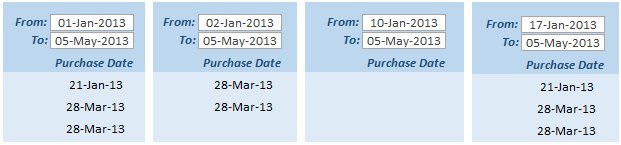

BadDates.jpg
 
ALWAYS use mm/dd/yyyy for inputting dates regardless of your regional settings
 
Where else on earth is the date being interpreted as potential mm/dd ??
Interpretation only happens in code and expressions. Bound controls follow your regional settings.
 
ALWAYS use mm/dd/yyyy for inputting dates regardless of your regional settings
This is extremely bad advice!
With my regional settings this will happen:
Code:
? Format(CDate("08/10/2022"), "YYYY-MM-DD")
2022-10-08

You probably meant to suggest to use mm/dd/yyyy as date format in query SQL, which makes sense even though I prefer the ISO format, which also works reliably.
 
Where else on earth is the date being interpreted as potential mm/dd ??
Since it is an unbound textbox, access does some guessing for you. All items in a textbox are variants. But since you have formatting in the field it knows to treat the values as a date. So you can use and enter based on regional settings.

The problem happens in your vba. In vba sql you should create a properly delimited string in either the format @jdraw or @sonic8 show. Regardless of your regional settings

2 Jan 2021 as
#1/2/2021#
or
#2021-2-1

If using the vba filter then
Code:
dim fromDate as string
dim toDate as string
fromDate = "#" & format(txtFrom,"MM/DD/YYYY") & "#"           'or "YYYY-MM-DD"
toDate =  "#" & format(txtTo,"MM/DD/YYYY") & "#"
Me.Filter = "PurchaseDate Between " & FromDate & " AND " & ToDate

if Sql
Code:
dim fromDate as string
dim toDate as string
fromDate = "#" & format(txtFrom,"MM/DD/YYYY") & "#"           'or "YYYY-MM-DD"
toDate =  "#" & format(txtTo,"MM/DD/YYYY") & "#"
strSql = "Select .... where purchaseDate between " & fromdate & " AND " & toDate
 
I found this years ago when I was using Access, and used it until I stopped using Access.
Code:
Public Const strcJetDate = "\#mm\/dd\/yyyy\#"  'Needed for dates in queries as Access expects USA format.
 
I use this to delimit strings, dates, nulls.
 
[...] SQL Server will always assume the date format to be mm/dd/yyyy [...]
You really mean SQL Server? The above is correct for JET/ACE/Access SQL, but it is not for SQL Server.

Code:
SET DATEFORMAT dmy;
SELECT convert(datetime, '08/10/2022');
Result: 2022-10-08
 
@widemonk

How are you converting the date on the screen to a date in your SQL? That must be the problem.
 
Where else on earth is the date being interpreted as potential mm/dd ??

Right here.
Format(txtPurchFrom, "dd/mm/yyyy") is used in the VBA that defines the custom SQL filter for the query.
 
@sonic8 and @Gasman Are you saying that SQL Server will interpret #01/02/2022# as Feb 2 and not Jan 1? When did that change?
Not I, I have never used SQL server with Access.
I was responding to the O/P's query that I quoted. AFAIK the O/P never mentioned SQL server?
 

Users who are viewing this thread

Back
Top Bottom