
You are using an out of date browser. It may not display this or other websites correctly.
You should upgrade or use an alternative browser.
You should upgrade or use an alternative browser.
Transform csv file to match access table for import
- Thread starter standenman
- Start date
standenman
Member
- Local time
- Today, 03:27
- Joined
- May 12, 2016
- Messages
- 45
CJ I have worked a bit with your code for doing a table append. Thank you very much.
So I "trim" up the csv I get from the form (basically elevate row 2 to be column names) then from MS Access do DoCmd.TransferSpreadsheet to create a table in Access from the csv. Then I can take that table and do an INSERT query like you suggested BUT...
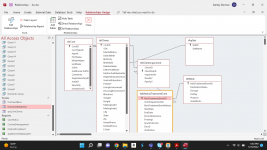
I still am being hoisted on the petard of my relational data. That is, I can append fine if dealing with just a single table, but I my data spans several tables and relationships. Here is a copy of the relationship layout. So I have tblContacts that includes clients as well as doctor, additional table for clients because I need lots more information about them. Each client could have 1 or 20 medical conditions. There could be a variety of treatments for a given malady. I have a supplemental table for meds because the information I need on that is different than that of surgeries or physical therapy. I welcome candor if I have made it too complex. But again the problem is that when I have the csv with "insulin" for "diabetes" I am creating a record in tblClientImpairment, tlbMedicalTreatmentEvent and tblMeds. I can't seem to get my arms around how I would do that.
So I "trim" up the csv I get from the form (basically elevate row 2 to be column names) then from MS Access do DoCmd.TransferSpreadsheet to create a table in Access from the csv. Then I can take that table and do an INSERT query like you suggested BUT...
I still am being hoisted on the petard of my relational data. That is, I can append fine if dealing with just a single table, but I my data spans several tables and relationships. Here is a copy of the relationship layout. So I have tblContacts that includes clients as well as doctor, additional table for clients because I need lots more information about them. Each client could have 1 or 20 medical conditions. There could be a variety of treatments for a given malady. I have a supplemental table for meds because the information I need on that is different than that of surgeries or physical therapy. I welcome candor if I have made it too complex. But again the problem is that when I have the csv with "insulin" for "diabetes" I am creating a record in tblClientImpairment, tlbMedicalTreatmentEvent and tblMeds. I can't seem to get my arms around how I would do that.
Attachments
- Local time
- Today, 10:27
- Joined
- Feb 19, 2013
- Messages
- 17,819
No need for transferspreadsheet, and for multiple tables stop once the second step is completed and save the query, then create new append queries for each table as required appending data from the saved query to the table.So I "trim" up the csv I get from the form (basically elevate row 2 to be column names) then from MS Access do DoCmd.TransferSpreadsheet to create a table in Access from the csv. Then I can take that table and do an INSERT query like you suggested BUT...
in the case of your 1-20 maladies you are going to need multiple append queries or use a union query
I'm assuming this is just to populate your tables once. If it is ongoing then you need a means of identifying a PK in your .csv so you can left join your query to the table to identify existing records and new records and either append, ignore or update as required. I don't see one and fields that might work don't contain any relevant information (SSN, email, phone). Names alone may be OK but risky.
Sometimes you will need more than just the destination table to be able to pick up the appropriate PK/FK to populate the secondary tables.
The order you run these queries is important - you need to append to the primary tables first to generate the PK. So far as I can see, not relevant to this import but as an example if the import included a 'birth state' field you would need to append to your tlpkstat table before you can append to your tblClients because you need to be able to 'lookup' the PK that goes into the birthstate field.
Once all this is done you can create some vba code to run the queries one after the other in the right order on the click of a button
standenman
Member
- Local time
- Today, 03:27
- Joined
- May 12, 2016
- Messages
- 45
OK. Thank you. I will need to study this!
.No need for transferspreadsheet, and for multiple tables stop once the second step is completed and save the query, then create new append queries for each table as required appending data from the saved query to the table.
in the case of your 1-20 maladies you are going to need multiple append queries or use a union query
I'm assuming this is just to populate your tables once. If it is ongoing then you need a means of identifying a PK in your .csv so you can left join your query to the table to identify existing records and new records and either append, ignore or update as required. I don't see one and fields that might work don't contain any relevant information (SSN, email, phone). Names alone may be OK but risky.
Sometimes you will need more than just the destination table to be able to pick up the appropriate PK/FK to populate the secondary tables.
The order you run these queries is important - you need to append to the primary tables first to generate the PK. So far as I can see, not relevant to this import but as an example if the import included a 'birth state' field you would need to append to your tlpkstat table before you can append to your tblClients because you need to be able to 'lookup' the PK that goes into the birthstate field.
Once all this is done you can create some vba code to run the queries one after the other in the right order on the click of a button
- Local time
- Today, 10:27
- Joined
- Feb 19, 2013
- Messages
- 17,819
based on the info provided, your first query would look something like this - call it qrySource
(change C:\path to wherever you have the file)
an append query will look something like this
Code:
SELECT *
FROM (SELECT *
FROM  [TEXT;DATABASE=C:\path;HDR=no].WorkHistoryRedacted.csv)  AS txt
WHERE (((txt.[F2])<>'First Name'));an append query will look something like this
Code:
INSERT INTO tblCont ( FirstName, MiddleName, LastName )
SELECT F2, F3, F4
FROM qrySourcestandenman
Member
- Local time
- Today, 03:27
- Joined
- May 12, 2016
- Messages
- 45
OK. that is why you are saying no transferspreadsheet - just query the csv. Thanks. One last question? So if I am executing append queries in sequence, I will need to preserve the auto number from the prior record to use as a foreign key in the next recordset I create. Correct? How do I save the autonumber just created in an append query?
Last edited:

- Local time
- Today, 05:27
- Joined
- Feb 28, 2001
- Messages
- 30,899
If your autonumber was created using the auto-increment (rather than the random) option, a DMax function of that field would do it. Once that record is created and saved, the autonumber IS available.
- Local time
- Today, 10:27
- Joined
- Feb 19, 2013
- Messages
- 17,819
doc's solution is fine if you are just adding one record at a time. But if adding multiple records you look it upSo if I am executing append queries in sequence, I will need to preserve the auto number from the prior record to use as a foreign key in the next recordset I create. Correct? How do I save the autonumber just created in an append query?
an example might be (made up)
you've added new state records using something like this
Code:
INSERT INTO tlkpStat ( StatName )
SELECT DISTINCT F6
FROM qrySourceNow you want to add records to tblClients. Your query will look something like
Code:
INSERT INTO tblCont ( FirstName, BirthStat)
SELECT F2, tlkpStat.statID
FROM qrySource INNER JOIN tlkpStat ON qrySource.F6 = tlkpStat.StatName
Next you want to add client impairments
Code:
INSERT INTO tblCont ( ClientImpID, Impairment, Deadly, painful)
SELECT tblCont.ContID, F23, F25, F26
FROM qrySource INNER JOIN tblCont ON qrySource.F2 = tblCont.FirstName
Note the above is for illustration only
Also don't understand why you just don't combine tblClients and tblCont together - maintaining a 1 to 1 relationship means one if not both PK's are not autonumbers so you need some sort of calculation to maintain the relationship
standenman
Member
- Local time
- Today, 03:27
- Joined
- May 12, 2016
- Messages
- 45
Well the idea was that if I had just a contacts table - which includes minimal information folks and clients where I need lots of information. so for a "Doc" contact I would have lots of null fields.doc's solution is fine if you are just adding one record at a time. But if adding multiple records you look it up
an example might be (made up)
you've added new state records using something like this
(USE DISTINCT to avoid adding duplicates)Code:INSERT INTO tlkpStat ( StatName ) SELECT DISTINCT F6 FROM qrySource
Now you want to add records to tblClients. Your query will look something like
Code:INSERT INTO tblCont ( FirstName, BirthStat) SELECT F2, tlkpStat.statID FROM qrySource INNER JOIN tlkpStat ON qrySource.F6 = tlkpStat.StatName
Next you want to add client impairments
Code:INSERT INTO tblCont ( ClientImpID, Impairment, Deadly, painful) SELECT tblCont.ContID, F23, F25, F26 FROM qrySource INNER JOIN tblCont ON qrySource.F2 = tblCont.FirstName
Note the above is for illustration only
Also don't understand why you just don't combine tblClients and tblCont together - maintaining a 1 to 1 relationship means one if not both PK's are not autonumbers so you need some sort of calculation to maintain the relationship
- Local time
- Today, 10:27
- Joined
- Feb 19, 2013
- Messages
- 17,819
I've developed a few healthcare apps over the years and the basic structure is not dissimilar
Customers - person/institution who pays - I see you have a ContTypeID so this could include Docs as well.
Clients - person receiving care
But the relationship is 1 to many, not 1-1 because, certainly in the case of institutions, one customer can have many clients. If that is not your situation then I would just combine the tables - null values take up no space so no saving there and I presume you have a lot more clients than docs - so you are making things more complicated than they need to be.
Only reason for splitting is either because there are more than 255 fields (which potentially implies a poor design anyway) or data security - confidential data that users are to be prevented from seeing is split off and usually stored in a separate BE.
I can't speak for your particular situation and appreciate you are not showing all your tables but would have thought your contact table needs to hold the phone/email info (otherwise how do you contact a 'Doc'?).
and within your clients table - wouldn't you want to keep a history of someone's marital status, previous addresses? changes in weight, living and housing environments? etc?
And can Docs have more than one speciality or belong to more than one institution?
Customers - person/institution who pays - I see you have a ContTypeID so this could include Docs as well.
Clients - person receiving care
But the relationship is 1 to many, not 1-1 because, certainly in the case of institutions, one customer can have many clients. If that is not your situation then I would just combine the tables - null values take up no space so no saving there and I presume you have a lot more clients than docs - so you are making things more complicated than they need to be.
Only reason for splitting is either because there are more than 255 fields (which potentially implies a poor design anyway) or data security - confidential data that users are to be prevented from seeing is split off and usually stored in a separate BE.
I can't speak for your particular situation and appreciate you are not showing all your tables but would have thought your contact table needs to hold the phone/email info (otherwise how do you contact a 'Doc'?).
and within your clients table - wouldn't you want to keep a history of someone's marital status, previous addresses? changes in weight, living and housing environments? etc?
And can Docs have more than one speciality or belong to more than one institution?
standenman
Member
- Local time
- Today, 03:27
- Joined
- May 12, 2016
- Messages
- 45
The addresses for contacts is complicated. Many years ago I followed the example of a contacts DB in an Access book. I am not sure it was the right strategy. because it made it very complex. Basically addresses connected to contacts via a switching table. This, however, was so annoying in implementation that - with clients - I put their address in the main table. Did not solve on the other contacts side. This DB has been limping along for many years.
Does anyone think this is a good solution to the flat file problem here?

I actually thinking about the DB called decomposerdemo: https://onedrive.live.com/?cid=44CC60D7FEA42912&id=44CC60D7FEA42912!169
Does anyone think this is a good solution to the flat file problem here?
Appending specific data from a query to multiple tables. - Microsoft Q&A
I have excel data that I imported into Access. The data has companies with multiple addresses, phone numbers, contact people and email addresses. I ran multiple queries which Duplicate Companies with multiple addresses, companies with sames addresses…
answers.microsoft.com
I actually thinking about the DB called decomposerdemo: https://onedrive.live.com/?cid=44CC60D7FEA42912&id=44CC60D7FEA42912!169
- Local time
- Today, 10:27
- Joined
- Feb 19, 2013
- Messages
- 17,819
A CRM system is probably not the right model to follow for your particular requirement but just guessing the actual requirement looks like you are not too far from what you need
i and many others are not prepared to follow onedrive and similar links so cannot comment on that part of your post
i and many others are not prepared to follow onedrive and similar links so cannot comment on that part of your post

- Local time
- Today, 06:27
- Joined
- Jan 23, 2006
- Messages
- 15,483
I note your reference to a Ken Sheridan demo. Ken is very well respected in the Access and database communities. Whether or not that demo fits your particular need is difficult to determine. Do you have a list of requirements of what your proposed database must support? Have you created a datamodel and tested it against your requirements with some sample data?
standenman
Member
- Local time
- Today, 03:27
- Joined
- May 12, 2016
- Messages
- 45
I'm just a dumb lawyer -I don't really know what you mean about "list of requirements" but I am trying to analyze Ken's code. Series of append queries, going to see if I can figure out proper order as it would apply to my tables.
- Local time
- Today, 05:27
- Joined
- Feb 28, 2001
- Messages
- 30,899
"List of requirements" would be the moral legal equivalent of formally mapping out a defense or prosecution based on available resources such as physical evidence, witness testimony, and verifiable records. What do you have to work with, what steps do you need to take, what contingencies do you have to protect against, what is the end goal of the process?
With project planning, your resources are available data, a good understanding of the process you are trying to parallel, and a well-defined goal to be reached by whatever application you create. This is, of course, a high-altitude overview, but the idea is "know where you intend to go because if you don't, how will you ever know you got there?"
We often describe Access as a tool to make a model of the flow of the business in question. To do so, you need to fully understand how that business works, at least to the extent that you want to model it.
With project planning, your resources are available data, a good understanding of the process you are trying to parallel, and a well-defined goal to be reached by whatever application you create. This is, of course, a high-altitude overview, but the idea is "know where you intend to go because if you don't, how will you ever know you got there?"
We often describe Access as a tool to make a model of the flow of the business in question. To do so, you need to fully understand how that business works, at least to the extent that you want to model it.
- Local time
- Today, 06:27
- Joined
- Jan 23, 2006
- Messages
- 15,483
Stan,
Here are a couple of examples of the kind of requirements; level of detail needed to help put your "project" into context. (from RogersAccessLibrary) Each is followed by the link to the corresponding tutorial showing how to get from requirement to vetted database structure.
# 1
ZYX Laboratories requires an employee tracking database. They want to track information about employees, the employee's job history, and their certifications. Employee information includes first name, middle initial, last name, social security number, address, city, state, zip, home phone, cell phone, email address. Job history would include job title, job description, pay grade, pay range, salary, and date of promotion. For certifications, they want certification type and date achieved.
An employee can have multiple jobs over time, (ie, Analyst, Sr. Analyst, QA Administrator). Employees can also earn certifications necessary for their job.
Here is the tutorial link that expands this overview to a database structure.
#2
We are Consolidated Widgets, the largest widget distributor in the Mid West. Our customers are small independent Widget Dealers who in turn sell the widgets to the consumer market. On the other end, we have our Manufacturers who make the widgets. Our function is to act as a middleman and warehouse for the independent dealers.
In an effort to make our Dealers more aware of new trends in the widget market, we are hosting a series of seminars, which allow the Manufactures to explain and extol the virtues of their products. Therefore, we need a computerized system that will help us manage the event. We have selected Microsoft Access as the rapid application tool to accomplish this.
The seminars work like this: The event takes place over a weekend, Saturday and Sunday. On each day, there will be seven seminars, four in the morning and three in the afternoon. Lunch will be provided for the attendees. Each seminar lasts 45 minutes, allowing 15 minutes time between seminars. In order to manage the seminars more effectively, we are asking each Attendee (there can be more than one Attendee from each Dealer) to sign up for the seminars they wish to attend.
The Manufactures may have one or more seminars, which may be presented by one or more of their employees. We need to be able to track that information for the web site, if the information changes, we want to be able to make it instantly available. We also need to track other information about the Seminars, like its location (room number), the starting and ending times, the seminar description, etc.
For the Dealers, we need to track the Attendees and their schedule, purchase order, sales tax rate, total cost to the Dealer, method of payment, etc.
For our own purposes, we need to track the Attendees, their schedule, our employee who entered the registration information, the cost of each seminar, method of payment, whether it is paid in full, etc.
We also want to have a simple survey where the Attendees rate each Seminar. We want to be able to give the Manufacturers feedback on how effective their seminars are. The rating will be a simple 1-5, Poor-Good style rating. The Manufactures will get a report giving them the percent for each level and the mean for the seminar. This will be on a seminar/hour basis, so that they can judge which of their people are the most effective presenters.
Here is the link to the tutorial that uses this requirement statement to build and test the associated data model
NOTE: You may have to copy the link, then use Paste and GO to get a successful download!!
For some reasons the links are presenting issues
Here are a couple of examples of the kind of requirements; level of detail needed to help put your "project" into context. (from RogersAccessLibrary) Each is followed by the link to the corresponding tutorial showing how to get from requirement to vetted database structure.
# 1
ZYX Laboratories requires an employee tracking database. They want to track information about employees, the employee's job history, and their certifications. Employee information includes first name, middle initial, last name, social security number, address, city, state, zip, home phone, cell phone, email address. Job history would include job title, job description, pay grade, pay range, salary, and date of promotion. For certifications, they want certification type and date achieved.
An employee can have multiple jobs over time, (ie, Analyst, Sr. Analyst, QA Administrator). Employees can also earn certifications necessary for their job.
Here is the tutorial link that expands this overview to a database structure.
#2
We are Consolidated Widgets, the largest widget distributor in the Mid West. Our customers are small independent Widget Dealers who in turn sell the widgets to the consumer market. On the other end, we have our Manufacturers who make the widgets. Our function is to act as a middleman and warehouse for the independent dealers.
In an effort to make our Dealers more aware of new trends in the widget market, we are hosting a series of seminars, which allow the Manufactures to explain and extol the virtues of their products. Therefore, we need a computerized system that will help us manage the event. We have selected Microsoft Access as the rapid application tool to accomplish this.
The seminars work like this: The event takes place over a weekend, Saturday and Sunday. On each day, there will be seven seminars, four in the morning and three in the afternoon. Lunch will be provided for the attendees. Each seminar lasts 45 minutes, allowing 15 minutes time between seminars. In order to manage the seminars more effectively, we are asking each Attendee (there can be more than one Attendee from each Dealer) to sign up for the seminars they wish to attend.
The Manufactures may have one or more seminars, which may be presented by one or more of their employees. We need to be able to track that information for the web site, if the information changes, we want to be able to make it instantly available. We also need to track other information about the Seminars, like its location (room number), the starting and ending times, the seminar description, etc.
For the Dealers, we need to track the Attendees and their schedule, purchase order, sales tax rate, total cost to the Dealer, method of payment, etc.
For our own purposes, we need to track the Attendees, their schedule, our employee who entered the registration information, the cost of each seminar, method of payment, whether it is paid in full, etc.
We also want to have a simple survey where the Attendees rate each Seminar. We want to be able to give the Manufacturers feedback on how effective their seminars are. The rating will be a simple 1-5, Poor-Good style rating. The Manufactures will get a report giving them the percent for each level and the mean for the seminar. This will be on a seminar/hour basis, so that they can judge which of their people are the most effective presenters.
Here is the link to the tutorial that uses this requirement statement to build and test the associated data model
NOTE: You may have to copy the link, then use Paste and GO to get a successful download!!
For some reasons the links are presenting issues
standenman
Member
- Local time
- Today, 03:27
- Joined
- May 12, 2016
- Messages
- 45
OK so the slow slog begins. I am seeking to enter a group of client medications. Here is the table organization:
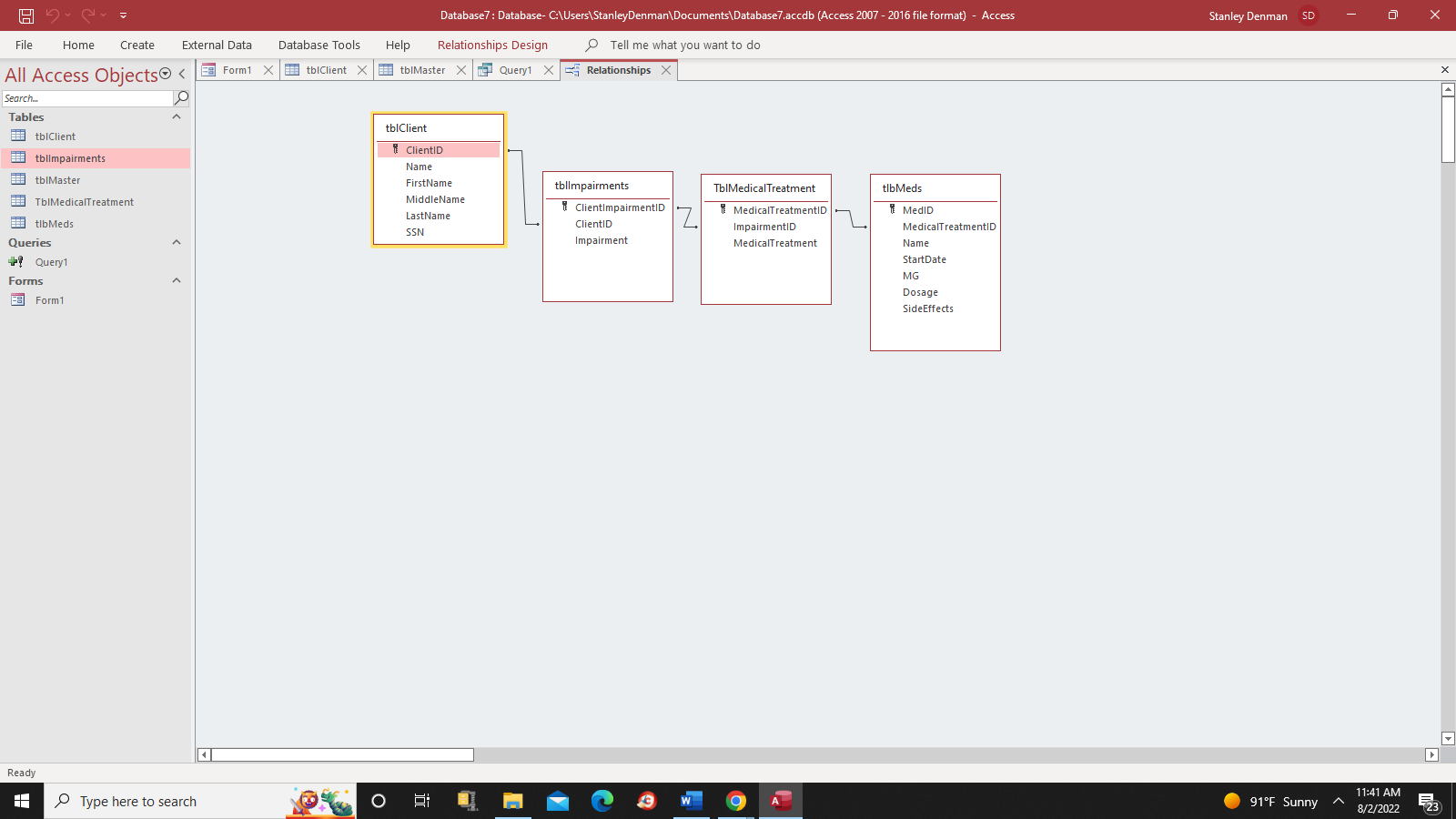
In creating a sequence of append queries I am starting with creating a record in tblClient with name and SSN. i have created a "mastertable" via code in this form:
Private Sub Command0_Click()
Dim strPath As String
strPath = "C:\Users\StanleyDenman\Downloads\ClientMedicationsStanleyDenman.xlsx"
DoCmd.TransferSpreadsheet _
TransferType:=acImport, _
TableName:="tblMaster", _
FileName:=strPath, _
HasFieldNames:=True
End Sub
Now my goal is to use the mastertable for the append queries. Here is the mastertable ith dummy data:
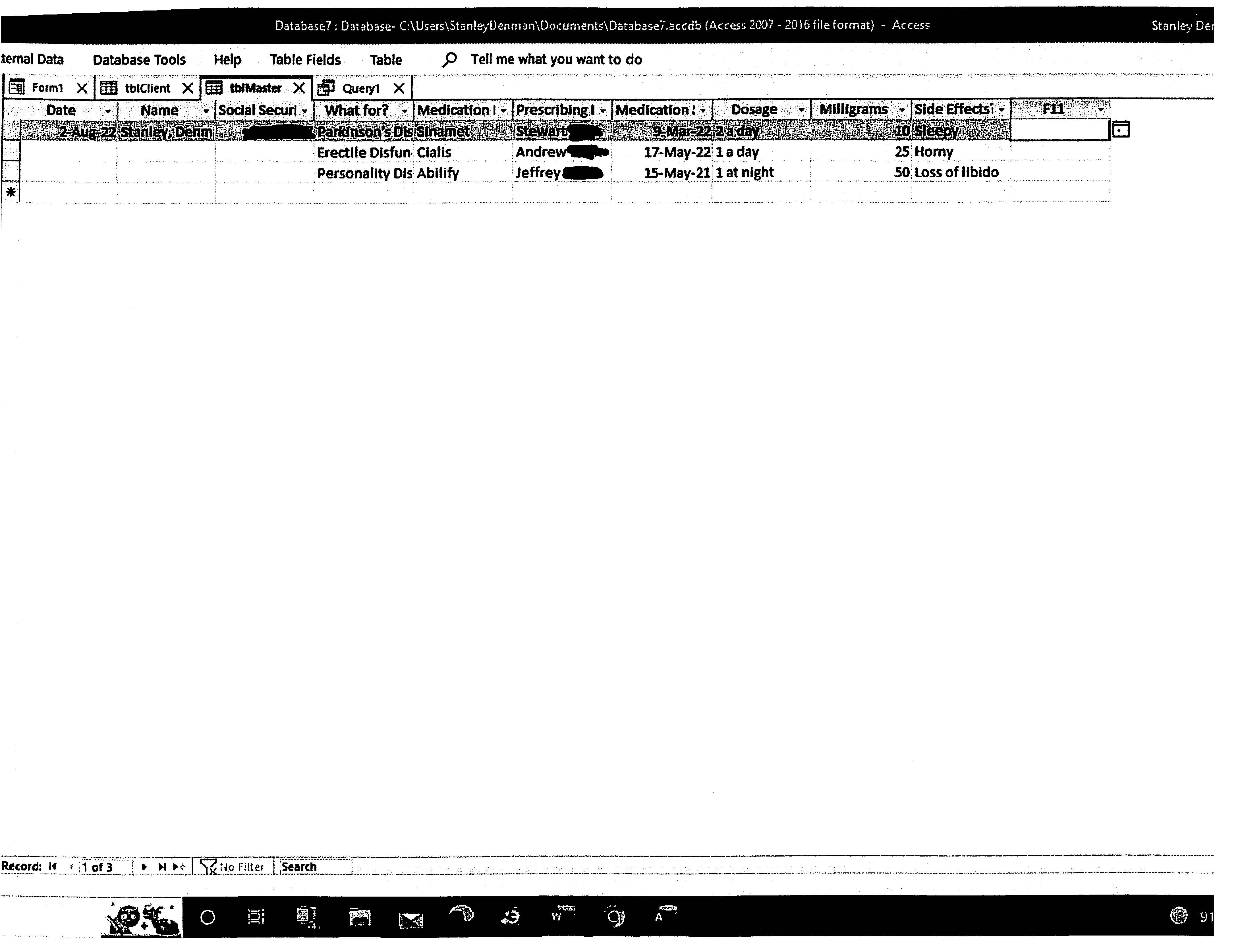
Here is my first append query:
INSERT INTO tblClient ( Name, SSN )
SELECT DISTINCT Name, [Social Security Number]
FROM tblMaster;
When I run it the append query puts 2 records in tblClient, ond of which is blank - not what I expected. I expected just one. The append query seems to think we need a blank record - I don't see where that is coming from.
In creating a sequence of append queries I am starting with creating a record in tblClient with name and SSN. i have created a "mastertable" via code in this form:
Private Sub Command0_Click()
Dim strPath As String
strPath = "C:\Users\StanleyDenman\Downloads\ClientMedicationsStanleyDenman.xlsx"
DoCmd.TransferSpreadsheet _
TransferType:=acImport, _
TableName:="tblMaster", _
FileName:=strPath, _
HasFieldNames:=True
End Sub
Now my goal is to use the mastertable for the append queries. Here is the mastertable ith dummy data:
Here is my first append query:
INSERT INTO tblClient ( Name, SSN )
SELECT DISTINCT Name, [Social Security Number]
FROM tblMaster;
When I run it the append query puts 2 records in tblClient, ond of which is blank - not what I expected. I expected just one. The append query seems to think we need a blank record - I don't see where that is coming from.
Attachments

- Local time
- Today, 10:27
- Joined
- Feb 19, 2013
- Messages
- 17,819
you have 3 records in your spreadsheet one with a name and two blanks - so distinct provides one name and one blank, you need to exclude the blank.
I'm going to drop out at this point, simply because it is not the way I would do it (I've already suggested what needs to be done and the original format was much easier from a data import perspective), the input format has changed and I can see other issues down the line because of those blanks.
Good luck with your project, but it is going down a path I don't want to follow
I'm going to drop out at this point, simply because it is not the way I would do it (I've already suggested what needs to be done and the original format was much easier from a data import perspective), the input format has changed and I can see other issues down the line because of those blanks.
Good luck with your project, but it is going down a path I don't want to follow
standenman
Member
- Local time
- Today, 03:27
- Joined
- May 12, 2016
- Messages
- 45
I did not think I was ignoring your approach save the starting out with transferspreadsheet. Thank you for all the help you have given me. I appreciate it.
INSERT INTO tblClient ( Name, SSN )
SELECT DISTINCT Name, [Social Security Number]
FROM tblMaster
WHERE Name IS NOT NULL;
OK solved it. Changed append query to:OK so the slow slog begins. I am seeking to enter a group of client medications. Here is the table organization:
View attachment 102192
In creating a sequence of append queries I am starting with creating a record in tblClient with name and SSN. i have created a "mastertable" via code in this form:
Private Sub Command0_Click()
Dim strPath As String
strPath = "C:\Users\StanleyDenman\Downloads\ClientMedicationsStanleyDenman.xlsx"
DoCmd.TransferSpreadsheet _
TransferType:=acImport, _
TableName:="tblMaster", _
FileName:=strPath, _
HasFieldNames:=True
End Sub
Now my goal is to use the mastertable for the append queries. Here is the mastertable ith dummy data:
View attachment 102193
Here is my first append query:
INSERT INTO tblClient ( Name, SSN )
SELECT DISTINCT Name, [Social Security Number]
FROM tblMaster;
When I run it the append query puts 2 records in tblClient, ond of which is blank - not what I expected. I expected just one. The append query seems to think we need a blank record - I don't see where that is coming from.
INSERT INTO tblClient ( Name, SSN )
SELECT DISTINCT Name, [Social Security Number]
FROM tblMaster
WHERE Name IS NOT NULL;
standenman
Member
- Local time
- Today, 03:27
- Joined
- May 12, 2016
- Messages
- 45
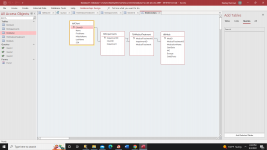
OK. I am about out of gas on this one. My serious of append queries which basically take a flat csv file and incorporate the date into my relational DB seems ALMOST there! Access, however, complains at the last query, saying I have a syntax error in the join operation. First pic is my table organization. The append queries start at tblClient and work until the last seeking to populate tblMeds. Here is the MasterTable ith dummy data.
here are the append queries, in order of execution:
QUERY1:
INSERT INTO tblClient ( Name, SSN )
SELECT DISTINCT Name, [Social Security Number]
FROM tblMaster
WHERE Name IS NOT NULL;
QUERY2:
INSERT INTO tblImpairments ( Impairment, ClientID )
SELECT DISTINCT [What for?], tblClient.ClientID
FROM tblMaster INNER JOIN tblClient ON tblMaster.name= tblClient.name;
QUERY3:
INSERT INTO tblMedicalTreatment ( MedicalTreatment, ImpairmentID )
SELECT DISTINCT tblMaster.Treatment, tblimpairments.ImpairmentID
FROM tblMaster INNER JOIN tblimpairments ON tblMaster.[What for?]= tblimpairments.Impairment;
QUERY4: (the one that fails):
INSERT INTO tblMeds ( MedicationName, MedicalTreatmentID )
SELECT DISTINCT tblMaster.[Medication Name (on Bottle)], tblMedicalTreatment.MedicalTreatmentID
FROM tblMaster INNER JOIN tbMedicalTreatment ON tblMaster.[Medication name (on Bottle)]= tblMedicalTreatment.MedicalTreatment;
MS highlights " tblMedicalTreatment" in the SELECT DISTINCT line when it complains of "syntax error in JOIN operation".
Thank you in advance to all.
here are the append queries, in order of execution:
QUERY1:
INSERT INTO tblClient ( Name, SSN )
SELECT DISTINCT Name, [Social Security Number]
FROM tblMaster
WHERE Name IS NOT NULL;
QUERY2:
INSERT INTO tblImpairments ( Impairment, ClientID )
SELECT DISTINCT [What for?], tblClient.ClientID
FROM tblMaster INNER JOIN tblClient ON tblMaster.name= tblClient.name;
QUERY3:
INSERT INTO tblMedicalTreatment ( MedicalTreatment, ImpairmentID )
SELECT DISTINCT tblMaster.Treatment, tblimpairments.ImpairmentID
FROM tblMaster INNER JOIN tblimpairments ON tblMaster.[What for?]= tblimpairments.Impairment;
QUERY4: (the one that fails):
INSERT INTO tblMeds ( MedicationName, MedicalTreatmentID )
SELECT DISTINCT tblMaster.[Medication Name (on Bottle)], tblMedicalTreatment.MedicalTreatmentID
FROM tblMaster INNER JOIN tbMedicalTreatment ON tblMaster.[Medication name (on Bottle)]= tblMedicalTreatment.MedicalTreatment;
MS highlights " tblMedicalTreatment" in the SELECT DISTINCT line when it complains of "syntax error in JOIN operation".
Thank you in advance to all.
Attachments

Similar threads
- Replies
- 23
- Views
- 4,147
- Replies
- 10
- Views
- 697

- Replies
- 22
- Views
- 1,361


Users who are viewing this thread
Total: 1 (members: 0, guests: 1)